Inspiring
April 24, 2021
Answered

P: Changes to Metadata Panel for targeting one or many images

  • April 24, 2021
  • 53 replies
  • 38313 views

In LR 11.0, MacOS 11.6.


I select several images in the grid view. Edit the location info in the Image section. The metadata is only set on the 'most" selected image. It used to correctly set the data on all selected images.


This is a real problem for me. If I go out and shoot a few hundred images, now I have to edit each one individually. Unacceptable.


I did not check to see if any other fields exhibit the same behavior. This was enough for me.


Is there another (reasonable) way to set the location os a set of images?

Correct answer Ian Lyons

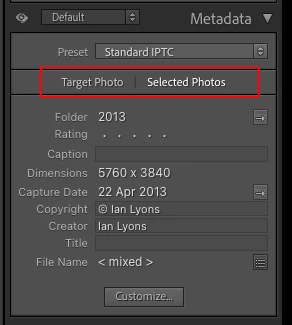
You need to tap on the 'new' and less than obvious 'Select Photos' button as shown in below screenshot. This enables the ability to apply metadata to multiple selected photos


53 replies

Participant
October 6, 2022

I used to select multiple images and change metadata in all of them. Now that no longer works. I have to change each image. Sucks when I have over 100 images to edit. 

Community Expert
October 6, 2022

In LrC's Library module, when you are in Loupe view (one image filling the main window) the general idea is that only this active image will be affected by changes, even if the Filmstrip may show several images highlighted. And the same thing for the Develop module, which in effect is always in Loupe view.


In Library: when you are in Grid view though, many kinds of change will apply across all highlighted images (but I don't think all kinds, and see below about Metadata specifically). Library also has got other kinds of view such as Survey - these do not act quite like Grid view so far as editing 'in the batch'.


BUT - you can "force" batch editing in any context by turning on AutoSync, using a switch at the left bottom corner of the right side panels. Any new edit carried out while this mode is active, will apply to all the currently highlighted images. There's an AutoSync switch for Library and an independent one for Develop. I do recommend caution with AutoSync since it is notoriously easy to apply unwanted edits onto a whole lot of images, if you ever forget it's active (and it will remain so if you e.g. close and restart Lightroom Classic). Perhaps make a habit of turning it off except while you are consciously working 'in the batch'.


Finally, the Metadata panel has recently gained a "Targeted Photo / Selected Photos" switch. This switch only appears when multiple images are highlighted. It controls both the display and the changing of metadata fields. When set to Targeted Photo, even if contents of a particular metadata field currently vary for the selected images, you are only shown the contents of, and can only alter, this field for the current active photo. When set to Selected Photos, if a field varies across these images you will see "< mixed >", and any new update will then write onto all these images. There's a warning dialog as below - the menu entry referred to, is the same thing as the switch within the metadata panel.


Note that if you have AutoSync turned on, that will I think override this more subtle behaviour, and always force a "bulk" change onto all the highlighted images.

EPICDirector
Known Participant
June 18, 2022

Bug in adding a caption to multiple images in Lightroom Classic ver 11.4 no longer works. I used to be able to select multiple images in Library Module, add a caption, click enter and LR would ask if I wanted to add to all. Okaying or accepting this would add the same caption to all. "Most selected" image seems to work differently in this version.

Expected outcome:

Step 1. Select multiple images in Library Display (note NOT by the filmstrip) grid.

Step 2. Under Metadata>Caption type in a caption.

Step 3. When done, hit ENTER, and approve "adding to all" or some such warning.

Expected RESULT. All selected images used to have the same caption.

Actual Result: Only the "most selected" image has the entered caption.

wandererAuthor
Inspiring
June 18, 2022

I just verified that the 11.4 release seems to work the same in this regard as the past few releases. I selected several images and added a caption to all of them at once. It worked. Two things to note: it must be done in Grid view, not Loupe view, and the "Selected Photos" switch must be set (up near the top of the metadata panel, just under the Preset dropdown; it will only be visible if multiple photos are selected). 


This "Selected Photos" switch was the change of behavior several releases ago that caused so much angst and this whole, long thread.

Participant
March 25, 2022

Hallo an alle! Mein Problem wurde hier schon mal 2020 gepostet, aber der Schreiber hatte keine Antwort erhalten. Ich hoffe, es kann mir jemand helfen ... Ich markiere im Bibliotheksmodul, Rasteransicht, alle Bilder und wähle dann Metadaten - Aufnahmezeit bearbeiten. Dort "Auf angegebenes Datum und Uhrzeit einstellen". Ich gebe bei "korrigierte Uhrzeit" ein neues Datum ein, Uhrzeit lasse ich unverändert. Leider ändert LR immer nur das Datum von EINEM Bild statt von allen. (Mein alter Someta-Geotagger ändert leider das Datum meiner Nikon Z6II immer auf ein Datum von 2002 ab, deshalb würde ich gerne diese Funktion in LR CC benutzen. Mit LR 6 hatte ich das Problem nie.)

johnrellis
Legend
March 25, 2022

[This post contains formatting and embedded images that don't appear in email. View the post in your Web browser.]


Google translation: "In the Library module, Grid View, I highlight all the images and then choose Metadata - Edit Capture Time. There "Set to specified date and time". I enter a new date for "corrected time" and leave the time unchanged. Unfortunately, LR only ever changes the date of ONE picture instead of all of them."


This is a different issue from the main topic of this thread, which is changing fields in the Metadata panel.


Are you in Library Grid view, with multiple thumbnails showing in rows and columns:


or are you in Library Loupe view, with one photo showing and possibly thumbnails displayed below in the filmstrip:


In Grid view, Metadata > Edit Capture time will update the dates of all the selected photos. But in Loupe view, Edit Capture Time will update the dates of just the most-selected photo, the one displayed in Loupe.


Note: This behavior is independent of the setting of Target Photo | Selected Photos in the Metadata panel and the menu item Metadata > Show Metadata For Target Photo Only.

Participant
March 26, 2022

Thank you very much, John Rellils, your anwer is the correct solution for me!!! I'm really very happy that this problem is resolved now .... 🙂

Participant
March 6, 2022

I have some go-no go issues with latest Lightroom releases:


1. I used to be able to highlight a number of images and change metadata (location, etc.) for all of them. Now, only the first image is changed, and I have to revise all the others manually. What idiot thought this was a good idea?


2. When I use plug-ins (Topaz) while still in Lightroom, the underlying program frequently stays open and requires manual shut-down (anf two tries are needed). Not sure whose software is at fault, but it is a collosal, recurring Pita.


3. The "Keywords list" had suddenly exploded to include a huge list if undesired/irrelevant/imposed listings. I want to contro omy own keywords.  Who thought THIS ATROCITY was a good idea? How can I get back to my original list?


Listen, what's up with you guys? These kind of glitchs results in relationship termination (yeah, I like you, but you do have competitors, and I'm getting very put out).


Anybody else have these issues?


Soon to be former user...

R


Per Berntsen
Community Expert
Community Expert
March 6, 2022

I can answer your first question – click Selected Photos at the top of the Metadata panel.

Since I rarely use keywords and don't use Topaz plugins for LR, I can't help you with those, but I'm sure somebody else can.


Known Participant
February 24, 2022

I've used LR since its beginning. Since I upgraded to LR 11.2, I select a bunch of photos, type text into the Caption field in the metadata panel, and it gets applied to only the first photo. I used to be able to have it applied to every selected photo. This is for the birds! What happened and how can I correct that? I don't have time to click in each image's Caption field to make it stick.

I'm on an iMac 2017, Catalina 10.15.7.

Thanks for any help!

Known Participant
February 24, 2022

Nevermind. Only when I clicked submit did the related conversations show up and it had the answer.

Participant
February 21, 2022

Thank you, you made my day! I was going nuts on that. What an absolutely ABSURD "feature"?! What were they even thinking? What's wrong with applying the edits to one photo when ONE photo is selected and to the selection, when SEVERAL photos are selected - especially that this is the behavior one is used to - and one would logically expect, from virtually any decent piece of software. Now, I understand that it may be a long process, which runs in the background anyhow, then why not just pop up a warning that it may take time (and a one you can dismiss, because, honestly, you know it) - they must really be smoking somthing really tough at Adobe these days. And how is it improving performance? I mean, all it does is masking bad performance and confusing the users.

Known Participant
February 21, 2022

I agree with all the posters here that (from the evidence of the outcry alone) Adobe clearly messed up. But in Adobe's defense, it's not quite as simple as you make it sound. Suppose I select multiple photos in Grid view, then switch to Loupe view. Now I see just one photo, and I can use the arrow keys to move back and forth through the xelection. Would you still want an update to metadata to affect all the selected photos?

Participating Frequently
February 21, 2022

Personally, what I would find useful, when you have multiple photos selected but are in loupe view and you attempt to change metadata or even add keywords, that an optional box(you tick never to see it again - and I would never tick) that pops up warns you that only the photo in loupe view will be "changed".   I'd love that feature.  (But not before Adobe figure out the bug that does not let me export movies since LR11.2 - its happenning on two very differently configured  computers - both a desktop and laptop - on movies I could previously export in LR11.1  argh!!)

Participating Frequently
February 9, 2022

Strangely enough, I can no longer add metadata to multiple items that are selected in the Library view. I can only update one item at a time even if more than one are selected. (Help Adobe!)


My System Info:

Lightroom Classic version: 11.2 [ 202201281441-a5b5f472 ]
License: Creative Cloud
Language setting: en-US
Operating system: Mac OS 12
Version: 12.1.0 [21C52]
Application architecture: x64
Logical processor count: 8
Processor speed: 2.6GHz
SqLite Version: 3.36.0
Built-in memory: 16,384.0 MB
Real memory available to Lightroom: 16,384.0 MB
Real memory used by Lightroom: 2,951.8 MB (18.0%)
Virtual memory used by Lightroom: 42,803.6 MB
Memory cache size: 1,825.9MB
Internal Camera Raw version: 14.2 [ 1028 ]
Maximum thread count used by Camera Raw: 5
Camera Raw SIMD optimization: SSE2,AVX,AVX2
Camera Raw virtual memory: 842MB / 8191MB (10%)
Camera Raw real memory: 845MB / 16384MB (5%)
Displays: 1) 3360x2100

Graphics Processor Info:
Metal: AMD Radeon Pro 450


Application folder: /Applications/Adobe Lightroom Classic
Library Path: /Volumes/Data/pix lib/-Lightroom-/Lightroom Main Catalog/Lightroom CC Main Catalog.lrcat
Settings Folder: /Users/robtmann/Library/Application Support/Adobe/Lightroom

Installed Plugins:
1) AdobeStock
2) Aperture/iPhoto Importer Plug-in
3) Facebook
4) HDR Efex Pro 2
5) Nikon Tether Plugin

Config.lua flags: None

Participant
January 30, 2022

I am using LrC 11.1 Release on Windows 11 Pro 21H2.  Since my latest LrC update I have been unable to tag multiple photos on the Creator attribuite.  This was not a problem previously

Ian Lyons
Community Expert
Community Expert
January 30, 2022
PunzunLtd
Participant
January 25, 2022

In Lightroom Classic v202112022200, writing metadata to multiple files simultaneously no longer works.


In previous Lightroom Classic versions, a user could select multiple photos in Grid View, then enter metadata in the Metadata panel. The metadata would be applied to all of the selected files.


In the latest version (202112022200), the behavior has changed. Now, metadata is applied only to the first selected file. However, metadata is removed from all the other selected files.


Given that a job could generate dozens or hundreds of photos with similar but not exactly the same metadata, this behavior change is either a direct defect (i.e., unintended behavior) or a regression usability defect (i.e., intended behavior but a reduction in usability).

Participant
January 25, 2022

I have the same issue.  Breifly solved by reseting but issue came back on a restart. Very frustrating.

Participant
January 18, 2022

I used to be able to change the Title or Caption of multiple Photos at one time by selecting them in Lightroom and then adding my title or caption to the photos and touching the return key to put them in place.

This no longer seems to be the case as i select multiple photos but only the one photo that is selected with the  lighter outline is changed. Does anyone have a solution for this?

GoldingD
Legend
January 18, 2022

At the Adobe Support Community, in Lightroom Classic, Under Discussion, right near the top, notice the document link that is ALWAYS provided when updates/upgrades are released. Here:


I have encircled the link in the screenshot above, go in the actual web page, and click on that link


Notice the link within that document that I encircled, on the actual web page, click on it


That brings up a document Adobe ALWAYS posts at updates and upgrades. Several articles may be included. Especially at upgrades. Notice that I circled two, you will want/need to bring up and read both. For now, for the subject at hand, on the actual web page, click on that one circled in blue, the one about Metadata

Participant
January 18, 2022

Thank you so much for your help. This has been driving me crazy as I knew I had been doing this the way I described and then all of a sudden it no longer works? What a relief. Thank you for paying attention to the small print and helping out all of us people who don't.


Mike Wurth