


Known Participant
October 22, 2022
Answered

P: Error Message: Failed to initialize pixel-mask storage (Windows)

  • October 22, 2022
  • 24 replies
  • 43958 views

Since updating to release 12.0 I have had 2 problems. When launching Lightroom Classic immediately after opening Windows I sometimes get the following message.
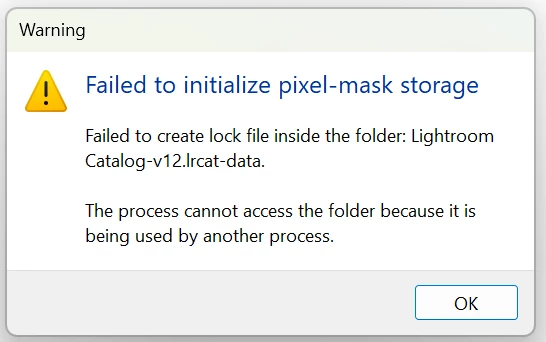
If I click OK and try launching Lightroom again it opens OK.

After doing various edits on a number of images and moving to a new image Lightroom gets stuck "Loading" an image. I close Lightroom, but it won't reopen and Windows won't close and has to be crashed.


This topic has been closed for replies.
Correct answer Rikk Flohr_Photography

If, after updating to Lightroom Classic 12.1 (released on 12.12.2022) and restarting your computer you are still experiencing this issue on a repeated basis, please start a new thread with complete information. 

Thank you!


24 replies

alexo73887716
New Participant
October 24, 2022

ho questo problema all'apertura del mio catalogo posto in un ssd esterno, se avvio lightroom su un catalogo dal disco di sistema, si avvia regolarmente, ma se provo ad aprire il catalogo suddetto o creo uno nuovo su quel disco... errore....

aiutatemi please ho già provato col file lock ma viene apparentemente cancellato correttamente.

johnrellis
Brainiac
October 25, 2022

Google translation of the error message: "Impossible to initialize the archive pixel-based masks Impossible to create a lock file inside the folder: Olha-v12.Ircat-data. The process cannot access the folder because in use by another process."


Are you on Mac OS 13 (Ventura)?  There's a problem with catalogs on external disks on Mac OS 13:

https://community.adobe.com/t5/lightroom-classic-discussions/lightroom-classic-v12-0-cannot-edit-from-external-drive-with-full-disk-access-on-macos-ventura/td-p/13281520


No one has posted a workaround, other than to move the catalog to the internal disk.

alexo73887716
New Participant
October 25, 2022

thank you so much, i'll have to wait a fix, but is the only solution to work right now!

New Participant
October 24, 2022

Help!!!! I cannot open a catalog of an edit my editor did for me ever since the update. Does anyone know how can this be solved? 

New Participant
October 24, 2022
I am having the same problem and have not been able to find any solutions.
New Participant
October 23, 2022

Rikk Flohr_Photography
Community Manager
Community Manager
October 24, 2022

Windows Customers (and Mac pre-Ventura Customers):
In the event of this failure, relaunching the application (Lightroom Classic) will rebuild the database - however, you many need to update existing AI Masks on previously edited images. 


If you are a Mac customer and using a beta or the final release of Ventura see this thread instead: https://community.adobe.com/t5/lightroom-classic-discussions/p-mac-ventura-known-issues-please-read-before-you-upgrade-your-os/m-p/13295031#M295243 

Rikk Flohr: Adobe Photography Org
PeterG1Author
Known Participant
October 24, 2022

But as mentioned this is not a one-off problem, it happens regularly when I open Lightroom, relaunching Lightroom results in it opening OK, until I close Windows and reopen it. Are you suggesting that I need to update all images where an AI mask has been applied. Firstly that is a lot of images, secondly how do I find them as I can't see a filter that would enable them to be found and thirdly what sort of update are you suggesting, do I need to alter parameters of every AI mask I have ever applied?

New Participant
October 22, 2022

I'm just experiencing the same problem:


WTF!! Maybe the new update? Hopefully, there will be a fix soon...

New Participant
October 28, 2022

My Catalog was corrupted by the latest 12.0 update. I had to recover with a backup. All works well now.