


Known Participant
October 22, 2022
Answered

P: Error Message: Failed to initialize pixel-mask storage (Windows)

  • October 22, 2022
  • 24 replies
  • 43958 views

Since updating to release 12.0 I have had 2 problems. When launching Lightroom Classic immediately after opening Windows I sometimes get the following message.
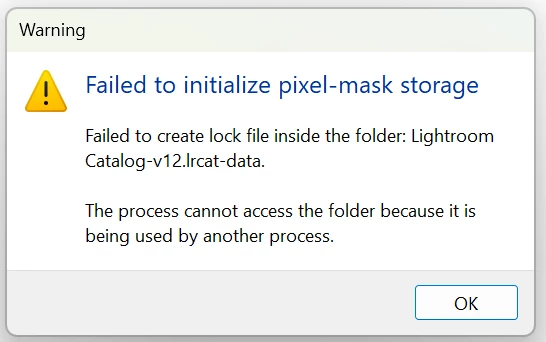
If I click OK and try launching Lightroom again it opens OK.

After doing various edits on a number of images and moving to a new image Lightroom gets stuck "Loading" an image. I close Lightroom, but it won't reopen and Windows won't close and has to be crashed.


This topic has been closed for replies.
Correct answer Rikk Flohr_Photography

If, after updating to Lightroom Classic 12.1 (released on 12.12.2022) and restarting your computer you are still experiencing this issue on a repeated basis, please start a new thread with complete information. 

Thank you!


24 replies

petera22370016
Participating Frequently
November 1, 2022

I'm also experiencing this problem. My environment is as follows: Lenovo desktop tower running Windows 11, Lightroom Classic 12.0.1, all files exist on my hard drive but are also accessible via OneDrive; also Microsoft Surface Pro running same level of Windows and Lightroom Classic and accessing the OneDrive copy of the files. The desktop tower is at my home, the Surface Pro is at my partners. I am never logged in on both systems at the same time. I have tried the workaround (delete CURRENT and restart Lightroom twice) and it has worked today. What happens tomorrow remains to be seen.

frankv80024001
Participating Frequently
November 1, 2022

Here is a short summary of my experience and how I have overcome the issue eventually (hopefully): 
In my case, any calalogue file with the suffix '-v12' created via the catalogue update from an older catalogue version '-v-11'  remained corrupt, neither the LR update to 12.0.1 nor any of the suggestions from this thread had solved the issue permanently. 

I then created a new cataloge with  LR 12.0.1 with a different name and in another folder, and imported all images (includes all edits, keywords, geo-localisations, and collections) from the corrupt catalogue (the one with suffix '-v12') using the 'Import from another catalogue' function. This new catalogue has since been working fine (for two days fulltime editing work that is). The only downside was, that I had to redo my catalogue and display preference settings but this was only a matter of minutes.  

New Participant
November 1, 2022

Here is a simple - tried and tested method to solve this problem!


Just cut and paste the catalog file outside the default folder.


Try it and thank me later 😉

New Participant
October 31, 2022

I got the same error message right after I upgraded to Ventura 13 on Mac OS.  It happened at the worst time.  What a pain.


Rikk Flohr_Photography
Community Manager
Community Manager
October 28, 2022

Please install the 12.0.1 update released today and see if you are still experiencing this issue. 

You can refresh your Adobe Creative Cloud App ([Ctrl/Cmd]+[Alt/Opt]+[ R ]) and download the updated version.


Thank you for your patience. 


Rikk Flohr: Adobe Photography Org
PeterG1Author
Known Participant
October 28, 2022

Rikk. Sorry, I have updated Lightroom Classic to 12.0.1 but still having the problem when I first try to open Lightroom after launching Windows. I have closed and reopened Windows twice to make sure it wasn't just a problem first time round.

Rikk Flohr_Photography
Community Manager
Community Manager
October 28, 2022

@PeterG1  I suspected this would fix everyone but you as your issue seems to be quite unique on the thread. I am contacting the team for instructions.   

They got back to me fast:


  1. Close Lightroom Classic.
  2. Rename the upgraded catalog. (catalog would be appended with V12)
  3. Open Lightroom Classic.
  4. In the Upgrade screen, select Choose a Different Catalog > Create New Catalog.
  5. See if a new catalog gets created.
  6. Upgrade again using the old catalog.
  7. Provide the log file created in the \Documents\LrClassicLogs folder.


Rikk Flohr: Adobe Photography Org
Sameer K
Community Manager
Community Manager
October 27, 2022

Hi all,


Please use these workarounds while we investigate this issue's root cause.


For Windows:

  • Go to the catalog location > Open the .lrdata folder.
  • Delete or move the file named 'Current.'
  • Relaunch Lightroom Classic - twice. (The first relaunch returns the error, the following relaunch works)

For macOS-pre-Ventura  (experimental on Ventura):

  • Go to the catalog location > Right-click on the .lrdata file > select 'Show Package Contents'.
  • Delete the file named 'Current.'
  • Relaunch Lightroom Classic - twice. (The first relaunch returns the error, the following relaunch works)


Thanks!

Sameer K

frankv80024001
Participating Frequently
October 30, 2022

I have installed the 12.0.1 on Windows 10 and still get the error and cannot open LR. 
The workaround by deleting the CURRENT file doesn't work either: The first relaunch returns the error and creates an new CURRENT file. The next relaunch still returns the error again without starting LR and so forth.


New Participant
October 27, 2022

Eu vou reverter para o monteray, se eu tivesse só um catálogo e pequeno seria a solução, mas não posso estar a por catálogos com 5gb no desktop para além de demorar horas nisto 

New Participant
October 26, 2022

Hello

Just tried launching Lightroom Classic, but it just comes up with the above warning message, which includes:

Failed to create lock file inside the folder Lightroom Catalog-v12.lrcat-data


The process cannot access the folder because it is being used by another process.


I have uninstalled LRC , rebooted the PC and then reinstalled LRC, but still the same issue.

Can anyone help please

Thanks

Chris Gunn

New Participant
October 26, 2022

also I forgot to mention I am running windows 10.

Inspiring
October 25, 2022

Exact same issue!!

New Participant
October 25, 2022

Preciso de ajuda. O lightroom não quer abrir nenhum catálogo.

Known Participant
October 25, 2022

I have the same issue. The proposed solution wont work as I can't open LRC in the first place, no matter what I try.

KennyJonson95
New Participant
October 25, 2022

Same problem for me now, and can´t do my job.
Why havn´t Adobe answered this issue more.

Known Participant
October 25, 2022

I was just on a support chat with someone, who said they're working on it. Unlike other long term LRC issue, I think they will consider it important enough to fix quickly, at least. Plenty of Mac based photographers rely on LRC. For now I will be using Capture One. Lets hope I don't start prefering it!