


Known Participant
October 22, 2022
Answered

P: Error Message: Failed to initialize pixel-mask storage (Windows)

  • October 22, 2022
  • 24 replies
  • 43958 views

Since updating to release 12.0 I have had 2 problems. When launching Lightroom Classic immediately after opening Windows I sometimes get the following message.
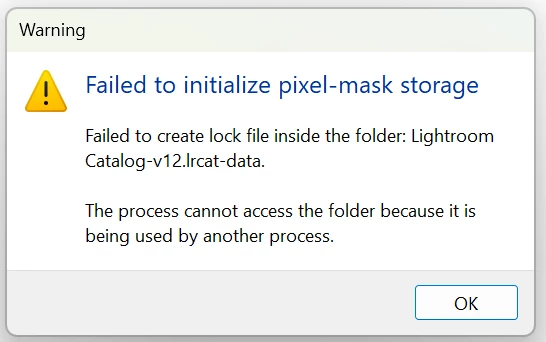
If I click OK and try launching Lightroom again it opens OK.

After doing various edits on a number of images and moving to a new image Lightroom gets stuck "Loading" an image. I close Lightroom, but it won't reopen and Windows won't close and has to be crashed.


This topic has been closed for replies.
Correct answer Rikk Flohr_Photography

If, after updating to Lightroom Classic 12.1 (released on 12.12.2022) and restarting your computer you are still experiencing this issue on a repeated basis, please start a new thread with complete information. 

Thank you!


24 replies

New Participant
May 20, 2023

Lightroom fails to open due to " failed to initialise Camera Raw" I'm using the latest updates for all on my MacBook M2 Max 16 inch. Thinking of leaving Adobe as they are failing to fix the issue and this has gone on for months now.

johnrellis
Brainiac
May 20, 2023

@RossColledge, your screenshot shows you are running "Lightroom", though your post has ended up in a thread about "Lightroom Classic" concerning a different error message (thank Adobe for the confusing product naming).  The Lightroom [sic] error "Failed to initialize Camera Raw" is discussed in this thread in the Lightroom ecosystem forum:

https://community.adobe.com/t5/lightroom-ecosystem-cloud-based-bugs/p-lightroom-error-failed-to-initialize-camera-raw/idi-p/13430118 


Though there are solutions for other errors provided there, I don't see any for this particular error message. But read for yourself more carefully...

January 21, 2023

the pixelmask storage fault has now made lightroom inoperable, is there a fix or do I have to go to another program most possibly pernamantly  why do we pay for things that dont work

New Participant
February 3, 2023

I am having the exact same problem and error messages. I've just updated to Lightroom Classic 12.1 and it cannot be opened. Trying to run a photography business. This is an absolute joke. And like you say, we are still paying for it.

New Participant
January 20, 2023

So i use lightroom with my computer backed up on a onedrive cloud for work, had problems with the same issue. The onedrive ended up unsyncing and re synicing, has me thinking this was a cause of my issue. Going through some touble shooting it turns out that the name of my .Ircat file was the route of the problems. Simply changing the name of the .Ircat file and reselecting my catalogue fixed the issue for me not sure how this will affect the long term but make sure to BACK UP often. Hope this can be figured out and fixed soon, I hope this can help someone with the same issue.

Happy Photography making,    Pat.


Known Participant
January 27, 2023

@Patrick Dent many thanks for sharing. I am desperate so I am willing to try. can you elaborate? for instance, whatwas the exact name before and after? and, you changed the name in the File Explorer "Without telling" lightroom and then just opened the new file name like nothing happened? 

New Participant
January 30, 2023

@jose dr63163530 Hi, Yah i can elaborate a bit, first i found my catalogue in my file explorer, i had tried other things before like checking the directory (swiftly left that alone), i found the .ircat folder and made sure i had a back up just incase i messed anything up, when i tried to open lightroom it tried to make a lock file, this helped me identify the specific Catalog file, i literally clicked on my lightroom catalog-v12.lrcat (the name before) file and added the date to the. For some reason this worked, im not sure why or how. Hope this has helped, hope you can save your catalog 

New Participant
January 19, 2023

I'm experiencing the same issue. Is there a solution to this? I'll scan this thread.

Has Adobe responded?

desengADE
New Participant
January 20, 2023
I moved the catalogue to a different folder and it worked

--
Regards,


[image: Blog] <>

http://debisengupta.wordpress.com/
Known Participant
January 27, 2023

@desengADE thanks for sharing, would it be same if I just change the name of the folder? my previews file is 1.8 Terabytes, and creating a replica might create problems. do you mean you copy-pasted all the contents of the folder to a new folder or you did cut and paste?

New Participant
December 13, 2022

This is still bothering me, I do have windows 11 and have been trying to install LRC 12 issued 12.12.2022.
Adobe should put out a fix for this sooner rather than later.

This is not good, there are some Aurora days ahead, and I do need the LRC for post producing of the photos.


Participating Frequently
January 2, 2023

Dear community,


I have had similar but different trouble with this error. In my case it seems to have corrupted my catalog severely.
I lost a lot of work (two weeks until last backup and some thousand images edited in this time).


I have had a very nice phone call with Adobe support which, in the end, unfortunately could not help. Please note that it is not my intention to blame Adobe as I think they are doing their job in a complex it world and things like this happen. I am writing this message here again to inform other users and get your ideas if you should have such as a last chance... 


What happened is, that I have been working with my huge catalog on an external ssd on a Windows 10 laptop with lightroom classic version before current 12.1, so I guess it must have been 12.0.
No problems until December 28th.
December 29th, I opened the same catalog on ssd with another Windows 10 computer and same lightroom classic version.
I got the message that my catalog is corrupted and needs to be repaired. The process was run automatically. But when trying to open the repaired catalog, I got the pixel mask failure message as everybody else here in this chat.
I went through all the proposals in here, updated lightroom classic to 12.1, but nothing helped until the solution from Sameer, to delete the "current" file from the lrdata folder.


I was super relieved when that worked as described. But then I found out, that the catalog is worse than the last backup (two weeks ago). In this repaired catalog, I have lost about 25000 photos (everything since August this year).


So, I need to go back to the last backup catalog and redo all work since then and hope that this issue is not repetitive.


My learning is: more backups more often, which is a pain as its tons of data and thus time in my case.


It seems as if it is not yet known what is causing the problem and how to prevent it.


As I said, if anybody here has an idea of how to get my work back, please let me know...


I hope this will be solved soon. 

Rikk Flohr_Photography
Community Manager
Community Manager
December 13, 2022

If, after updating to Lightroom Classic 12.1 (released on 12.12.2022) and restarting your computer you are still experiencing this issue on a repeated basis, please start a new thread with complete information. 

Thank you!


Rikk Flohr: Adobe Photography Org
Jamie R Doyle Photography
New Participant
December 6, 2022

So I did the suggestion of deleting the file named 'Current' as suggested by Sameer and was able to finally get LRC to launch. I had to refind the folders and update all of the folders inside of my catalog (I did this yesterday, 12/5) and now I am coming across the issue where not all of the images are loading. Not sure if anyone else has run into this issue?

thomask70967818
New Participant
December 8, 2022

Sameer,

Many thanks! Was pretty close to a full blown panic attack with a deadline due tomorrow.

Known Participant
December 8, 2022

for me, I never managed to make it work with my exisign catalog but now I think it was more an issue of my external drive. I managed to make it work if the external drive was NTFS formatted, but I never made it work with HFS+ (MacOS). So I went back to Mac for the forseable future.

New Participant
November 28, 2022

Just need to say you are a lifesaver, thank you so much for sharing this fix Sameer!

Known Participant
November 29, 2022

@Katie253578385n09  hi Katie. can I ask if you use Windows or Mac? Sameer fix has not worked for me on Windows PC, so I am curious maybe I am doing something wrong.

Rikk Flohr_Photography
Community Manager
Community Manager
November 3, 2022

If you are a Windows customer and you are still experiencing this issue after updating to 12.0.1 and after trying the steps outlined earlier, can you please reply to this post with:


Windows Version [Start Button] "winver"

Lightroom Classic Version Number (Help>System Info…)

Confirm you have rebooted your computer (Y or N)
Active Antivirus programs currently running on your system.


Thanks

Rikk Flohr: Adobe Photography Org
New Participant
November 6, 2022

I had the problem after the 12.0.1 Upgrade, tried rebooting etc. Eventually I got ontop Adobe support who got me to move the lock file folder omto the desktop - specialist sais it was a permissions problem howeve I couldnt see anything wrong when I looked the folder properties. However it has been working since without the pixel mask error message for several days now. Unfortunately LRC hung last night when trying to sunchronise a folder, I had to close the process when I started work this morning to restart it. Then it hung again when I tried to synchronise the same folder, so it hasnt been completely trouble free....

Windows 10 21H2 (OS Build 19044.2130)

Lightroon Classic Version 12.0.1 [202210260744-9e008017]

BitDefender Total Security 26.0.28.94


Inspiring
November 2, 2022

I upgraded my catalog to v12 recently, then 12.0.1 several days ago  - basically as they were released. I have been working in the catalog fine, including importing several recent jobs and working on the images, until this morning. When I tried to open the catalog immediately after booting the computer, I got the "Failed to initialize pixel-mask storage" error.


I work on two computers, a Lenovo ThinkStation P410 workstation running Windows 10 Pro v10.0.19043 (at my office) and a Lenovo Legion 5 laptop running Windows 10 Home v10.0.19044 (at home). Both computers have been running LR12.0.1 for several days. My catalog is on an external SSD. The issue occurred today on the workstation; I used the catalog successfully on the workstation yesterday afternoon and last night on the laptop. I have not used the new masking options, and the work I've done in the past few days has not involved any kind of masking.


I tried restarting Windows and opening the catalog again, but got the same error.


Additionally, the issue seems to have caused errors on the external hard drive, which chkdsk was able to repair. I can share the event viewer logs if requested.


I've seen another thread about this, from before 12.0.1 was released, suggesting re-upgrading the catalog, but I can't re-upgrade my old v11 catalog to v12 without losing a lot of work, so I'm hoping there's another solution.


Thanks,

John B

Inspiring
November 2, 2022

I've just been notified that this post was moved into this thread because it addresses a similar problem. However, please note that the problem I'm experiencing occurred AFTER upgrading to v12.0.1 and using the v12 catalog successfully for several days, so the official solution to upgrade to v12.0.1 does not solve my problem.

frankv80024001
Participating Frequently
November 2, 2022

Hi John,

same experience here.  I then created a new, empty catalog with different name and in different drive and folder (C:/..../pictures). Using the 'Import from another Catalog' function I imported all images (incl. all edits, keywords, geo-tags, collections, etc) from the corrupt catalogue into that new catalog. (This will also rescue your recent work done after the upgrade from v11.)   That new catalog has since worked fine for me without issues.  Meanwhile I have copied its folder to the external drive and it continues to work fine from there, too. 

Best,

Frank