


Participant
April 12, 2021
Answered

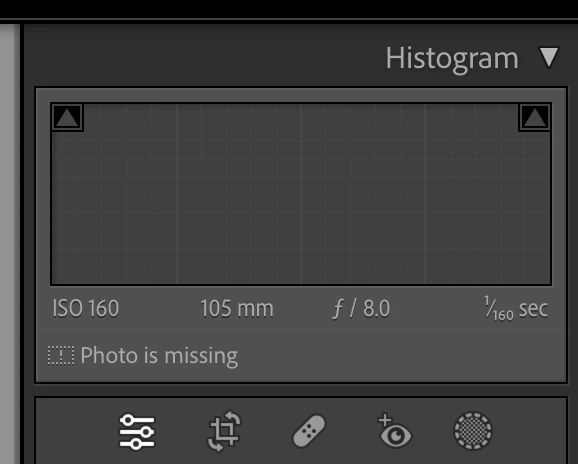
P: Toolbar [Done] Button has moved to tool bar beneath Histogram

  • April 12, 2021
  • 27 replies
  • 29879 views

Hola, tras la nueva actualizacion a Lightroom Classic 12.0, el botón "HECHO" que se encontraba en la esquina inferior derecha para dar el OK luego de añadir nuevas mascaras, recortes y algunos ajustyes locale.....pues ese botón ha desaparecido de mi programa LrC 12.0,,,,,no se que ha pasado, tengo que dar ENTER en mi teclado o bien doble click fuera de la imagen para aplicar cambios,,,,,,me pueden decir si esta nueva actualizacion se ha cargado ese botón o es que hay alguna forma de activarlo...??... antes se encontraba en este sitio, adjunto imagen de referencia.
 

Correct answer Rikk Flohr_Photography

The [Done] button is no longer in the Tool Bar ([ T ]) for the Crop, Mask, Target Adjustment Tools (TAT), White Balance and the Guided Upright tools. It is replaced by the [Return to Edit] button to the left of the Crop tool under the Histogram. The button now applies and exits the active tool.

Note: There is more than one way to commit each of these tools.

Example: Crop Tool


  1. You can click the [Return to Edits] button that replaced [Done] or
  2. You can click the Crop icon again or
  3. You can use the [Enter/Return] key or
  4. You can use the [Esc] key or
  5. Use the Crop KBSC [ R] or 
  6.  Use the [Close] inside the Crop Panel (Thanks MattK - I missed that one)
  7. Simply move to the next image (if you want to maintain the tool between images)


Similar situations exist for the other tools for which the [Done] button was relocated.


27 replies

Participant
October 21, 2022

Why!!?? Why did you remove it Adobe? Frickin, theres no reason to remove it, now I have to rework YEARS of muscle memory, edit, done, edit, done. Absolutley stupid. Can you tell I am annoyed by this useless change? BRING. IT. BACK! 

Participant
October 22, 2022

After a few days of frustration with the lack of a Done button I have reverted to LRC version 11.5. I hope Adobe will see the light and bring it back for version 12.2. In the meantime I will miss using the newest updates but at least will return to the comfort and efficientcy of clicking Done which is also consistent with other operatiosn in LR.

Photovit
Inspiring
October 22, 2022

How about a petition for a compromise: Keep the DONE Button but have it migrate to the Local adjustments panel where the new Edit icon has been added as a replacement with absolutely no reference to this change in the What's New page... See a mockup for this suggestion on the attached file. (the blue outer glow was just to keep us all happy-{:-)

Expert in Senior training on LRC & Photoshop>Tovit Lore<br />Expert in Senior training on LRC & Photoshop
rrr_hhh
Inspiring
October 21, 2022

Where has ended the "Done" button which used to be under the display when using the different editing tools, like crop, mask, patch tools or for the transform tools ?

This is very noyous, since with the new version you have to abandon the mouse to press the enter taste now. 

Participant
October 21, 2022

Yes, and a habit that has been used for many years of clicking Done to finish an operation no longer works. I have done it automatically as I have for years and instead it reverts to the Previous edit. There is nothing  to be gained by not keeping the Done button. Also when using the HSL panel the Done button is still there. Let's have a consistent user interface.

Participant
October 20, 2022

Nach einem Lightroom CC Update auf die Version 12 ist im Reparatur Werkzeug der Button "Fertig" verschwunden. Auch wenn mit der Taste "T" die Symbolleiste eingeblendet wird fehlt der Button. Mein System Win11 mit allen Updates. 


[moved from bugs to discussions - Mod.]

AxelMatt
Community Expert
Community Expert
October 20, 2022
My System: Intel i7-8700K - 64GB RAM - NVidia Geforce RTX 3060 - Windows 11 Pro 25H2 -- LR-Classic 15 - Photoshop 27 - Nik Collection 8 - PureRAW 5 - Topaz Photo
johnrellis
Legend
October 19, 2022
Participant
October 18, 2022

Content-Aware Remove

1. If you have made a selection with Content-Aware Remove and you want to make a new selection with Heel or Clone, there is no Done button. So one might think they have to leave the Heeling tool and come back to choose a different mode without changing the mode of their current selection.


You can use the Enter key to complete your current selection and choose a different heeling mode,  but maybe there should be a more obvious way to do so as well.


2.  (Problem stopped happening while wrigint this issue. Not sure if it is intermittent or maybe I just needed to restart LRC) The Zoom does not work after you make a selection. So you cannot easily zoom into make a selection, and navigate to another part of the image. 


People Masking

3. If the person is upside down, the tool may not recoginize them with the Person mask. You can rotate the image for the masking to work. 


Thanks,


Mal

Legend
October 19, 2022

@malmedia,


#2 this is a known issue. It's not as random as it appears. Launching LrC 12 directly into the Develop module (in Develop when last closed), then using the Content Aware Remove tool will not be a problem. The Space Bar activates Zoom and Pan. Switch to another module and then back to Develop will cause the problem to return after using the Content Aware Remove tool. You can reactivate the Space Bar function by clicking outside the image area, but each time you use the CA Remove tool, the problem is back. Constant clicking in and out of the image area is really annoying. When it is misbehaving, you will also find that the [ and ] keys don't change the brush size, but change the Rating of your image.

Inspiring
October 19, 2022

On LRC Version 12.0 the "Done" button seems to have disappeared after i use the cropping tool,

I was available on the bottom right of the panel after using the croping tool in developer mode but it now seems to have gone and i cannot save the crop,

Am i missing something or is there some setting?

Rikk Flohr_Photography
Community Manager
Community Manager
October 18, 2022

The [Done] button is no longer in the Tool Bar ([ T ]) for the Crop, Mask, Target Adjustment Tools (TAT), White Balance and the Guided Upright tools. It is replaced by the [Return to Edit] button to the left of the Crop tool under the Histogram. The button now applies and exits the active tool.

Note: There is more than one way to commit each of these tools.

Example: Crop Tool


  1. You can click the [Return to Edits] button that replaced [Done] or
  2. You can click the Crop icon again or
  3. You can use the [Enter/Return] key or
  4. You can use the [Esc] key or
  5. Use the Crop KBSC [ R] or 
  6.  Use the [Close] inside the Crop Panel (Thanks MattK - I missed that one)
  7. Simply move to the next image (if you want to maintain the tool between images)


Similar situations exist for the other tools for which the [Done] button was relocated.


Rikk Flohr: Adobe Photography Org
Photovit
Inspiring
October 22, 2022

I can relate to the need of  LRC's developing teem to condense features, refresh functions, BUT I do not understand what was accomplished by removing the DONE button from the Crop, Masking and Spot Removal tools? My LRC students are all Senior citizens which I have been training and working with for over 10 years. They are really not going to be happy about this NEW decision. They do not remeber any keyboard shortcuts - they use visualized functions ONLY. The small Edit icon on the left of the Local Adjustment pannel is a weak UI solution, this area is designated for special powerful tools, why would you use this space for a DONE replacement in the new form of an EDIT icon which basically does nothing, only allows one to continue editing. I find this quite short-sighted. When LRC developers will come up with a new Local adjustment feature in the future, this space will be needed for a new tool icon. So what then? the edit icon will be removed? moved down to the T panel? mmmm... I wonder.


Expert in Senior training on LRC & Photoshop>Tovit Lore<br />Expert in Senior training on LRC & Photoshop
Participant
December 4, 2022

i agree ... its so much easier to just be able to press the done button that was on the lower right .  hope they can consider bringing it back 

Participant
April 12, 2021
The "Done" button which used to appear in Lightroom on the bottom right after you had cropped, applied gradients, brushes etc now no longer appears ?
You can still just press enter twice to apply adjustments, but why is it missing since latest upgrade.
Does no one QA any of your code changes or regression test ?
F. McLion
Community Expert
Community Expert
April 12, 2021

Maybe the tool bar is hidden. Press 't' to show it.

--- Got your issue resolved? Please label the response as 'Correct Answer' to help your fellow community members find a solution to similar problems. ---
Participant
October 18, 2022

On my mac, I have to press T, not t, to show the toolbar. And itseems like I have to press it with every image. Is there a way to make the toolbar appear by default like it did before the latest upgrade?