


Participant
April 11, 2021
Answered

People view--photos are too big

  • April 11, 2021
  • 2 replies
  • 621 views

Please help a newbie! I am using People View, but instead of seeing multiple faces in a nice grid, I can only see one and it is so big that I can only see part of a face! I have tried toggling through different views, but can't figure out how to get back to a grid within People View.


Thanks!!
This topic has been closed for replies.
Correct answer johnrellis

[This post contains formatting and embedded images that don't appear in email. View the post in your Web browser.]


Initial troubleshooting steps:


1. Do View > People.


2. Do View > Grid.


3. Do View > Show Toolbar (if the toolbar isn't showing at the bottom with the Thumbnails slider).


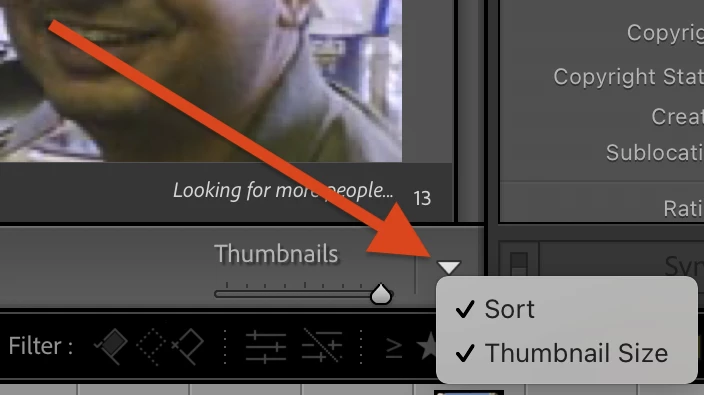
4. If you don't see the Thumbnails slider in the lower-right corner, click the down-arrow menu and check Thumbnail Size:

5. Push the Thumbnails slider all the way to the right.


6. If that doesn't help, please post a full-resolution screenshot of what you see.  That could give clues.

2 replies

Tony_See
Inspiring
April 11, 2021

Yep:

Grid Mode activated by keystroke G (caps only shown here for readability purposes.)

Maybe check your Zoom factor (functional for a single image in Develop panel -- keystroke D, and Loupe Mode -- keystroke E) and can be seen in the Navigator window on the left of those modes.

NMLizAuthor
Participant
April 13, 2021

Thank you both! I couldn't remember how to get the Thumbnail slider to show up in People View.

johnrellis
Legend
April 13, 2021

Glad you got it resolved.

johnrellis
johnrellisCorrect answer
Legend
April 11, 2021

[This post contains formatting and embedded images that don't appear in email. View the post in your Web browser.]


Initial troubleshooting steps:


1. Do View > People.


2. Do View > Grid.


3. Do View > Show Toolbar (if the toolbar isn't showing at the bottom with the Thumbnails slider).


4. If you don't see the Thumbnails slider in the lower-right corner, click the down-arrow menu and check Thumbnail Size:

5. Push the Thumbnails slider all the way to the right.


6. If that doesn't help, please post a full-resolution screenshot of what you see.  That could give clues.