


Participating Frequently
February 14, 2021
Answered

Preview images are not displayed

  • February 14, 2021
  • 5 replies
  • 2606 views

I upgraded my operating system from WIN7 to WIN10.
I use LR Classic. I upgraded to LR Catalog v10 version.
In the left panel of the library, everything appears to be OK, as is the metadata information. Preview images just don't show up.
The v10.lrcat and v10.lrdata folders contain a lot of data, that is, they are not empty.
How do I make preview images appear?

Topi
This topic has been closed for replies.
Correct answer Per Berntsen
Hi
Yes appears.
At the start of the study, the develop view was empty. I can't say at what
point the picture has started to appear there. There have been very many
experiments with different settings here.
Does the developer use the same Previews.lrdata images as the library?
Toivo Myyrä

Library and Develop use separate previews.

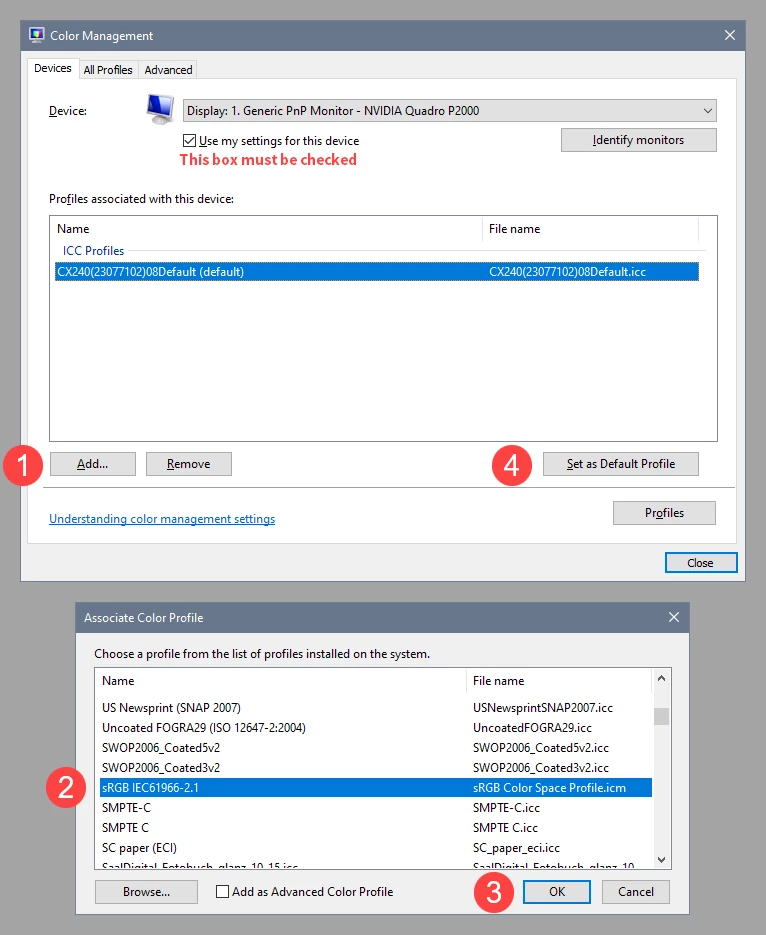
Did you follow Axel's advice, and try to set the monitor profile to sRGB?

If not, here's how you do it.

If it fixes the issue, it is recommended that you calibrate the monitor with a hardware calibrator.

This will also create and install a custom profile that describes your monitor accurately.


With Lightroom closed, press the Windows key + R, type colorcpl in the box and press Enter.

Add the sRGB profile, and set it as default.


5 replies

KR Seals
Community Expert
Community Expert
February 15, 2021

Did you try disabling the GPU with the procedure I mentioned in my previous post?

Ken Seals - Nikon Z 9, Z 8, 14mm-800mm. Computer Win 11 Pro, I7-14700K, 64GB, RTX3070TI. Travel machine: 2021 MacBook Pro M1 MAX 64GB. All Adobe apps.
toimyyAuthor
Participating Frequently
February 16, 2021
Hi
I removed the GBU's use, as previously instructed to. I still checked it
after reinstalling the LR. The selection is OFF
toimyy
Jim Wilde
Community Expert
Community Expert
February 16, 2021

Make sure that the images themselves are not being reported as "missing", do you see an "!" icon at the top-right corner of the thumbnails in the grid view? If they are missing, you need to resolve that problem before the previews can be generated.

If the images are NOT missing, have you tried to force LrC to rebuild them (select a few thumbnails in the grid and go to the Library menu>Previews>Build Standard-Sized Previews), does that help?


If the images are online, but building the previews doesn't resolve the issue, it's possible that the previews cache is corrupted. Close LrC, locate the catalog file using File Explorer, then rename the previews cache (will be called your catalog name Previews.lrdata), which will force LrC to create a new previews cache when you next start it. Initially all the thumbnails will again be blank but should start to automatically populate with the preview image as LrC will automatically start to build new previews. 

AxelMatt
Community Expert
Community Expert
February 15, 2021

It is possible that your monitor profile is corrupt.

Here you'll find more information about that: https://www.lightroomqueen.com/how-do-i-change-my-monitor-profile-to-check-whether-its-corrupted/


My System: Intel i7-8700K - 64GB RAM - NVidia Geforce RTX 3060 - Windows 11 Pro 25H2 -- LR-Classic 15 - Photoshop 27 - Nik Collection 8 - PureRAW 5 - Topaz Photo
toimyyAuthor
Participating Frequently
February 15, 2021
I uninstalled and reinstalled LR.
I updated the video card to the latest version.(Nivida Quodro K2000D) It
didn't help.

Toivo Myyrä
KR Seals
Community Expert
Community Expert
February 15, 2021

Have you tried closing and restarting your computer and restarting Lightroom Classic?

My suggestion is to once you start Lightroom Classic, disable the GPU: Preferences -> Performance -> Use Graphics Processor = Off. 

If that doesn't work, uninstall and reinstall Lightroom Classic through the Adobe Creative Cloud app. Also check with the maker of your GPU that the drivers are up to date.

Ken Seals - Nikon Z 9, Z 8, 14mm-800mm. Computer Win 11 Pro, I7-14700K, 64GB, RTX3070TI. Travel machine: 2021 MacBook Pro M1 MAX 64GB. All Adobe apps.
KR Seals
Community Expert
Community Expert
February 14, 2021

@toimyy  I'm sorry, I can't translate that 😞


Ken Seals - Nikon Z 9, Z 8, 14mm-800mm. Computer Win 11 Pro, I7-14700K, 64GB, RTX3070TI. Travel machine: 2021 MacBook Pro M1 MAX 64GB. All Adobe apps.
toimyyAuthor
Participating Frequently
February 14, 2021

Preview images do not appear in grid or loop view. The grid does change according to the selection made in the menu. The box where the image should appear contains information about the image (metadata)

KR Seals
Community Expert
Community Expert
February 14, 2021

Is it possible that Lightroom Classic is still building the previews? Look at the very top left to see if a previews process is running.

Are you talking about what you see in the center area? You need to have a folder of images selected or near the top of the left hand side click on All Photographs in the Catalog Panel. Do you see images in Grid or Loupe view in the center of the Lightroom Classic screen?

Ken Seals - Nikon Z 9, Z 8, 14mm-800mm. Computer Win 11 Pro, I7-14700K, 64GB, RTX3070TI. Travel machine: 2021 MacBook Pro M1 MAX 64GB. All Adobe apps.
toimyyAuthor
Participating Frequently
February 14, 2021
En näe mitään. Kuvatiedot ovat. mutta itse kuvat puuttuvat

--
Ystävällisin terveisin
Toivo Myyrä