leonardol4373017
New Participant
September 25, 2017
Answered

PROBLEM RENAMING VIDEO FILES

  • September 25, 2017
  • 2 replies
  • 2112 views

Hi Everyone,

I'm having some issues tying to rename the video files in my library.

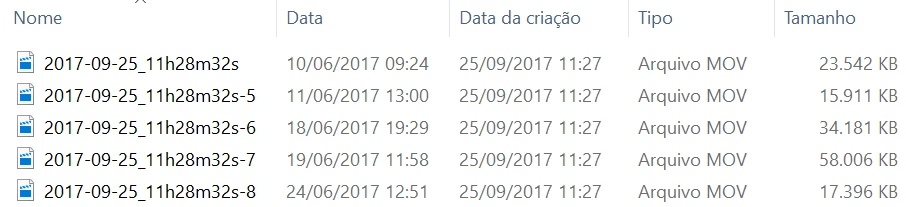
Whenever I try to rename a video file Lightroom does that based on the date when the file was copied/modified for the last time instead of the date that the video was shot.

It only happens to video files, doesn't matter if they were recorded on my Canon camera or my iPhone.

Photo files are renamed correctly.

Can anybody help me with that?
    This topic has been closed for replies.
    Correct answer johnrellis

    LR's support for video metadata is problematic, and it sounds like you've tripped over this bug: https://feedback.photoshop.com/photoshop_family/topics/lightroom-still-inconsistent-capture-date-time-for-videos

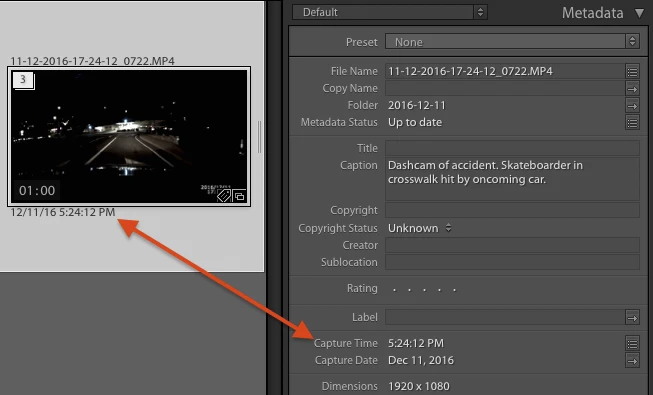
    To see if this happening to you: In LIbrary, do View > View Options to ensure the Capture Date/Time is shown under the thumbnails in grid view.  Select one of the videos and look at the Metadata panel on the right.  Does the date/time under the thumbnail match the Capture Date/Time shown in the Metadata panel?

    If it doesn't match, then LR hasn't been able to correctly read the capture date/time from the video, and you've likely encountered this bug.  You could try the workaround described here: https://feedback.photoshop.com/photoshop_family/topics/lightroom-still-inconsistent-capture-date-time-for-videos?topic-r… But be sure to back up your catalog first!

    2 replies

    seamuswarren
    Participating Frequently
    June 7, 2018

    Yeah, I have a similar query as a number of video files seem to be stripped of metadata.

    I'm wondering if maybe my cameras were not associating metadata when videos are captured, but this does not appear to be the case when I look at the file information at least of some recently captured video clips (along with still images) that are still on the camera's SD card.

    I was hoping Lightroom would be more video focussed as most of us are presumably capturing video images in addition to our stills... and we'd want to organise the DNGs, AVIs and MOVs from a single point.

    johnrellis
    Brainiac
    June 7, 2018

    a number of video files seem to be stripped of metadata

    Which metadata fields are missing in the catalog? Which cameras? This may be a different bug, with a different workaround...

    seamuswarren
    Participating Frequently
    June 7, 2018

    Hello johnrellis,

    Please disregard or - if you have administrative access - delete my post as I may be confusing an issue with a Digital Harinezumi I used some time ago. An issue I'll look at again when I test that particular camera.

    For me the issue at hand is associated with the file renaming preset process as applied to video files and a secondary issue of limited metadata in comparison to still image files.

    For instance, the camera make, model and serial numbers are not recorded in the metadata associated with the video images.

    Back to the main issue or renaming video files, the date fields appear to be inserting today's date rather than the "Capture Date" - but not when renaming still image files where the process appears to act as expected.

    I think the solution is described somewhere in this forum, which is to edit capture time despite their being no apparent need to do so as described in the short clip:

    johnrellis
    johnrellisCorrect answer
    Brainiac
    September 25, 2017

    LR's support for video metadata is problematic, and it sounds like you've tripped over this bug: https://feedback.photoshop.com/photoshop_family/topics/lightroom-still-inconsistent-capture-date-time-for-videos

    To see if this happening to you: In LIbrary, do View > View Options to ensure the Capture Date/Time is shown under the thumbnails in grid view.  Select one of the videos and look at the Metadata panel on the right.  Does the date/time under the thumbnail match the Capture Date/Time shown in the Metadata panel?

    If it doesn't match, then LR hasn't been able to correctly read the capture date/time from the video, and you've likely encountered this bug.  You could try the workaround described here: https://feedback.photoshop.com/photoshop_family/topics/lightroom-still-inconsistent-capture-date-time-for-videos?topic-r… But be sure to back up your catalog first!