


Problem with import from iPhone to LRC
I'm using Lightroom Classic 14.1 on macOS Sonoma 14.7.2 I'm trying to import photos and videos from my iPhone 14 Pro/iOS 18.0. The import process never ends. What happens is:
- Start the import process to import ~1000 items from my iPhone attached directly via USB-C Lightning cable. The destination folder is one which Lightroom has successfully imported photos from my SD card.
- At the start of the import process, previews for a few photos are displayed initially and then none until I cancel the import.
- After a few minutes, the progress bar shows no progress.
- If I cancel the import process, an error is displayed. "The following files were not imported because they could not be read or the destination is not writable (1)"
- The error shows a number of video files that could not be imported. In this example, these files are 452,659,828MB.
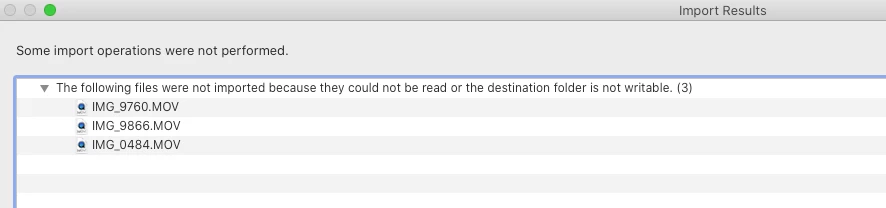
- The error shows a number of video files that could not be imported. In this example, these files are 452,659,828MB.
- Over several imports, videos over 1GB in size have been imported from the iPhone, so sizeof the .MOV files doesn't seem to be the issue.
- The error is misleading because the destination is writable because 100s of photos have been imported in previous attempts. I have checked all permissions in MacOS and all is as it should.
For whatever reason, the import process gets stuck when importing certain videos. For example, I let one import attempt go for about 2.5 hours. Over several import attempts, I've been able to get most of the 1000 items imported. But in total, it's taken me hours to do so when it should have taken me a fraction of the time. It gets stuck when it encounters an error and the only way to see the error is to cancel the import. As a user, I don't know if progress is really taking a long time or whether it's stuck.
My walkaround today was to use "image capture", the built in MacOS-app that allows you to import to folder. It also got stuck on a .MOV file, without an error other than "your phone was disconnected during import". There is no problem with my cable or connector. I just selected the file below the .MOV file that caused the problem and it could without any problems import the rest.
My thought are that once LRC identifies a problem with a file it will not import files as it should. Even though I unselected the .MOV file that where the problem.
 AdChoices