Inspiring
August 14, 2018
Answered

"An internal error has occurred" - attempt to index a field with nil value. A fix/workaround?

  • August 14, 2018
  • 3 replies
  • 2116 views

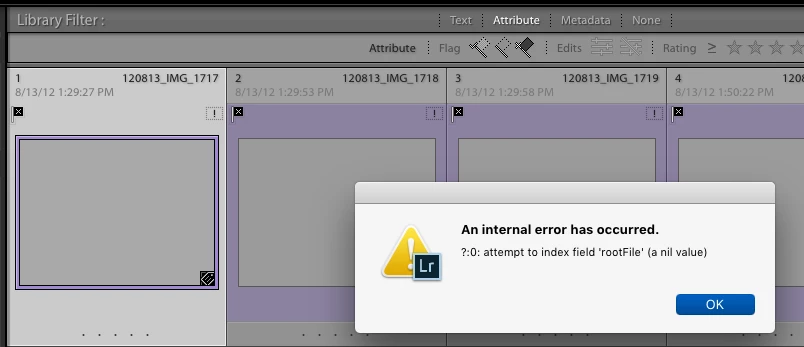
I am running LR 7.4 (Classic CC), with macOS 10.13.6, & everything "stock."  While cleaning up & organizing a sizable collection, some photo files became "lost" & some declined to blank grey with no detail info.  Then I get the internal error msg:

If I isolate a few files to be erased, I can do that, but one/some lead to the error msg & I've no idea which ones.  How can I remove the offenders & get back to smooth working?

    This topic has been closed for replies.
    Correct answer Jay_Warner

    Solution!    Well maybe for me at least.

    I think I figured it out.  the catalog was holding 2 records (thumbnails, file info) for a single image file.  When I deleted _only one_ of them, the delete command worked, & both references went away. 

    When I tried to delete both records, the dreaded internal error msg came up & it stopped doing anything.

    Background:  I am running a 'stock' Mac Pro (late 2013), Mac OS 10.13.6.  With LightRoom Classic CC 7.4, with Camera Raw 10.4, again as installed.  No additional plug-ins.

    I am collecting & coagulating over 100,000 images from multiple sources -- old catalogs, old image file collections.  Mostly RAW, with many jpg & a few tiff's.

    A number of catalog references turned up missing.  Some to the point of having little or no catalog file information.  At first, I thought these 'file missing' images were causing the 'nil reference' error.  (they may still do that.)

    So I went through & tried to locate all the missing files.  This seemed to help.

    But THEN I found that some sound catalog image records still woudn't delete or remove.  Some image records appeared twice in a single subfolder.  How could this be?  I could make the machine find them, but then it would refuse to let me delete (or remove) them - nil error again.  when I tried, it also turned them into lost images as well.

    then I got bright, or lucky.  When I deleted a single one of these 'doubles', both went away.  So I went through the whole stack, deleting every second reference to the offending images.  (It happens that I didn't want them in any case, so deletion was called for.). This cleared things up considerable, and I haven't seen the nil error msg since then.

    One not-so-minor issue:   If I removed one of the doubles, both disappeared.  If I really want the image file in the catalog, I have to add or import it back in.

    OK, LR gurus, can you figure out what _really_ happened inside, get the right terms on it, and help us all stay away from those 'nil errors'?  They aren't 'nil' when you hit one.

    3 replies

    Jay_WarnerAuthorCorrect answer
    Inspiring
    August 29, 2018

    Solution!    Well maybe for me at least.

    I think I figured it out.  the catalog was holding 2 records (thumbnails, file info) for a single image file.  When I deleted _only one_ of them, the delete command worked, & both references went away. 

    When I tried to delete both records, the dreaded internal error msg came up & it stopped doing anything.

    Background:  I am running a 'stock' Mac Pro (late 2013), Mac OS 10.13.6.  With LightRoom Classic CC 7.4, with Camera Raw 10.4, again as installed.  No additional plug-ins.

    I am collecting & coagulating over 100,000 images from multiple sources -- old catalogs, old image file collections.  Mostly RAW, with many jpg & a few tiff's.

    A number of catalog references turned up missing.  Some to the point of having little or no catalog file information.  At first, I thought these 'file missing' images were causing the 'nil reference' error.  (they may still do that.)

    So I went through & tried to locate all the missing files.  This seemed to help.

    But THEN I found that some sound catalog image records still woudn't delete or remove.  Some image records appeared twice in a single subfolder.  How could this be?  I could make the machine find them, but then it would refuse to let me delete (or remove) them - nil error again.  when I tried, it also turned them into lost images as well.

    then I got bright, or lucky.  When I deleted a single one of these 'doubles', both went away.  So I went through the whole stack, deleting every second reference to the offending images.  (It happens that I didn't want them in any case, so deletion was called for.). This cleared things up considerable, and I haven't seen the nil error msg since then.

    One not-so-minor issue:   If I removed one of the doubles, both disappeared.  If I really want the image file in the catalog, I have to add or import it back in.

    OK, LR gurus, can you figure out what _really_ happened inside, get the right terms on it, and help us all stay away from those 'nil errors'?  They aren't 'nil' when you hit one.

    Sean McCormack
    Community Expert
    Community Expert
    August 29, 2018

    Not sure if it's related, but there was a bug a while ago where Lightroom would not know files were imported and import them again, but still linking both images to the one file. It was fixed, but this may be a hangover from that.

    Sean McCormack. Author of 'Essential Development 3'. Magazine Writer. Former Official Fuji X-Photographer.
    Inspiring
    August 30, 2018

    That bug you mention may possibly be blamed for the presence of the 'doubles' in the first place.  However, I did not keep any sort of record of what was being done, so have no info on that possibility.

    JohanElzenga
    Community Expert
    Community Expert
    August 14, 2018
    -- Johan W. Elzenga
    Sahil.Chawla
    Adobe Employee
    Adobe Employee
    August 14, 2018

    Hi Jay,              

    We're sorry to hear about this, do you have any third party plugins installed?

    Please try the steps mentioned here and let us know if it helps:

    Disable the plugins by going to File > Plugin manager.

    Regards,
    Sahil

    Inspiring
    August 16, 2018

    Thank you all for your prompt response. I shall study it closely.

    To answer your questions,

    1) No I am not using any plugins - this was a stock installation.

    2) When I take the time to locate missing folders, the problem occurs less frequently. I have also been deleting smaller groups of files at one time (50 - 200 at once, instead of 500 - 1500). The extra work is worth the added comfort in watching everything behave as desired/planned.