Known Participant
February 22, 2024
Answered

RAM usage/memory leak on Mac OS

  • February 22, 2024
  • 5 replies
  • 8797 views

Hi there,


I've been having this problem for about half a year now. I thought it would get fixed in the recent 13.2 LRC update, but that wasn't the case.


So what happens is that my RAM fills up when LRC is idling for some time. I work on LRC then move to another task, put the iMac in sleep mode, wake it up again the next day and at some point memory usage goes from around 7 GB to 150 GB (!).


Looks like a memory leak to me. Pls Adobe, fix this.


Running Mac OS 14.3.1.


Thanks
This topic has been closed for replies.
Correct answer hasansheikh

Update: 


Contacted Adobe Support. They identified two issues:


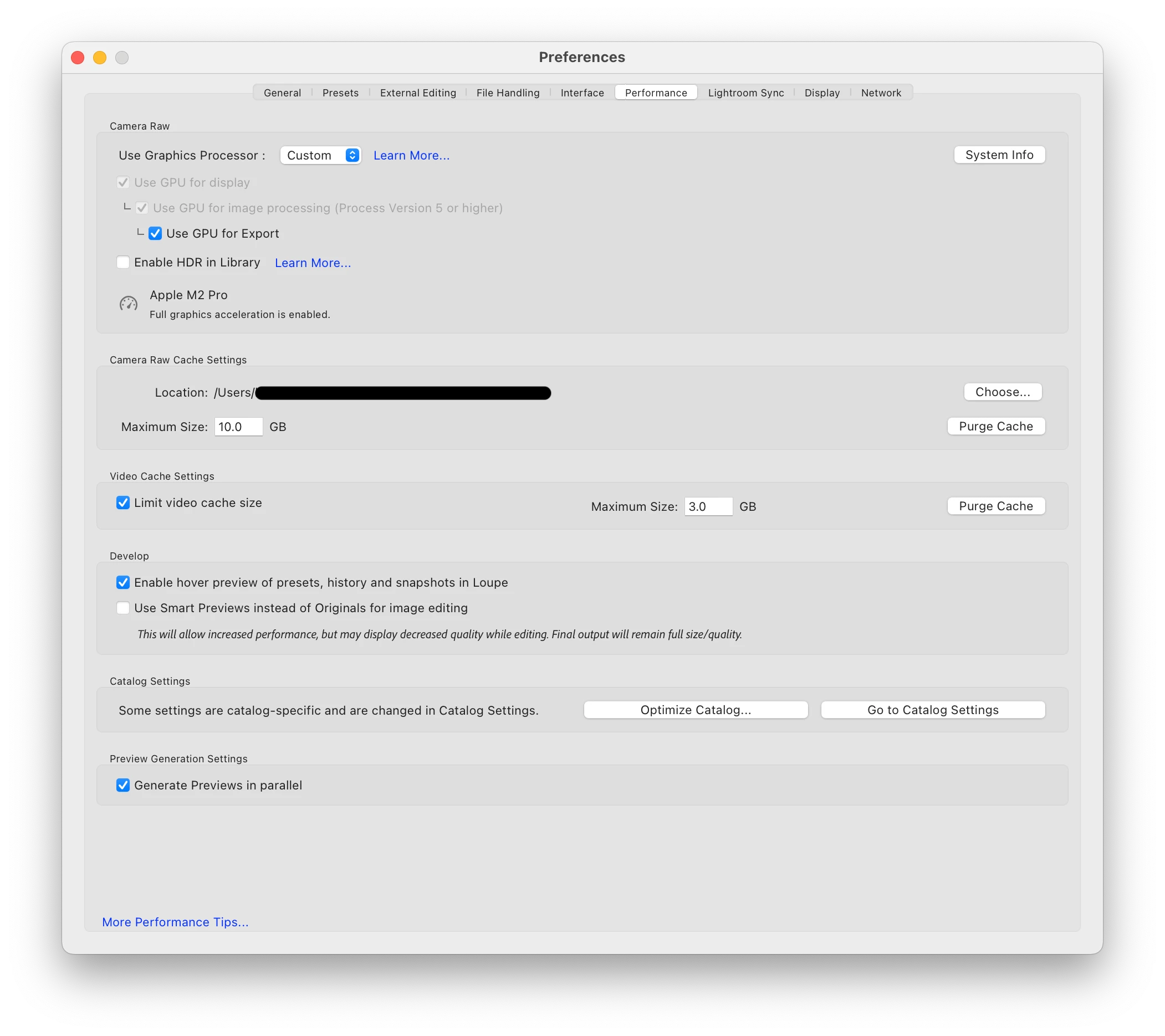
1. The performance settings were not set to provide maxium performance. They have been updated. See image below.


2. LrC continuiously syncing in the background due to a new sync version released by Adobe. After pausing the sync, the memory usage that was rapdily being clocked up in the background stopped.


Additionally, 


3. Several of my photos' originals were lost in the past and were previously synced to the Cloud. LrC sync was continuously trying to sync these photos and therefore the sync was stuck. I removed all Collections that were being synced. This must have also helped bring the memory uage under control. 


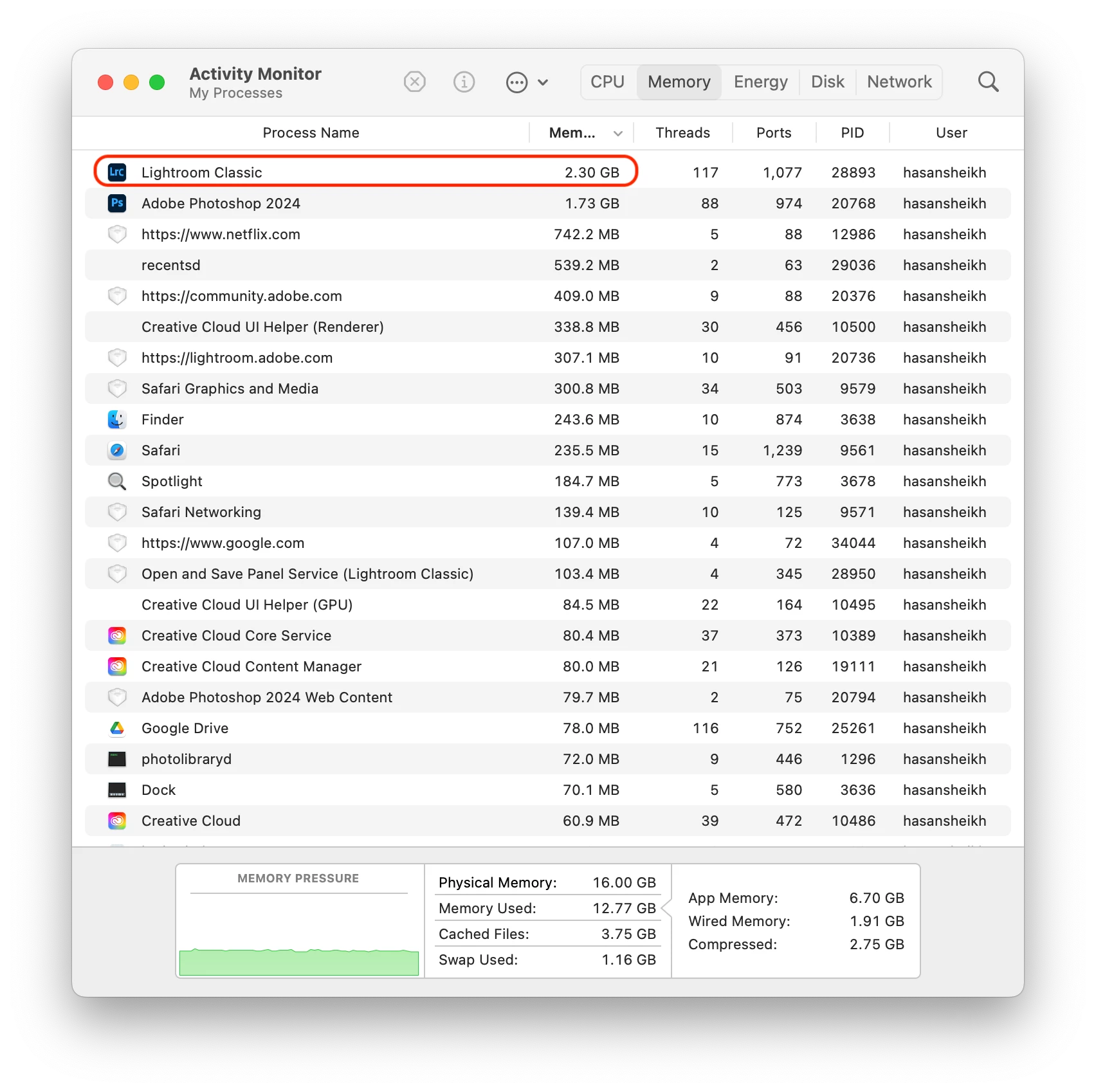
See the current memory usage after an hour's of heavy editing (including AI edits) below - it appears more reasonable and under control.


5 replies

Participating Frequently
September 6, 2024

Been trying to find a solution on forums but couldn't so opted to post it here:


- LrC is memory usage ~74gb (has exceeded 80gb at times as well)

- LrC still working but quite slow (basic edits are even taking time)

- Completely erased MacOS and installed a fresh copy of Sonoma 14.6.1 (current version), and only softwares I have installed are LrC and Outlook at present besides the default apps and software

- Have also tried to upgrade MacOS to Sequoia Beta 15.1, but even that did not make any difference, hence decided to erase MacOS and installed the fresh Sonoma as noted above

See attached screenshot from Activity Monitor. 


Questions:

  1. Is this normal (in the nearly decade of LrC usage, I have not quite experiecned anything like this)
  2. Can this be fixed?
  3. Please share a solution


LrC system information:


Lightroom Classic version: 13.5.1 [ 202408271704-d15d09cd ]
License: Creative Cloud
Language setting: en-US
Operating system: Mac OS 14
Version: 14.6.1 [23G93]
Application architecture: arm64
Logical processor count: 12
Processor speed: NA
SqLite Version: 3.36.0
Power Source: Battery, 48%
Built-in memory: 16,384.0 MB
Dedicated GPU memory used by Lightroom: 1,493.0MB / 10,922.6MB (13%)
Real memory available to Lightroom: 16,384.0 MB
Real memory used by Lightroom: 2,960.3 MB (18.0%)
Virtual memory used by Lightroom: 770,354.4 MB
Memory cache size: 325.5MB
Internal Camera Raw version: 16.5 [ 1954 ]
Maximum thread count used by Camera Raw: 5
Camera Raw SIMD optimization: SSE2
Camera Raw virtual memory: 2198MB / 8191MB (26%)
Camera Raw real memory: 3348MB / 16384MB (20%)

Cache1:
Final1- RAM:35.0MB, VRAM:0.0MB, 9AC4EAA4-95DE-41C0-BB2E-E0795DF653C1.dng
Final2- RAM:262.0MB, VRAM:0.0MB, A7405654.dng
Final3- RAM:254.0MB, VRAM:0.0MB, A7405655.dng
Final4- RAM:35.0MB, VRAM:0.0MB, A01558D5-0DB9-4426-A425-E4B23BFF6DCB.dng
Final5- RAM:35.0MB, VRAM:0.0MB, 27E33840-AE11-4A23-80D8-835782CA0B09.dng
Final6- RAM:254.0MB, VRAM:0.0MB, A7405653.dng
Final7- RAM:35.0MB, VRAM:0.0MB, EE21E084-B50F-4917-8EFD-DEB6EEB8D930.dng
Final8- RAM:35.0MB, VRAM:0.0MB, 86EB40A9-A88D-49E4-B80D-068DC83474EE.dng
Final9- RAM:35.0MB, VRAM:0.0MB, 362DCEBA-C238-4058-B2A6-AD1FD5276DA1.dng
NT- RAM:980.0MB, VRAM:0.0MB, Combined:980.0MB

Cache2:
m:325.5MB, n:1,310.6MB

U-main: 139.0MB

Standard Preview Size: 3456 pixels
Displays: 1) 3456x2234

Graphics Processor Info:
Metal: Apple M2 Pro
Init State: GPU for Export supported by default
User Preference: Auto
Enable HDR in Library: OFF

Application folder: /Applications/Adobe Lightroom Classic
Library Path: /Volumes/Lightroom/Lightroom Catalogs/Hasan/Original Catalogue-v13-3.lrcat
Settings Folder: /Users/hasansheikh/Library/Application Support/Adobe/Lightroom

Installed Plugins:
1) AdobeStock
2) Aperture/iPhoto Importer Plug-in
3) Flickr
4) Nikon Tether Plugin

Config.lua flags:


hasansheikhCorrect answer
Participating Frequently
September 7, 2024

Update: 


Contacted Adobe Support. They identified two issues:


1. The performance settings were not set to provide maxium performance. They have been updated. See image below.


2. LrC continuiously syncing in the background due to a new sync version released by Adobe. After pausing the sync, the memory usage that was rapdily being clocked up in the background stopped.


Additionally, 


3. Several of my photos' originals were lost in the past and were previously synced to the Cloud. LrC sync was continuously trying to sync these photos and therefore the sync was stuck. I removed all Collections that were being synced. This must have also helped bring the memory uage under control. 


See the current memory usage after an hour's of heavy editing (including AI edits) below - it appears more reasonable and under control.


New Participant
September 10, 2024

This definitely helped. I had errors in Sync Activity (Preferences->Lightroom sync). After clearing them, memory usage decreased and responsiveness of Lightroom Classic increased. I now keep cloud sync paused unless I need it.

kerryt97789372
Participating Frequently
March 23, 2024

I think I've found a clue about the memory leak. If I leave LRC in Develop mode when I exit, it starts up in Develop mode and leaks memory. But if I exit in Library mode, it starts up in Library mode and doesn't leak memory, even if I leave it sitting in Develop mode while I run an errand or something. So, to reiterate, putting it in Library mode before quitting is my workaround.

Ian Lyons
Community Expert
March 23, 2024

Good catch. I'll report to QE.


Ian Lyons
Community Expert
March 9, 2024

It would be helpful if you all posted a copy of the LrC 'System Info'. This can be obtained from the Help > System Info menu item. Use the built-in 'Copy' button. I've attached screenshot of the dialog for info.


Note that the 'System Info' is most useful if captured when your memory useage reaches a high level rather then directly after relaunching LrC.


kerryt97789372
Participating Frequently
March 9, 2024

With Activity Monitor showing 45 GB used, here's my system info:

Lightroom Classic version: 13.2 [ 202402141005-bf1aeb84 ]
License: Creative Cloud
Language setting: en-US
Operating system: Mac OS 14
Version: 14.2.1 [23C71]
Application architecture: x64
Logical processor count: 16
Processor speed: 3.2GHz
SqLite Version: 3.36.0
Built-in memory: 32,768.0 MB
Dedicated GPU memory used by Lightroom: 1,722.0MB / 8,176.0MB (21%)
Real memory available to Lightroom: 32,768.0 MB
Real memory used by Lightroom: 3,856.2 MB (11.7%)
Virtual memory used by Lightroom: 134,377.7 MB
Memory cache size: 35.6MB
Internal Camera Raw version: 16.2 [ 1763 ]
Maximum thread count used by Camera Raw: 5
Camera Raw SIMD optimization: SSE2,AVX,AVX2
Camera Raw virtual memory: 236MB / 16383MB (1%)
Camera Raw real memory: 243MB / 32768MB (0%)

Cache1:
Preview1- RAM:22.0MB, VRAM:0.0MB, Roll_042_11.tif
NT- RAM:22.0MB, VRAM:0.0MB, Combined:22.0MB

Cache2:
final1- RAM:64.0MB, VRAM:0.0MB, Roll_042_11.tif
final2- RAM:64.0MB, VRAM:185.0MB, Roll_042_10.tif
final3- RAM:64.0MB, VRAM:0.0MB, Roll_042_09.tif
T- RAM:192.0MB, VRAM:185.0MB, Combined:377.0MB

Cache3:
m:35.6MB, n:37.8MB

U-main: 67.0MB

Standard Preview Size: 5120 pixels
Displays: 1) 5120x2880, 2) 2560x1440

Graphics Processor Info:
Metal: AMD Radeon Pro Vega 56
Init State: GPU for Export supported by default
User Preference: Auto

Application folder: /Applications/Adobe Lightroom Classic
Library Path: /Users/kjthompson/Pictures/Lightroom/Lightroom Catalog-2-v13.lrcat
Settings Folder: /Users/kjthompson/Library/Application Support/Adobe/Lightroom

Installed Plugins:
1) AdobeStock
2) Aperture/iPhoto Importer Plug-in
3) Flickr
4) Nikon Tether Plugin
5) Topaz Photo AI

Config.lua flags: None


Ian Lyons
Community Expert
March 9, 2024

'System Info' is indicating that the application and GPU are using less than 6GB of memory. Try temporarily disabling the Topaz plug-in to see whether it helps the amount of memory being consumed when computer is idle.

kerryt97789372
Participating Frequently
March 8, 2024

I have the same problem. I'm running LRC 13.2 on an Intel Imac Pro with Sonoma 14.2.1. I started LRC about 40 minutes ago, then ran an errand. When I got back the memory usage was 33 GB (on a 32-GB machine). Now, five minutes later, after having done nothing in LRC, the memory usage is up to 37.5 GB. The only workaround I'm aware of is to process a few images, then quit and restart LRC.

SFsixAuthor
Known Participant
February 22, 2024

There also seems to be a correlation between how much RAM you have installed and RAM used by LRC. In above mentioned case RAM usage went up to 150GB with 64GB installed.

I'm on 32GB total RAM now and LRC would only use around 70GB now. Obviously still a memory leak, but I thought it might be helpful to mention this.