christians37487347 wrote Is there a trick to reduce the .DNG to the more reasonable < 60MB size. ? |
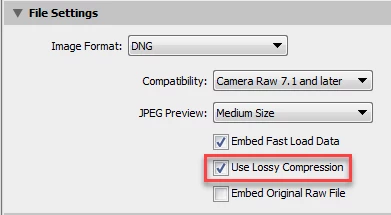
This is what I love about participating in the Adobe forums–I almost always learn something! I woke up this morning and had a DUH moment. You CAN reduce the size of the LR panorama DNG using the Export module and selecting DNG Image Format and 'Use Lossy Compression.' Yes it's a lossy file format, but unlike JPEG file format it contains the original raw data. I tried this on a few panorama DNGs and couldn't any difference at 1:1 Zoom View between the original DNG and Lossy DNG files.
EDIT: I noticed when 'Use Lossy Compression' is checked 'Resize to Fit' is enabled and can be used to reduce the DNG panorama image size. I compared lossy DNGs created without Resize and with 50% Resize using RawDigger and their histograms are identical. So you can also resize the panorama DNG.
More details here:
Adobe expands DNG format with inclusion of smaller, Lossy DNG option: Digital Photography Review
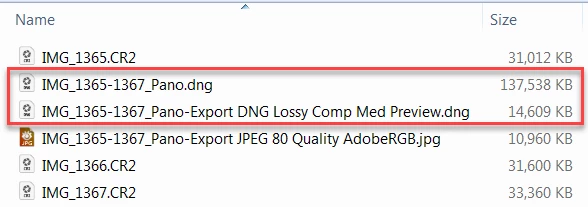
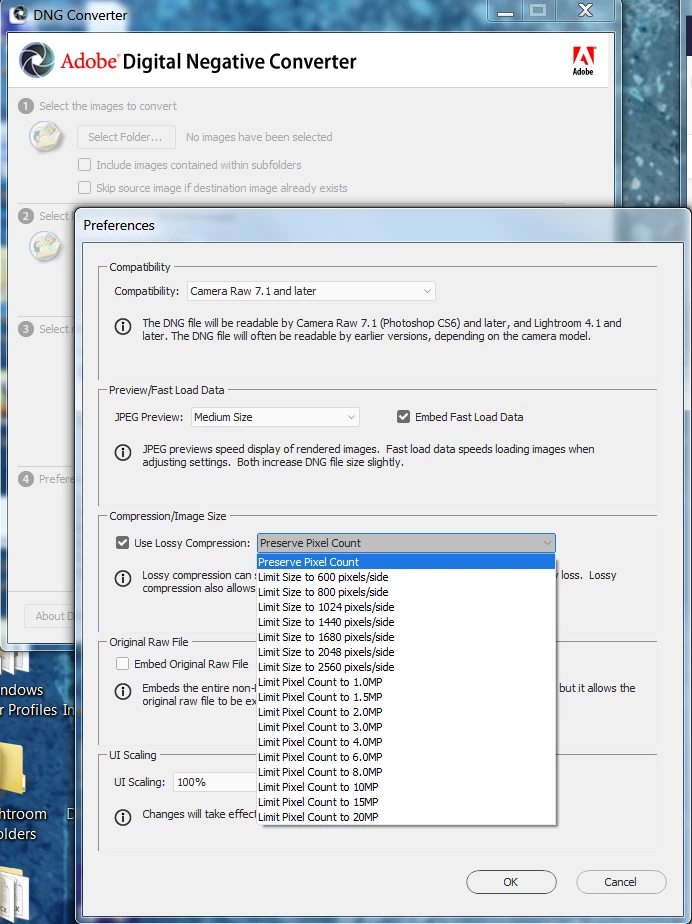
You can also reduce the DNG image size using the Adobe DNG Converter, but you're limited to 20 megapixel maximum size. Too bad Adobe didn't offer more options for larger image sizes!
EDIT: I tried the DNG Converter with Medium Preview, Embed Fast Load Data, Lossy Compression, Limit Size to 20MP, and the same settings in LR 7.2. The stats and histograms in RawDigger are identical for both files indicating the same processing is used in the DNG Converter and LR.




 AdChoices