


Known Participant
December 12, 2022
Answered

Renaming a folder doesn't update folders panel

  • December 12, 2022
  • 3 replies
  • 1374 views

I was doing some clean-up in LrC and renamed a folder within LrC.  As soon as I accepted the name change a ? appeared next to the folder and all of the photos inside the folder were now considered missing.  I confirmed that the files were still in the original location.


Here are the steps I followed:

  1.  Right click on the folder and select Rename Folder from LrC pop up menu
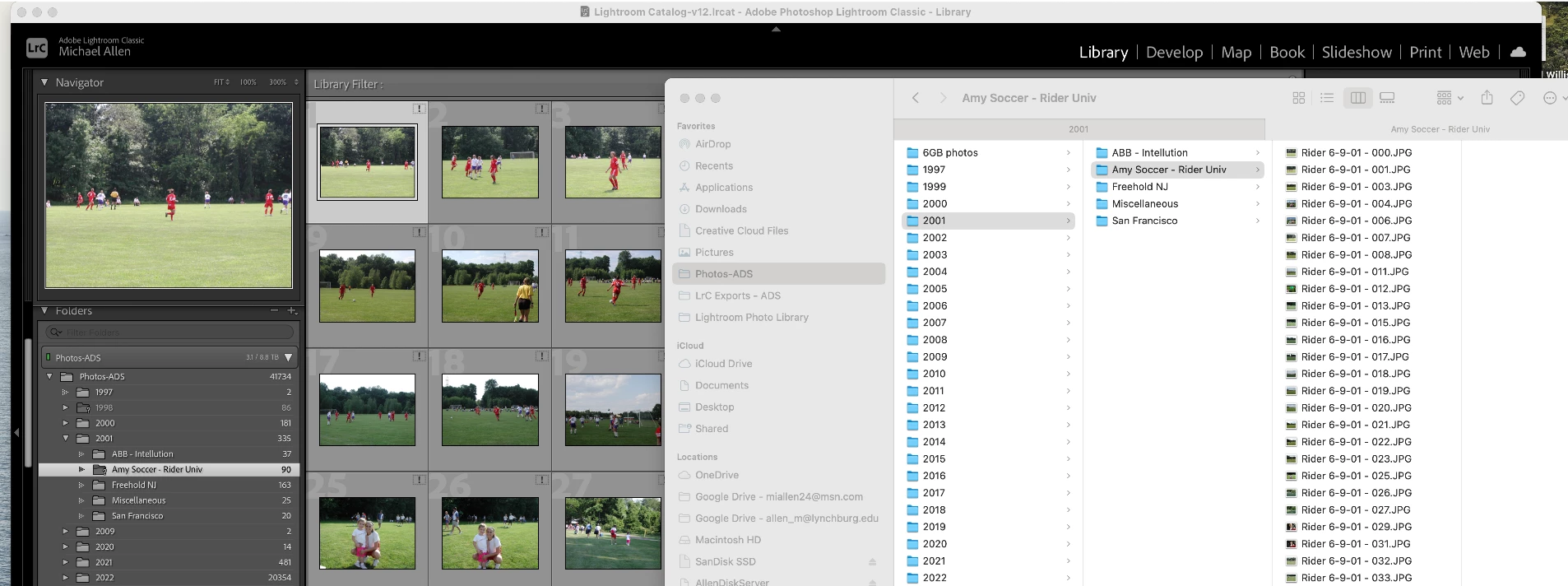
  2. Add the word Soccer to the name of the folder (See below snip)

Expected Result

New folder name with files shown and LrC aware of the file locations


Details:

M1 iMac running MacOS Ventura 13.0.1

LrC version 12.0.1


The snip below shows the folder structure in LrC with the ? and the Finder window shows that the folder and files exist.


This topic has been closed for replies.
Correct answer dj_paige

I'm wondering if the TOP SECRET method (shhhh!)(don't tell anyone) of shutting down LrC and then re-opening it will make the problem go away.


I'm also wondering if the DOUBLE TOP SECRET method of using your operating system to rename the folder to Amy Soccer - Rider Univ1 and then using your operating system un-renaming it will make the problem go away.

3 replies

GoldingD
Legend
December 12, 2022

Something went wrong, at any rate see:

https://www.computer-darkroom.com/lr2_find_folder/find-folder.htm

probably in part 2, update folder location.


Mike42809Author
Known Participant
December 12, 2022

LrC still isn't resolving the new name or the files.  I tried manually locating the file and received the below error message.  I was going to change the folder name back to the original but LrC won't let me do that.


I did follow the link you included, thank you, and see the warning about renaming.   I'll keep that in mind going forward.


JohanElzenga
Community Expert
Community Expert
December 12, 2022

This is beginning to look like catalog corruption. Do you have a recent catalog backup from just before this happened? If so, replace your catalog by this backup copy and see if that solves the problem.


-- Johan W. Elzenga
kglad
Community Expert
Community Expert
December 12, 2022

sorry, that's where i thought i'd moved it.  (but apparently not.)

Rikk Flohr_Photography
Community Manager
Community Manager
December 12, 2022

I am not able to reproduce this following the OP's steps.  Name updates immediately in LrC and Finder. 

Rikk Flohr: Adobe Photography Org
kglad
Community Expert
Community Expert
December 12, 2022

in the future, to find the best place to post your message, use the list here, https://community.adobe.com/


<moved from using the community>

Mike42809Author
Known Participant
December 12, 2022

I thought it belonged in the bugs community since I think it's a bug?  Do these go in the community for the respective products?