


Inspiring
June 6, 2017
Answered

Retrieving images from Mac system trash.

  • June 6, 2017
  • 1 reply
  • 6887 views

Hi guys,

I trashed some thirty or more images by mistake and they are still in my Mac Trash. There is no Put Back option. So, I'm thinking of dragging them into a folder on my Desktop and then use the Put Back option - if it works. Any better, quicker way?

Also, many had been adjusted at length in Develop before they were trashed. Will the adjustments hold by the time the images are back in the Library?

Thanks a lot.

Raphael
    This topic has been closed for replies.
    Correct answer 99jon

    Not an option.


    LR should create your named subfolder, so go ahead e.g.

    Users/Raphael/Pictures/NYC Spring 2017

    1 reply

    99jon
    Brainiac
    June 6, 2017

    Copy them back into the folder where LR says they should be - click a Library thumbnail and view the file path in the metadata panel. The develop settings should automatically re-link unless you have also removed the files from the LR Library.

    Inspiring
    June 6, 2017

    Thank you Jon.

    These were deleted from their folder  (Delete from Disk) - I know exactly the folder they originate from. So now they sit in the Mac trash with no put back option. What do you think my next move ought to be? BTW, many of these had been assigned to specific collections.

    Inspiring
    June 6, 2017

    I’m not sure what you mean by a cloned Library. You would need a copy catalog or backup (.lrcat file)

    If the thumbnails are available they will each have an explanation mark if the image is missing from disk (original folder). In that case the files could be re-connected.


    I duplicate/clone my library on a separate drive using "SuperDuper!" Had I used it 2 days ago I could have backed up my libraries in reverse and be done with it - but there are images on my active library dating from after 5.30, and these are not yet on my library's clone. I just checked it and all the deleted images are still there, with all the adjustments, etc.

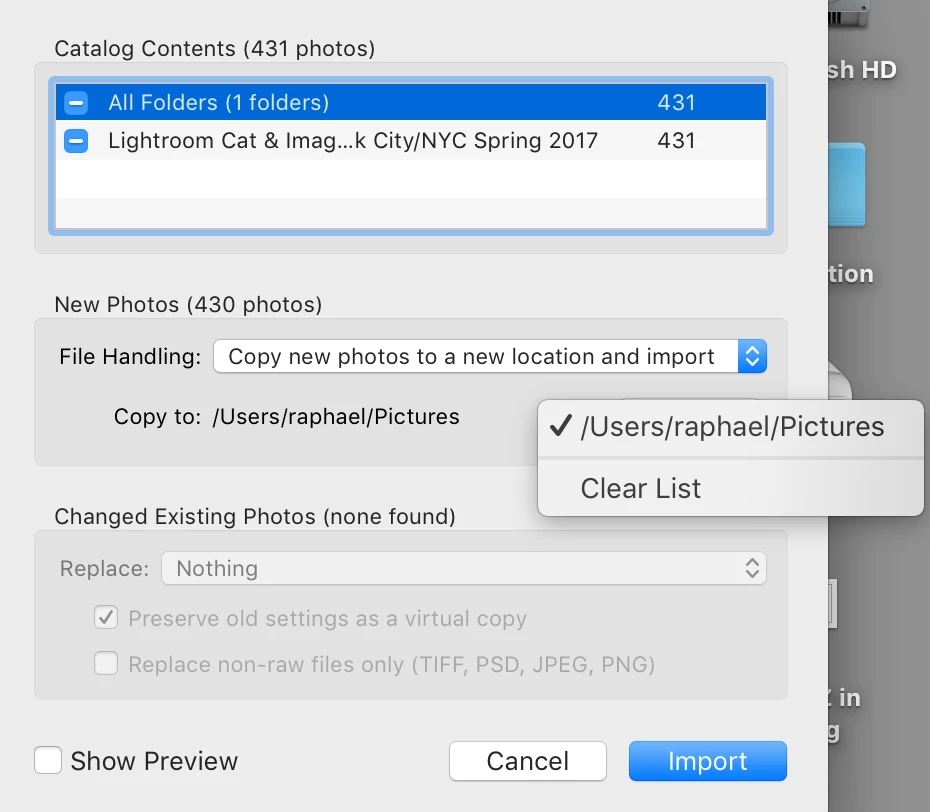
    Please see attached screenshot. So my question to you is: how do I use the clone to replace the deleted images, adjustments and all?

    Thanks a lot.