




Question
Secondary display window (if not full screen) moves between screens when using Lights Out
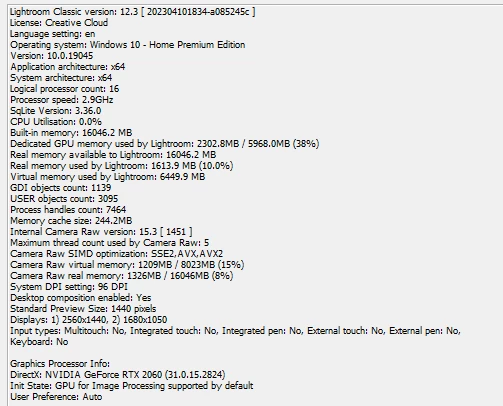
I am using LrC 12.3 on Windows 10 Home (22H2), in a dual screen setup (extending the Windows desktop across both but normally only using one for LrC).
I have just discovered a strange window management issue:
- click [2] button at top of filmstrip on main app window
- a resizable [2] window opens, floating above [1] and on the same screen.
- drag this to the second screen, size and position it to suit - without making this fullscreen
- select Lights Out mode by pressing L
- [2] window's location unexpectedly moves back to the first screen, but with normal Lights Out operation in other respects
(expected behaviour: this window stays on the second screen where I had put it)
- If [2] window is manually dragged to second screen and made fullscreen there, it stays put with Lights Out, as expected.
- Furthermore if this [2] window having been made fullscreen, is then made NOT fullscreen, it will still thereafter hold its position if Lights Out is used.
- But once that window is closed, on later reopening that using the [2] button above filmstrip again, the same unexpected behaviour repeats as steps above.
In other words, it is only a secondary display window 'instance' which has never yet been fullscreen, which shows this odd behaviour of moving all by itself.
 AdChoices