



bellevue scott
Inspiring
March 30, 2023
Answered

Sequential file naming can't start with a zero

  • March 30, 2023
  • 1 reply
  • 1349 views

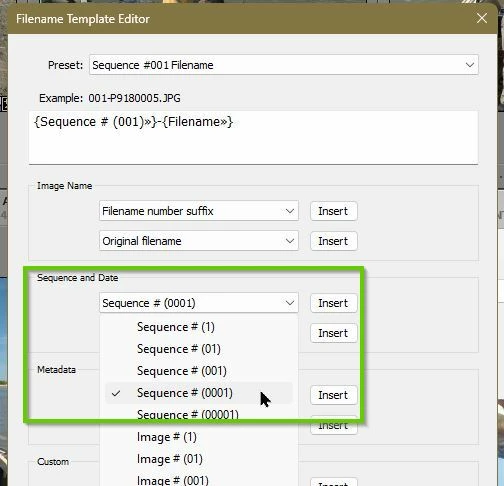
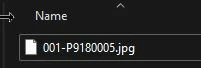
Why can't sequential file naming start with a zero? I know I used to be able to do this, and sometimes you want to create a file array with the image files so for example if you have 100 files to export, you will start with 001 so that you have an array from 001-100. But you can't do that in LR. It converts 001 to 1. Is there a way around this?
This topic has been closed for replies.
Correct answer Rob_Cullen

I have no trouble renaming with a leading 0 of a sequence.

You need to define your 'Rename' template with one of the Sequence options that includes one, or more, leading zeros-


1 reply

Rob_Cullen
Rob_CullenCorrect answer
Community Expert
March 31, 2023

I have no trouble renaming with a leading 0 of a sequence.

You need to define your 'Rename' template with one of the Sequence options that includes one, or more, leading zeros-


Regards. My System: Windows-11, Lightroom-Classic 15.0, Photoshop 27.0, ACR 18.0, Lightroom 9.0, Lr-iOS 10.4.0, Bridge 16.0 .
bellevue scott
Inspiring
April 1, 2023

Rob

I searched and searched and couldn't find it. So I did a web search, came upon a video on how to do this on youtube, and this may well have done more to improve my LRC experience than anything ever. Thanks. Nice trick. I had no idea. 

bellevue scott
Inspiring
April 6, 2023

A good result! You might also find many other tutorials by Julianne Kost at-

https://jkost.com/blog/lightroom-training-videos


Thanks for this tip. It's been very helpful. But I've found that what this does really is rename photos in LR. I still can't find a way to export files using these custom templates. Am I missing something? I don't want to rename the original photos, I want to export them with a sequential name without renaming the originals.