


Participating Frequently
July 9, 2019
Question

Slideshow Error: Attempt to Index a Nil Value

  • July 9, 2019
  • 2 replies
  • 6848 views

Hi there,

I am using Lr V 5.7. When I try to create a slideshow I am getting an Attempt to Index a Nil Value error. I was browsing various forums. This error seems to occur under various circumstances and I have found different recommendations how to fix it, including creating a new catalogue and deleting "phantom images" in the selection of images I want in the slide show. None of the tips worked for me.

Any idea how I could approach this? Many thanks in advance!

I am using a German client. The German part translates to: An internal error occured:
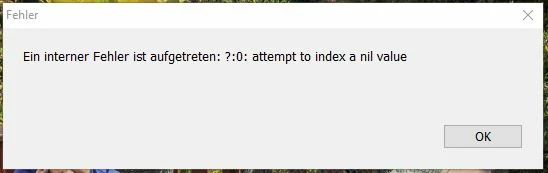
This topic has been closed for replies.

2 replies

GoldingD
Brainiac
July 9, 2019

Please accomplish the following, just to make sure something got overlooked.

In LR click on Help, click on System Information, click on Copy. Paste that info in a reply, recommend from first line to just past the plug-in info, all that OpenGL stuff after that point is of little value. Well, unless your rig uses OpenGL instead of DirectX or Metal within LR)

Participating Frequently
July 10, 2019

Hi David,

here you go. I am using a German client. I guess one can pull the specs easily from the listing though. Let me know if you have any questions.

Thanks - Klaus

Version von Lightroom: 5.7 [991162]

Lizenztyp: Perpetual

Betriebssystem: Windows 8.1 Home Premium Edition *remark: I am running a Windows 10 Home OS*

Version: 6.3 [9600]

Anwendungsarchitektur: x64

Systemarchitektur: x64

Anzahl logischer Prozessoren: 8

Prozessorgeschwindigkeit: 3,5 GHz

Integrierter Speicher: 16327,6 MB

Für Lightroom verfügbarer phys. Speicher: 16327,6 MB

Von Lightroom verwendeter phys. Speicher: 467,7 MB (2,8%)

Von Lightroom verwendeter virtueller Speicher: 445,9 MB

Cache-Speichergröße: 474,0 MB

Maximale Anzahl Threads, die Camera Raw verwendet: 4

DPI-Einstellung des Systems: 96 DPI

Desktop-Komposition aktiviert: Ja

Monitore/Anzeigegeräte: 1) 1920x1080

Anwendungsordner: D:\Program Files (x86)\Adobe\Lightroom 5.7

Bibliothekspfad: G:\Lightroom-x\Lightroom 5 Catalog.lrcat

Einstellungen-Ordner: C:\Users\[Username]\AppData\Roaming\Adobe\Lightroom

Participating Frequently
July 16, 2019

A bit strange is the fact that in the system info the operating system is  Windows 8 and you are saying that you use Windows 10.

I would prefer a clean reinstallation of Lightroom 5.

Save all your catalog, templates etc.

Deinstall Lightroom 5

Use the Adobe Cleaner Tool

Restart your computer -> do not skip this step.

Install Lightroom

Restore catalog, templates etc. 


Hi Axel,

Thanks for your response. Took me a few days to review. I‘d like to try your recommendation. However I am struggling to find a download source for Version 5.7.

Can anyone point me in the right direction?

Thanks - Klaus

Akash Sharma
Brainiac
July 9, 2019

Hi KlausKonrad,

That's definitely what should not be happening, let us help make it right. Could you please let us know which exact version of Lightroom Classic CC are you using? Note: You can find that out by going to Help > System info

Also, are you using any 3rd party plugins in Lightroom?

Could you try resetting the preferences of Lightroom and let us know if it helps?
How to set Lightroom Classic CC preferences

Regards,

Akash

Participating Frequently
July 9, 2019

Hi Akash.

Thanks for your reply. I am using Adobe Photoshop Lightroom 5 - Version 5.7.

I have reset the preferences but this didn't help. Amy other idea what I could try?

Thanks - Klaus

AxelMatt
Adobe Expert
July 9, 2019

Which exact version of Lightroom do you use? 5.7 or 5.7.1?

Which operating system do you use?

Has that ever worked in the past? If yes, what has been changed on your system before the error occured?

My System: Intel i7-8700K - 64GB RAM - NVidia Geforce RTX 3060 - Windows 11 Pro 25H2 -- LR-Classic 15 - Photoshop 27 - Nik Collection 8 - PureRAW 5 - Topaz Photo