
Known Participant
December 2, 2016
Question

Sony built-in lens profile applied

  • December 2, 2016
  • 3 replies
  • 11250 views

I recently started shooting with Sony A7R2 (compressed raw) and noticed a small alert in Lens Corrections tab in the Develop module.
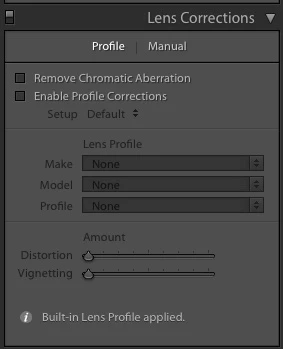
This itself is surprising as I have previously turned off all three Lens Compensation options in the camera menu. When I click the "i" icon it reveals the following:
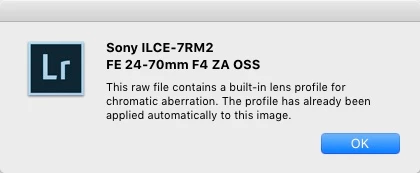
Apparently chromatic aberration correction is applied in Lightroom whether you select it in camera or in Lightroom. It seems to me that the choice should remain with the individual not forced as it seems. While generally I do apply chromatic aberration to all my images there are times, when evaluating a new lens for instance, that I want to turn it off.

I am intersted if someone more in the know can shed some light on this.

-louie

    This topic has been closed for replies.

    3 replies

    Legend
    December 2, 2016

    There are some good explanations of why this is done for Sony (and other) cameras in this thread, and why you shouldn't even try to turn it off

    Lens correction in Lightroom CC: Retouching Forum: Digital Photography Review

    Known Participant
    December 2, 2016

    Ok I can see that it can make sense for the fixed lens cameras like the RX100 series. However, I am looking into the most expensive, supposedly highest quality optics, where each lens costs more than and even multiple times the price of a fixed lens camera.

    Lets just stipulate that the Sony internal  chromatic aberration (CA) correction profile is far and away the best. I still want to be able to disable it to see how much CAs are present at least as part of my evaluation process.

    Given that Sony's top end full frame lens lineup for the A7 cameras is across the board more expensive than the Canon and Nikon comparable lenses I don't buy the notion that having the automatic correction is some how saving me money. It strikes me more as an obfuscation of design flaws. It also bothers me that Adobe had implicitly bought into this notion. I did read elsewhere that you have the option in DXO to ignore these "built-in" profiles.

    To be clear I am not expecting a perfect lens I just want to be able see what I am getting when I am laying down thousands of dollars on a new camera system.

    -louie

    ssprengel
    Inspiring
    December 7, 2016

    Adobe engineer Chris Castleberry responded to Louie's query and explained how to disable the built-in profile or apply another one: Lightroom: Unable to disable "Built-in Lens Profile applied" for raw files | Photoshop Family Customer Community . He also explained that Sony firmware bakes the chromatic aberration correction into the raw file using "opcodes", and that cannot be disabled.


    Chris explained how to disable an external lens profile, which you can also disable by unchecking the Enable Profile Corrections option.

    Chris did not say there is a way to disable the “built-in” profile from the Sony OPCODES as the OP is asking about, here, in this thread.

    Just Shoot Me
    Legend
    December 2, 2016

    No it is a Built In correction.

    If it wasn't built in then you would need to put a check mark in the Chromatic aberration box to apply it.

    Usually the i info reveals this.

    The check box labeled "Enable Profile Corrections" should be label Enable "MANUAL" profile corrections.

    With some cameras some corrections are done In Camera and passed down with the file even on RAW files.

    Some Adobe has built in for most lenses for most manufacturers.

    DdeGannes
    Community Expert
    Community Expert
    December 2, 2016

    The lens profile is supplied by Sony the Camera manufacturer and is applied by the camera firmware if you shoot in jpeg mode. If you shoot raw then the info is in thew raw file and is being applied by Adobe at Sony's behest.

    Regards, Denis: iMac 27” mid-2015, macOS 11.7.10 Big Sur; 2TB SSD, 24 GB Ram, GPU 2 GB; LrC 12.5,; Lr 6.5, PS 24.7,; ACR 15.5,; (also Laptop Win 11, ver 24H2, LrC 15.0.1, PS 27.0; ) Camera Oly OM-D E-M1.
    Known Participant
    December 2, 2016

    i am also wondering why there is no way to disable this correction? It seems heavy handed of Sony and Adobe to force this to happen.

    -louie

    Legend
    December 2, 2016