



ouiouiphoto
Known Participant
February 14, 2022
Answered

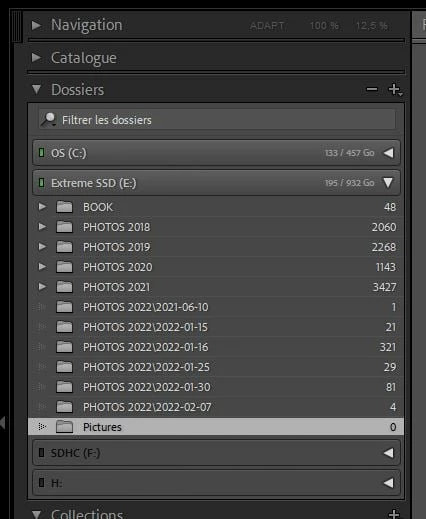
Subfolders displayed with the folder as "Folder\Subfolder" when created outside of LRC

  • February 14, 2022
  • 4 replies
  • 1131 views

Dear all


One of my community member has this issue. The subfolders are not displayed correctly. You should have PHOTOS 2022 and inside PHOTOS 2022 you should have all the subfolders.  I have checked the structure on the Disk. On the disk you have a PHOTOS 2022 folder and inside it the subfolders. Resetting the pref seems to have no impact. The PHOTOS 2022 and the subfolders has been created outside Lightroom. If you import and let LRC create the folders there is no issue. Any idea is welcome 😉 
 

This topic has been closed for replies.
Correct answer Todd Shaner

Try right-clicking on each of the PHOTOS 2022\ folders and select 'Show Parent Folder.'

4 replies

Todd Shaner
Legend
February 15, 2022

1) If it happens again with a new import try reseting your LrC Preferences file as outlined at the below article. Place a copy of the current preferencs file on your desktop so it can be easily restored if the issue remains.

https://www.lightroomqueen.com/how-do-i-reset-lightrooms-preferences/


2) Remove (not delete) the newly imported files and folders.


3) Try importing the same files and folders again.

Todd Shaner
Legend
February 15, 2022

What does the LrC Folders panel look like now after right-clicking on each of the PHOTOS 2022\ folders and select ing'Show Parent Folder?' Please post a screenshot, which might give us  a clue as to what's happing to cause this issue. Thank you.

ouiouiphoto
Known Participant
February 15, 2022

It looks normal now with Photo 2022 and inside the subfolders. This happens to one of my community member, so I cannot unfortunately  make more tests.  


.Sheepdog trying to help Lightroom and Photoshop beginners
Rob_Cullen
Community Expert
Community Expert
February 14, 2022

Might not be relevant, but- Do NOT use the [ \ ] character in Folder names.


Regards. My System: Windows-11, Lightroom-Classic 15.0, Photoshop 27.0, ACR 18.0, Lightroom 9.0, Lr-iOS 10.4.0, Bridge 16.0 .
Community Expert
February 15, 2022

Agreed - I would go further, it's IMO unwise to use any such characters for folders or for file names and the like anyway, not just so far as Lightroom is concerned. They may be apparently fine but then still cause problems when you, or other people, try to use them in another context.


I would go further still and advise against any remotely special character for anything that may be involved in later processing of any kind. Outright text content is OK (such as a caption or a notes field, or the words inside a text document - all applications know to surround that sort of thing with quote-marks - to only handle it with thick metaphorical gloves).


To give an idea: I had an task some time ago, to use a utility to archive a lot of emails as separate files on disk (in "msg" format). That was fine except that one correspondent liked to punctuate the subject lines of his emails with semi-colons. Seems trivial, and the email system had no problem with this. But now this email subject had to be used in the new filename, thus every email that included such semicolon(s) needed manual editing within the email system console, to replace those with the commas they always should have been. Otherwise each one would generate a separate error and separately refuse to archive. That also included every reply or forward to these same emails, if it had quoted the problematic subject line. So HIS eccentric and innocent whim, cost ME many hours of completely needless and increasingly testy toil!

ouiouiphoto
Known Participant
February 15, 2022

Thanks but There is no special characters in the folder name. LRC just don't display the folder and subfolder correctly 


.Sheepdog trying to help Lightroom and Photoshop beginners
Todd Shaner
Todd ShanerCorrect answer
Legend
February 14, 2022

Try right-clicking on each of the PHOTOS 2022\ folders and select 'Show Parent Folder.'

ouiouiphoto
Known Participant
February 15, 2022

Thanks. It did the trick. 

.Sheepdog trying to help Lightroom and Photoshop beginners