


Inspiring
February 20, 2025
Question

tif file metadata is not automatically updating

  • February 20, 2025
  • 1 reply
  • 314 views

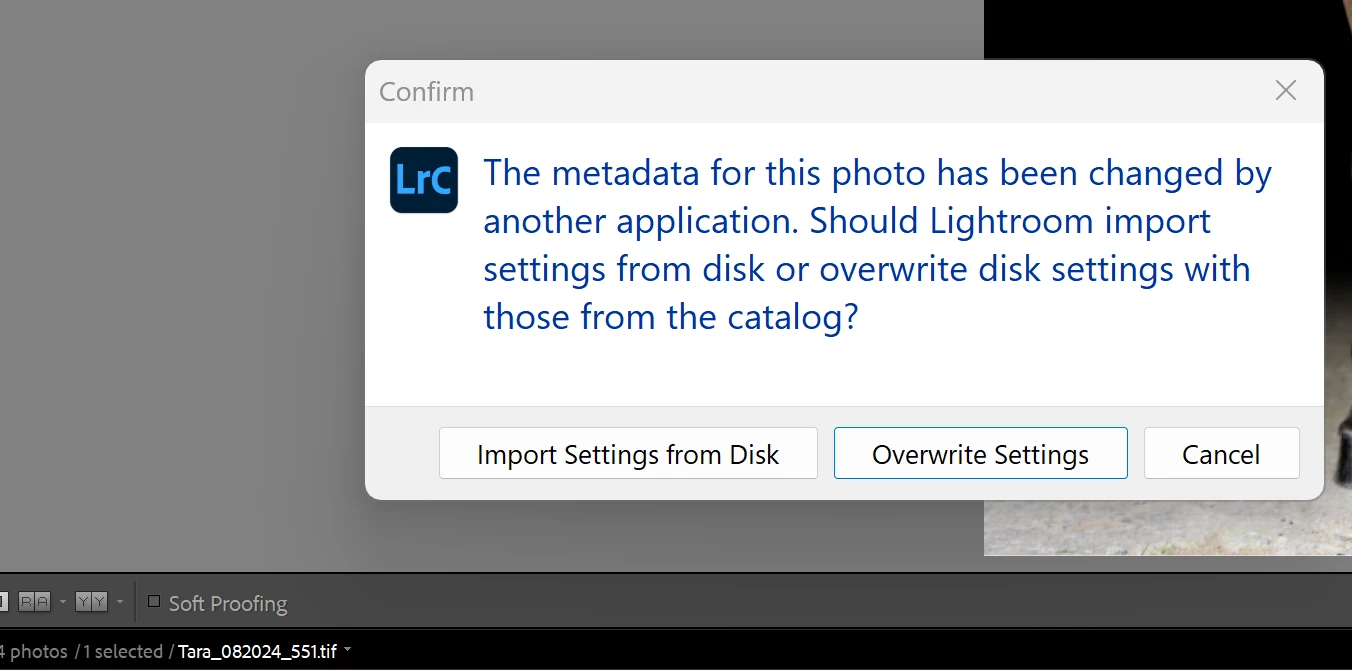
Everytime I make a change to a tif file in photoshop, Lightroom is not automatically updating with the changes. This message appears.


Even if I click on "Import Settings from Disk", the changes are not persistent within Lightroom. The preview icon in the bottom strip reverts back to the original preview.


This did not always happen. I am not sure what changed or how to fix it.


1 reply

JohanElzenga
Community Expert
Community Expert
February 20, 2025

What kind of 'changes' are you talking about? Edits in Photoshop should carry over because those edits change the pixels of the image. If you add metadata in Photoshop, then you will indeed get this error. Lightroom Classic never automatically updates metadata from a file, because updating the metadata in the Lightroom Classic catalog by reading them from file, will also remove any Lightroom Classic edits (because these are also metadata). That means it's not a good idea to add metadata to the image outside of Lightroom Classic if you do have Lightroom Classic edits.


-- Johan W. Elzenga
kdash1228Author
Inspiring
February 24, 2025

I'm making changes such as editing a mask for a color layer, levels adjustment, using the clone stamp to remove bugs.


In the past, whenever I made these changes in Photoshop, they would automatically appear in Lightroom.

DdeGannes
Community Expert
Community Expert
February 24, 2025

It's as Johan indicates, there is an option in Lightroom Classic to "Automatically write Metadata to XMP" , LrC does not automatically read info from the file except at initial import when there is an XMP file present.


Regards, Denis: iMac 27” mid-2015, macOS 11.7.10 Big Sur; 2TB SSD, 24 GB Ram, GPU 2 GB; LrC 12.5,; Lr 6.5, PS 24.7,; ACR 15.5,; (also Laptop Win 11, ver 24H2, LrC 15.0.1, PS 27.0; ) Camera Oly OM-D E-M1.