


Inspiring
February 24, 2023
Answered

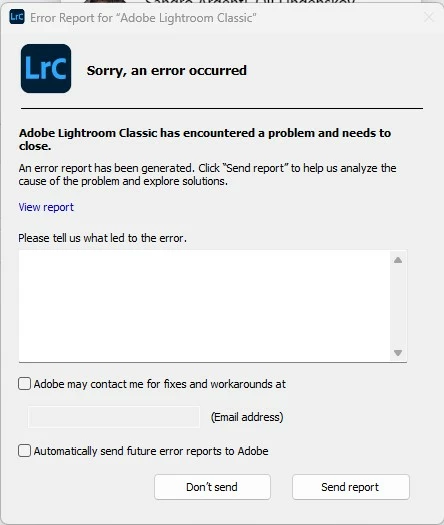
Today when attempting to launch Lightroom Classic I get a pop up SORRY, AN ERROR OCCURRED [SOLVED]

  • February 24, 2023
  • 3 replies
  • 2330 views

Today when attempting to launch Lightroom Classic I get a pop up SORRY, AN ERROR OCCURRED and the app shuts down.  I am running v12.2


How do I fix this please?
 

This topic has been closed for replies.
Correct answer tonymuffin

I solved the issue by uninstalling and re-installing LrC.

3 replies

tonymuffinAuthorCorrect answer
Inspiring
February 24, 2023

I solved the issue by uninstalling and re-installing LrC.

GoldingD
Legend
February 24, 2023

in that dialog box, type in your problem. Include  link to your community post,  check the box allowing Adobe to contact you, type in your e-mail address, And send the report to Adobe.

Inspiring
February 24, 2023

Did that already.

Inspiring
February 24, 2023

Also, after deleting the Preference files from the instructions above, I don't even get that Pop Up Error any longer when attempting to launch LrC.  Nothing!  I have some photos I took this week that I need to process.  How do I get this working?  Is it possible to re-install LrC over the top of itself?  If so how?

Legend
February 24, 2023

Try:

  1.  Restart the computer 
  2.  Reset the LrC preference file
  3.  See if some other catalog will open properly, perhaps an unzipped version of a recent catalog backup.
  4.  See if Lightroom Classic will work properly under a different user ID
Inspiring
February 24, 2023

I've already re-started the computger.

I've reset the LRC preference file. Same issue! With issues prior why is it necessary to keep resetting the preference file.  This obviously is an issue with LrC.

There is no other Catalog.

There is no different User ID.

Legend
February 24, 2023
quote

I've already re-started the computger.

I've reset the LRC preference file. Same issue! With issues prior why is it necessary to keep resetting the preference file.  This obviously is an issue with LrC.

There is no other Catalog.

There is no different User ID.


By @tonymuffin


I suggested you try opening a backup of the catalog, not some other catalog.


Create a new user ID on your computer and try opening the catalog from there.