SdeGat
Inspiring
January 19, 2024
Answered

Unable to delete Folder (LrC)

  • January 19, 2024
  • 3 replies
  • 3208 views

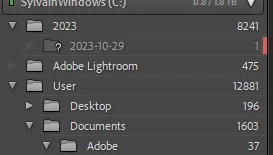
This folder below has been hanging in my list for a while and LrC will just not let me delete it. 😞

That's the one with the red marker. It does not exist on my hard drive (SSD actually).

Maybe it's a folder that got renamed but I don't remember.

How can I get rid of it? 


This topic has been closed for replies.
Correct answer drtonyb

@SdeGat 

I could fix your catalog and send it back to you, but the easiest solution for you is to do the following:


In LrC, choose File > New Catalog and create a new catalog "Lightroom Catalog-v13-fixed"


Choose File > Import From Another Catalog... and choose your current catalog file "Lightroom Catalog-v13.lrcat"


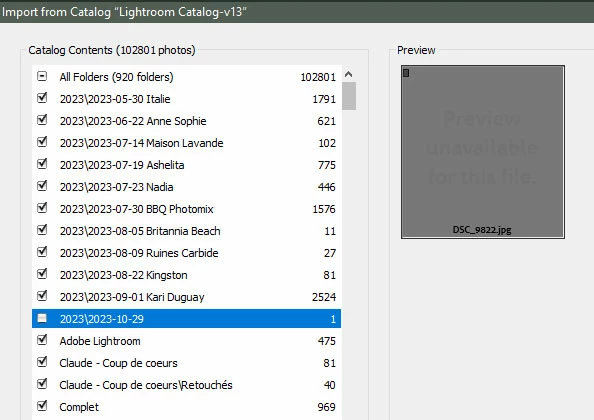
When it has processed the catalog, in the Catalog Contents (left panel) deselect the folder "2023\2023-10-29" that has 1 photo, then click Import and wait.

Once finish, check you new catalog for any problems.


3 replies

JohanElzenga
Community Expert
January 20, 2024

Try the following.
1: In Windows Explorer, not in Lightroom, create a temporary folder somewhere in your Home folder and call it Temp.

2: Right-click on the 2023-10-29 folder in Lightroom and choose 'Find Missing Folder'.

3: In the dialog that follows, navigate to the Temp folder and select it.

4: The missing 2023-10-29 should be gone, and the Temp folder should show in Lightroom in its place.

5: Try if you can remove the Temp folder from Lightroom.


-- Johan W. Elzenga
Brainiac
January 21, 2024

The top folder named 2023 has 8241 images, but the only folder under it is the problem folder 2023-10-29 with what appears to be 1 image.


Under Pictures, 2023 is also listed with 8241 images.


Right-click on the top folder named 2023 and select Show Parent Folder. What happens?


SdeGat
SdeGatAuthor
Inspiring
January 21, 2024

Thanks @drtonyb; I see this:


GoldingD
Brainiac
January 20, 2024

Looks like a call to adobe on Monday.


All the discussions in this community page and at other support blogs appears to indicate a catalog corruption.


https://community.adobe.com/t5/lightroom-classic-discussions/can-t-remove-a-folder/m-p/14077623/highlight/true

https://www.lightroomqueen.com/community/threads/remove-folders-doesnt-remove-folders.41474/


GoldingD
Brainiac
January 19, 2024

I see that it looks like LrC thinks their is one photo in that folder that got imported into the catalog. In Library Module, when you click on that folder, does that one image appear in the center grid or loupe panel?


What error message are you getting? Perhaps a warning about the folder containing images/files?


Do you have any other folders/subfolders with the same name? Possibly an accidental duplicate? (and the two folders could easily show different totals)


SdeGat
SdeGatAuthor
Inspiring
January 20, 2024

No image appear @GoldingD and I'm not getting any error message when I click on remove.

Nothing happens and that's it.

GoldingD
Brainiac
January 20, 2024

When you select the parent folder right above it, and perhaps right click and select to show in Explorer, are their any other subfolders? You already stated the one you are showing is not, but others? And what if you create one named as such.