


New Participant
November 15, 2016
Answered

Using Lightroom License on 2 computers

  • November 15, 2016
  • 3 replies
  • 8316 views

I am considering buying Lightroom 6 (not the CC version).  I understand that this makes it possible to use it on 2 different computers.  We have two addresses, and a Mac at one and a PC at the other.  So does that mean I wouldn't be able to take advantage of the 2 computer license?  I have read conflicting information about this
    This topic has been closed for replies.
    Correct answer JP Hess

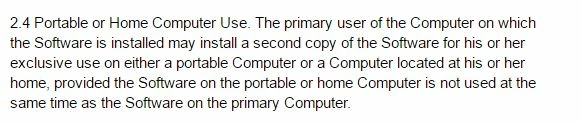
    I think whoever wrote that FAQ was misinformed. Here is the section from the license agreement itself:

    3 replies

    New Participant
    May 5, 2020

    Hi,


    I need to install and run Lightroom 6 (DVD copy) on my new laptop which replaced my old one that failed before I could de-activate my Adobe software.  It installed okay but I get the following message** telling me to de-activate it from a computer to allow the licence to pass to my new laptop and starting a countdown to when it will I presume stop working ?  I do have it installed on my Desktop PC but now need to get it working on my new laptop for mobile working thereby respecting the Adobe 2 PC's/ One User per license.  My purchase was registered with Adobe back in September 2015 against my email address (timisajames@gmail.com) but I am not sure how to get the licence on my old laptop revoked to allow my new laptop to use Lightroom as when logged onto my account it shows my registration only with the date and no details re. where I have it installed.  Could you advise how I could contact Adobe to resolve this issue ?


    ** see attached file for error message on new laptop.


    Thanks in advance,


    Tim James - UK

    DdeGannes
    Community Expert
    May 5, 2020

    A couple of simple facts that we as other users just like yourself cannot help with, this means to achieve what is necessary to activate the installation, on your new computer, you need to contact Adobe support directly.


    1. If you did the install from the CD you would have installed version 6.0, the last version was 6.14 which was issued in December 2017.

    2. If you have a installation file for the latest version 6.14 then you have crossed one hurdle, since Adobe has no active links available. Sometimes some other user may post a link but it appears they also disappear very quickly.

    3. You in the final analysis have to contact Adobe Support directly and satisify them as to the legitimacy of your request so they can activate your new computer. Your license is registered so you do have an Adobe a/c. Your user name would be the email address you registered with.


    Regards, Denis: iMac 27” mid-2015, macOS 11.7.10 Big Sur; 2TB SSD, 24 GB Ram, GPU 2 GB; LrC 12.5,; Lr 6.5, PS 24.7,; ACR 15.5,; (also Laptop Win 11, ver 24H2, LrC 15.0.1, PS 27.0; ) Camera Oly OM-D E-M1.
    Brainiac
    November 15, 2016

    The license allows you to install it on two computers that you own, for your own personal use (not you're nephew's use on one computer and your own personal use on the other computer) and that Lightroom can only be used on one computer at a time.


    Read the license yourself:

    Photoshop Lightroom End User License Agreement - Adobe Labs

    New Participant
    November 15, 2016

    Yes but it is ambiguous

    Photoshop Lightroom End User License Agreement - Adobe Labs

    see section 2.4  It refers to "a home" so I dont know if downloading it from two different ISPs would work.

    And this is what is on Adobe license FAQ:

    "If you own, or are the primary user of, a single-user- or volume-license Adobe product that is installed on a computer at work, you can also install and use the software on one secondary computer of the same platform at home or on a portable computer. "

    So, I presume I wouldn't be able to download on mac version and one PC version.  Very limited!

    Brainiac
    November 15, 2016
    "If you own, or are the primary user of, a single-user- or volume-license Adobe product that is installed on a computer at work, you can also install and use the software on one secondary computer of the same platform at home or on a portable computer. "

    This text does not appear in the Lightroom license. It does not apply.

    So, yes you can, under the Lightroom license, install and activate (not download as you said) one copy of Lightroom on a Mac and a second copy on a Windows computer.

    JP Hess
    Inspiring
    November 15, 2016

    The license for Lightroom is not specific to Mac or Windows. So you will be able to install Lightroom on both computers. The catalog will be interchangeable between the two computers. You just need to have the catalog and images on an external hard drive. This license for Lightroom is for your personal use. It is not intended that two different people will be sharing the same license.