


Earth Oliver
Brainiac
January 4, 2020
Answered

VRAM Memory Leak Still Not Fixed

  • January 4, 2020
  • 12 replies
  • 9372 views

It's been months now and this issue is still causing so many problems. 

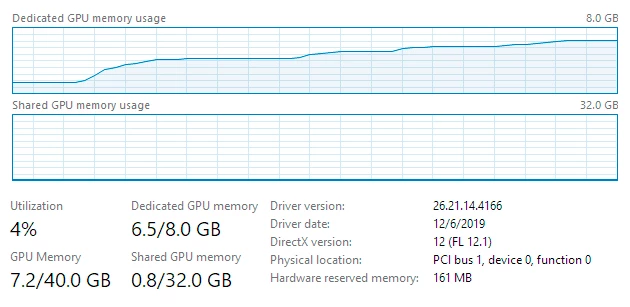
Within minutes of opening Lr Classic and doing anything (grid, Develop, etc), all available VRAM will be consumed and most computers will become unusable if any other apps are opened which need to use the GPU.
People are increasingly complaining about Lr and system performance and this is the primary issue which is contributing.
Here's a SS showing what happens within a few seconds after you open Lr and develop a single image using only the basic sliders.

Does no one at Adobe care about this bug?


This topic has been closed for replies.
Correct answer Ian Lyons

Participants in this forum are almost all customers like yourself, and any Adobe personel who do visit tend to focus on useability issues rather than bugs, etc. Fortunatley, your issue is already known to Adobe and is being investigated. However, it would still be helpful to report the issue on the forum that Adobe provides for bug reporting and feature requests. https://feedback.photoshop.com/topics/lightroom-classic/5f5f2093785c1f1e6cc40872


12 replies

New Participant
July 13, 2022

Going to hop on this bandwagon and note this is STILL not fixed. Lightroom CC will quickly max out 12GB of VRAM on a 3080ti doing... almost nothing... and then I've got stuttering window animations just moving files around.

Earth Oliver
Brainiac
July 13, 2022

The stuttering is due to a Gsync bug that affects all Adobe apps and which isn't going to be fixed anytime soon. If you want relief from it, you have to completely disable Gsync. I reported the issue years ago...

New Participant
February 27, 2024

Hi, is there a link to details about this Gsync bug? I'm also facing the same issue and want to gather more information about it. 

New Participant
June 15, 2021

I had a similar experience where I'd use 18/24 GB of VRAM on my card, and other programs like Photoshop would give warning about insufficient VRAM. DxO's raw demosaic tool, which heavily uses GPU features to process images, would go from processing them in a few seconds, to taking up to a minute when VRAM usage is high, likely because of swapping data in and out.


I'm running on a 7700k with a RTX 3090, with 32gb of system ram, and NVME/SSD disk.

New Participant
June 15, 2021

I was looking at the 3090 myself, hoping it would not be AS susceptible to the leak. I mean you would think it would be better with it’s 32gb of ram. However, I from your post it sounds like it still gets just as bogged down as the rest of the GPUs. Am I correct?

Ian Lyons
Community Expert
June 15, 2021

The issue is not RAM it's having large quantities VRAM (i.e. more than 4GB) available for the Camera Raw component to swallow up and hold on to. LrC 10.3 should have improve GPU VRAM management compared to earlier versions, and work is ongoing to further improve VRAM management.


Participating Frequently
February 7, 2021

Same issue: Lightroom uses almost all VRAM and causes Photoshop GUI to lag. For instance opening a new document, the new document initialy shows a part of a previously opened photograph, and zooming is slow. Or starting a filter (NIK) is also very slow - Photoshop even briefly shows status 'Not responding' in the process list - etc. It starts when switching to the Developer module in Lightoom.


During the last 1,5 years I kept my nvidia drivers up to date (use the Studio driver) and this issue also occurred with my previous GPU. If I close Lightroom the issue goes away and I can see Photoshop start to use more VRAM, especially when starting a filter like NIK. I'm keeping my Win 10 up to date, run one 4K screen (@10 bit and 98Hz), have a reasonable fast cpu (AMD 5950X) and there are no page-outs, event viewer errors or other suspicious messages. 


Would be nice if Lightroom had a 'Let Photoshop Use: xxxx MB (xx%)'-like setting to cap VRAM usage. I'm all for maximizing hardware usage, but not when it starts to impact performance of other programs, in this case Adobe's own Photoshop.

Also, using 22GB of VRAM seems rather unnecessary - Lightroom wasn't noticably different with my previous 8GB GPU (of which Lightroom used about 7GB, of course). 

Participating Frequently
February 8, 2021

Oh, some extra info: once Lightroom is closed or has otherwise let go of VRAM (which it seems to do after some time of inactivity or after a pc sleep/wake cycle), Photoshop performance is no longer impacted. To my understanding this is because Photoshop now can use VRAM more freely. 


As you can see, Dedicated GPU memory for Photoshop has increased, most likely due to Lightroom not hogging the bulk of it anymore.


Note: I also keep LR and PS fully up to date via Creative Cloud.

Ian Lyons
Ian LyonsCorrect answer
Community Expert
February 8, 2021

Participants in this forum are almost all customers like yourself, and any Adobe personel who do visit tend to focus on useability issues rather than bugs, etc. Fortunatley, your issue is already known to Adobe and is being investigated. However, it would still be helpful to report the issue on the forum that Adobe provides for bug reporting and feature requests. https://feedback.photoshop.com/topics/lightroom-classic/5f5f2093785c1f1e6cc40872


KR Seals
Community Expert
October 28, 2020

Win 10, I7 8700K, GTX 970 4GB VRAM, 64GB RAM

Start LrC V9.4, develop module VRAM at about 1.5GB VRAM in use

Start Premier Pro 2020, import video and move to editing panel, start play - VRAM goes up to a little over 2GB.

Start export in PP - Adobe Media Encoder starts VRAM goes up to about 3GB

Go back to LrC V 9.4, develop about 6  images - VRAM usage goes up to 3.6GB. Upon completion of develop activity, VRAM usage goes down to 3.0GB

On completion of AME encoding and PP playback, VRAM stays at 3GB.

The Still images are DJI P3P Drone 12MP and the video is DJI 4K video.

Ken Seals - Nikon Z 9, Z 8, 14mm-800mm. Computer Win 11 Pro, I7-14700K, 64GB, RTX3070TI. Travel machine: 2021 MacBook Pro M1 MAX 64GB. All Adobe apps.
Community Expert
October 27, 2020

Really wonder why some peeople have this issue and others don't. I constantly run Premiere at the same time as Classic and never seen any issues like described here. Much less beefy GPU with only 4GB of VRAM. Main machine is a 2018 MBP with a Radeon Pro 560X 4 GB GPU. I basically never quit Classic. It stays running for weeks usually only interrrupted upon needing to update OS or Classic itself.

Earth Oliver
Brainiac
October 27, 2020

from what i understand, this is a Win10 issue. 

D Fosse
Community Expert
October 28, 2020

"this is a Win10 issue"


Win 10 pro (still build 2004), Nvidia Quadro P2000/5GB


While I do consistently have VRAM usage pretty close to the ceiling at 95% or so, I just cannot see any problems with that. When other applications open and need VRAM, they get it. It's not as if Lightroom holds on to it if it's requested elsewhere.


GPU temperature is 40 degrees or so, no particular fan spinning. Everything is business as usual.


It drops if I turn off GPU for image processing - but, again, what's the problem with VRAM doing some actual work? In my book, this is how memory management is supposed to work. Free memory isn't doing anything, it could just as well not be there at all.

New Participant
October 27, 2020

I just started having this problem when getting a new PC.  I had problems working in Premiere Pro for video editing because my PC could not handle the work load so I upgraded.  I went from a GTX 970 to an RTX 2070 Super 8GB.  Premiere Pro is a dream now, but Lightroom was running terribly.  It ran perfectly fine for me on my older, much slower system.  I noticed that my VRAM usage was nearly maxed out as soon as I enter the Develop Module and if not immediately, after a single 1:1 zoom it will be at 95% usage and stay that high without ever dropping.  This means that even trying to watch a YouTube video on my second screen while editing causes problems.  The video will start dropping frames or freezing for short intervals.  This is the exact same screen setup I had with my old PC.  I only switched the PC itself, all my other hardware is the same.  This is definitely an issue, maybe not a "bug" if they intend it to use all of your VRAM, but what if you want to do more than just use Lightroom on your PC at one time.  I like to watch YouTube while I get my work done.


I can run current games that are quite strenuous to run on my 4k monitor on ultra settings and have YouTube videos playing on my second screen at the same time and my system still runs better than with Lightroom open sitting idle.  I am quite familiar with computers and computer hardware and I have been building PCs for a long time.  I can assure you this is not user error.  I do not have this problem with any other piece of software.  


My proposed suggestion to Adobe would be to allow us to choose how much VRAM is allocated to Lightroom like we can choose our cache size.  Maybe the same for RAM for users having problems with their RAM being used up.  You can already restrict CPU usage through Task Manager in Windows 10 by limiting the number of cores Lightroom can use.


I did find that changing my graphics acceleration to "Use only for display" solves this issue if you want a bandaid for the short term.  It is a shame that I am stuck choosing between not using the GPU for image processing at all or not doing anything else GPU related on my PC at the same time.  Somewhere inbetween would be great.


Here are my scpecs in case anyone is curious (I should have no performance issues with this build, and it definitely should not be running slower than my on my old PC ran Lightroom if I turn on full graphics acceleration)


CPU: Intel i7-9700K overclocked @ 4.6GHz (with liquid cooling my temps stay in the 40-50C range so this is not the issue and I have stress and stability tested with a suite of different software and games)

RAM: 16GB @ 3000MHz Dual Channel

GPU: RTX 2070 Super 8GB (I have tried fresh installs of both the gaming and studio drivers with no change in Lightroom)

Hard Drive: 1TB M.2 NMVe

OS: Windows 10 with the current updates installed


Hopefully this helps anyone having this problem by knowing you can solve the VRAM issue at least by disabling the "Use GPU for image processing" option and restarting Lightroom.  If you don't have a solid procressor though, this may slow you down as well and it is a shame to waste a powerful GPU for doing graphical work.  I believe there is third party software that will allow you to restrict how much RAM a process can use if regular RAM is your issue.  I have not found any programs that allow you to restrict VRAM for a given process though.


Thanks for everyone's input and suggestions.  Hopefully Adobe will see people having this issue and come up with some kind of fix for us.


Earth Oliver
Brainiac
October 27, 2020

yes, i needed to use Premiere last week and it's 100% unusable if Classic has been open for more than a few minutes. And when i say unusable, i mean it's totally and completely unusable. We've been complaining about the problem for two years now and Adobe doesn't seem interested in acknowledging that this is a problem. Similar to how your machine will also become unusable when Exporting from Classic because it maxes out the processors and users can't set a limit there either...

D Fosse
Community Expert
January 6, 2020

Now I got the chance to check this with the 5GB Quadro P2000.


Here's with Photoshop open, working on a number of big files:


And here I launch Lightroom and start working:


So no problem here. Lightroom uses an additional 0.5 GB VRAM and stays there. Actually I'm surprised it didn't use more. The picture is pretty similar to what I got with the 2GB P600, but with less total VRAM the graph looked more dramatic.


In the OP's case, I suspect a buggy driver, or possibly plugins/extensions if he has any.


Earth Oliver
Brainiac
October 27, 2020

Can you try again, but this time develop about 10 images? There's no way that you can use Develop without it filling up the vram, so i think your original test might not have triggered the issue.

D Fosse
Community Expert
January 5, 2020

I looked some more at this (although still on the 2GB Quadro P600; so not a lot of VRAM).


But the functional principle seems pretty clear. This is a dynamic and changing reallocation of VRAM according to immediate needs. Having Lightroom open along with PS, Ai, ID, Br, with varying amounts of documents open/active in each, shows that they are all using different amounts of VRAM depending on circumstances.


Total usage never exceeds 85% no matter what I do. But proportions vary, which is shown by closing out and reopening the different apps. If it was a leak, it would keep rising until it hit the ceiling at 100%. That never happens.


It might surprise someone to learn that Firefox tends to take a significant chunk. Even MS Word produces a clearly visible bump in the graph!


This is how memory management should work. The memory is in use the whole time, but shifted between the different apps.


And to be perfectly clear: everything worked smoothly the whole time. No performance issues in Lightroom or anywhere else. Files in Lightroom are 36-45 MP raws, so on the largish side.

Community Expert
January 5, 2020

Is this windows specific? I run Classic for weeks at an end editing images, etc. and never shut it down. It just keeps running fine even though I launch photoshop, after effects and premiere while Lightroom is running. I completely agree with D_Fosse that it is normal for apps to use the GPU memory that they need and the graph above is not strange at all. This would not be something that would lead to crashing or instability. That is just not how modern memory management works. When another app request GPU memory, it will swap part of this out to the DMA or Shared GPU memory.

D Fosse
Community Expert
January 5, 2020

Same experience as Jao, on Windows 10.  No problems whatsoever, even under heavy load with several applications open.


As for the graph itself, I'll take another look when I get to work on monday. That machine has a Quadro P2000 with 5GB VRAM, so more directly comparable to your example.

Community Expert
January 4, 2020

And I agree with D_fosse that this is probably not a bug but expected behavior and likely not the cause of the problem you are having with performance.

Earth Oliver
Brainiac
January 5, 2020

The issue popped up when they released the version which utilized the GPU when scrolling in the Grid. Performance had been fine prior and now Lr is essentially making VRAM unavailable to other apps. The issue was reported on day 1 which is why i'm claiming that months later, it's still an issue.