[This post contains formatting and embedded images that don't appear in email. View the post in your Web browser.]
Very interesting. I observed the same behavior on my Macbook M2 Max exporting 1000 raws from and to the internal SSD:
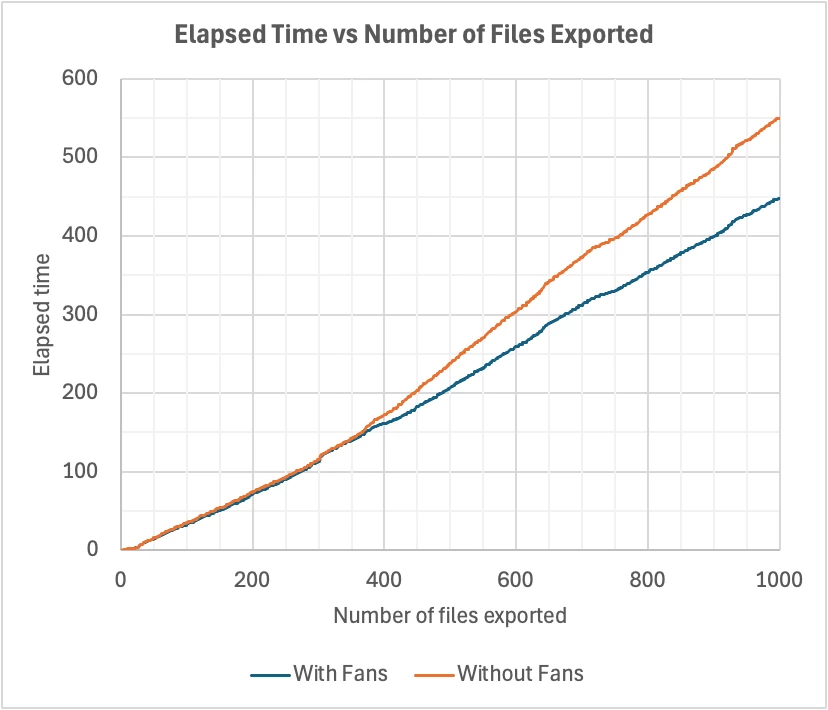
(See the attached spreadsheet.)
After 364 files, the Mac throttled back on the GPU and performance cores. (Maybe the GPU was throttled and the performance cores were limited by that; or maybe the performance cores were throttled, and the GPU limited by that; or maybe both were throttled.)
Overall, keeping the fans on increased the rate of export by 23%. But just comparing the time when the GPU and cores were throttled (after the first 364 files), the rate of export was 41% faster with the fans on.
* * *
I don't think this is under the direct control of LR (or any typical app). It's the operating system and firmware that decide when to throttle.
* * *
I didn't think there were thermal issues with the Apple Silicon Macbook Pros. The last years of the Intel Macbook Pros were notorious for their bad thermal engineering, with throttled CPUs due to overheating and fans that got easily clogged.
It may be that the Apple designers have deliberately chosen to run the fans less aggressively in order to keep the Macbooks quieter. Many people really don't like to hear the fans running (like my wife).
Hey, I did another test while actually measuring the time difference and it's crazy!
650 pics export with the standard mac os fan control: 13 minutes.
The same run but with manual fan control: 7:30 minutes!
So almost twice as fast!!
Something can't be right here? I think the fans used to spin up by themselves eventually but now, not at all! Only during GPU only tasks..



 AdChoices