harald andren27032443
Known Participant
January 4, 2020
Answered

why dosent my edited photos look the same on my phone as they did on my computer

  • January 4, 2020
  • 7 replies
  • 3853 views

so when i am done editing my photo it looks good. i exsport it to onedrive and it still looks good. but if i go into ondrive on my phone then it looks different. like i have pushed every color to max. is ther anyway to fix this?


This topic has been closed for replies.
Correct answer Per Berntsen

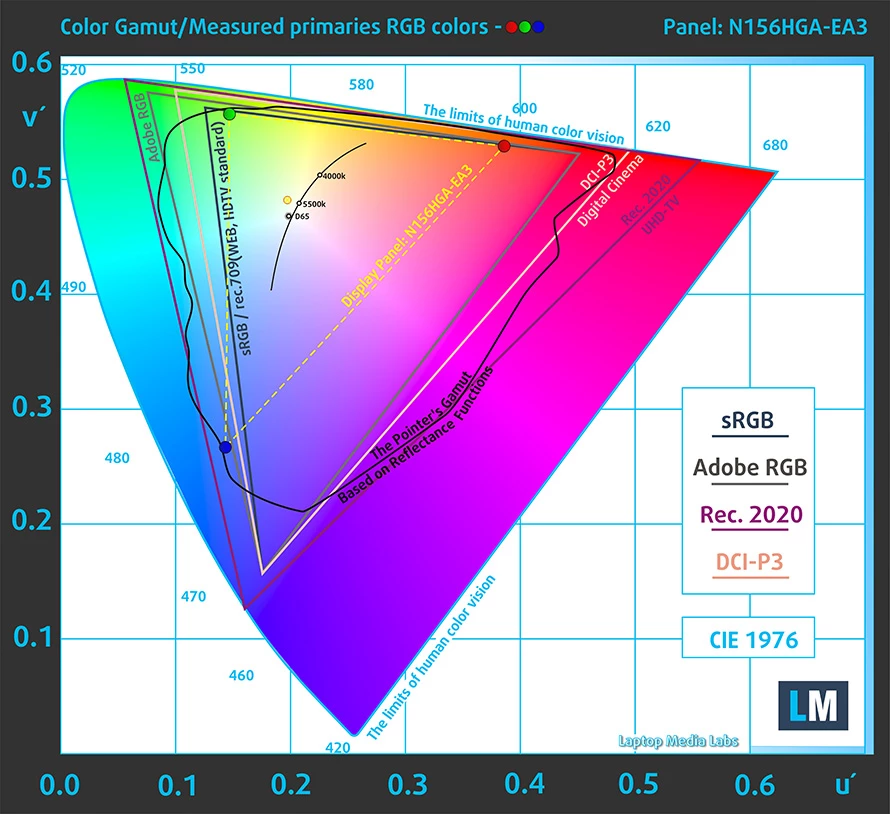
According to one laptop test site, your laptop can only display 54% of the sRGB gamut. (other sites claim as much as 65%)

Here's a color gamut diagram from https://laptopmedia.com/review/acer-aspire-3-a315-55g-review-a-non-obnoxious-notebook-for-the-average-joe/

As you can see, saturated reds and to some extent blues are outside the screen's gamut, but it does a bit better with greens.

I suspect that this is the cause of the problem – your screen cannot display saturated colors, whereas your phone can, and to make matters worse, it's not color managed. 

I'd say that this screen is not suited for image editing – you need a screen that can display a significantly higher percentage of the sRGB gamut, like 90 - 100%, especially if your work contains saturated colors.



7 replies

D Fosse
Community Expert
Community Expert
January 5, 2020

Yes, I've noticed quite a few of these laptop displays with a very narrow gamut, considerably smaller than sRGB. Presumably these are fitted in laptops mainly intended for the office market, where this isn't a concern. It's come up several times here before.

josephlavine
Community Expert
Community Expert
January 5, 2020

I see you've already been given some great information. As others have mentioned, this sounds like a color management issue, and unfortunately, not all devices can be color managed and even then not to the same standard. Phones have gotten much better, but still not great. 

Per Berntsen
Community Expert
Per BerntsenCommunity ExpertCorrect answer
Community Expert
January 5, 2020

According to one laptop test site, your laptop can only display 54% of the sRGB gamut. (other sites claim as much as 65%)

Here's a color gamut diagram from https://laptopmedia.com/review/acer-aspire-3-a315-55g-review-a-non-obnoxious-notebook-for-the-average-joe/

As you can see, saturated reds and to some extent blues are outside the screen's gamut, but it does a bit better with greens.

I suspect that this is the cause of the problem – your screen cannot display saturated colors, whereas your phone can, and to make matters worse, it's not color managed. 

I'd say that this screen is not suited for image editing – you need a screen that can display a significantly higher percentage of the sRGB gamut, like 90 - 100%, especially if your work contains saturated colors.



harald andren27032443
Known Participant
January 6, 2020

what computer do you recommend?

Per Berntsen
Community Expert
Community Expert
January 6, 2020

I'm not really the right person to ask, since I have limited experience with laptops.

But I did buy a laptop a few moths ago to to be able to check my work, and for storage when travelling.

It's got a quite decent screen with 98% sRGB, and I could use it for editing if in a pinch.

But even with calibration, it's impossible to make it display like my Eizo desktop monitor, which I know displays correctly.

The laptop is a Huawei Matebook X Pro, which cost the equivalent of $2,000, and it runs Lightroom surprisingly well.


Per Berntsen
Community Expert
Community Expert
January 4, 2020

Is it a laptop? If so, what model?

harald andren27032443
Known Participant
January 5, 2020

ACER ASPIRE 3

Per Berntsen
Community Expert
Community Expert
January 4, 2020

You look at the specs for your monitor.

Color gamut is usually listed as a percentage of either sRGB or Adobe RGB.

A standard gamut monitor is usually close to sRGB, and a wide gamut monitor is usually close to Adobe RGB.

It can also be anywhere in between.

What is the make and model of your monitor?

harald andren27032443
Known Participant
January 4, 2020

i just have an acer computer. dont think i can se the name of my screen. sorry i am no exspert


Per Berntsen
Community Expert
Community Expert
January 4, 2020

One possible cause is that your computer has a defective or inaccurate monitor profile, causing images to appear under saturated in color managed applications. This could lead you to increase the saturation in Lightroom, and the image will in reality be more saturated than you think.


To troubleshoot the monitor profile, try setting it to sRGB. (use Adobe RGB if you have a wide gamut monitor)

Restart Lightroom after changing the profile.

If this fixes the issue, it is recommended that you calibrate the monitor with a hardware calibrator, which will also create and install a custom monitor profile that accurately describes your monitor.

sRGB may be close enough for most people, but for accurate color, use a calibrator.

See https://www.lightroomqueen.com/how-do-i-change-my-monitor-profile-to-check-whether-its-corrupted/


harald andren27032443
Known Participant
January 4, 2020

it didnt help setting it to sRGB. but this might be a stupid question. but how do i know if my pc has a wide gamut monitor

Per Berntsen
Community Expert
Community Expert
January 4, 2020

Lightroom and most web browsers are color managed, and use the monitor profile to display correct colors.

Phones are not color managed, and can not be expected to display correct colors. They also typically display over saturated.

If your phone has different color themes or settings, you can try a different one to see if it's possible to get a closer match.

harald andren27032443
Known Participant
January 4, 2020

but dont phones use thr color space sRGB

D Fosse
Community Expert
Community Expert
January 4, 2020

If it's not color managed, it doesn't even know what a color space is.
