


Participating Frequently
January 8, 2019
Answered

Windows 10 changed file names when moving files

  • January 8, 2019
  • 4 replies
  • 14059 views

I was consolidating files onto one hard drive and didn't realize Windows would add a date stamp into the file name, so file names went from Image 001 to image 001 (2016_04_18 16_58_52 UTC).CR2, also have the XMP from Lightroom 5.7 and jpeg. As a result, Lightroom can not find the files. I can point to each one individually, or go back into Windows and change the file name back, but I have 13,000 images which means about 40,000 files. If I re import all of the files with the messed up names, I will lose all of my adjustments. Help!

I foolishly thought by keeping the same drive and folder names, it would all go well.
This topic has been closed for replies.
Correct answer Todd Shaner

larryscarstairs  wrote

I was consolidating files onto one hard drive and didn't realize Windows would add a date stamp into the file name, so file names went from Image 001 to image 001 (2016_04_18 16_58_52 UTC).CR2.

It sounds like you have Windows 10 file history backup running. See this for more details:

How to Use Windows’ File History to Back Up Your Data

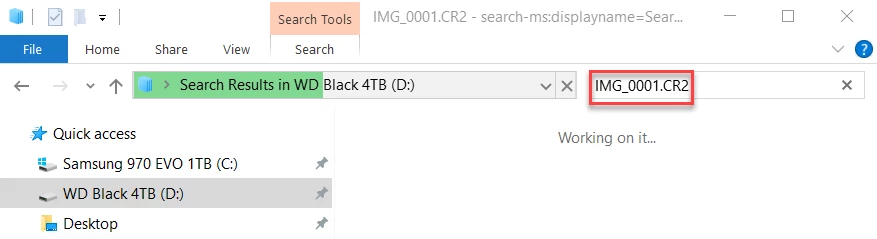
I've never used it, but the original unrenamed files should also be on the drive you moved them to. Try doing a top-level Windows Explorer search on each of the drives you have installed (C:\, D:\, etc.) for a known original file name without the time stamp.

4 replies

New Participant
October 17, 2021

I have exactly the same issue after using the Backup facility in Windows 10. All my image files (thousands) have had their filenames changed to include a UTC timestamp, just as you described.


Did you manage to resolve your issue eventually (hopefully without having to write computer script) ?

Todd Shaner
Todd ShanerCorrect answer
Brainiac
January 9, 2019

larryscarstairs  wrote

I was consolidating files onto one hard drive and didn't realize Windows would add a date stamp into the file name, so file names went from Image 001 to image 001 (2016_04_18 16_58_52 UTC).CR2.

It sounds like you have Windows 10 file history backup running. See this for more details:

How to Use Windows’ File History to Back Up Your Data

I've never used it, but the original unrenamed files should also be on the drive you moved them to. Try doing a top-level Windows Explorer search on each of the drives you have installed (C:\, D:\, etc.) for a known original file name without the time stamp.

Just Shoot Me
Brainiac
January 9, 2019

Thanks Todd. I think you nailed it.

See this post over at Super User.

remove windows file history timestamps in file name - Super User

It shows the same UTC time stamp with parentheses.

This is clearly some type of User Error. That the OP has this feature turned on and Copied the history backups and or File History created second copies with the time stamp.

Todd Shaner
Brainiac
January 9, 2019

https://forums.adobe.com/people/Just+Shoot+Me  wrote

remove windows file history timestamps in file name - Super User

It shows the same UTC time stamp with parentheses.

This is clearly some type of User Error. That the OP has this feature turned on and Copied the history backups and or File History created second copies with the time stamp.

Unfortunately the OP also said, "I did check files to make sure they imported ok before deleting the originals but didnt realize the significance of the time stamp until it was too late."

Hopefully the actual original files without timestamps imported into LR were not deleted. A search as I outlined should find them if still present on one of the drives.

Participating Frequently
January 9, 2019

I had multiple copies of folders and files, so I decided to clean them up using explorer rather than in lightroom, which I realize now I should have done. So i clicked and dragged folders and files onto a new hard drive. Thats all. Nothing fancy - stuff I have done with excel, word and other files over the years.

After I moved a folder, I checked to see if the right number of files were present and then I loaded a photo or so to make sure they worked. I noticed the addition to the file name but failed to realize the impact it would have.

But it is done now so now I need to deal with it and that is what I am trying to figure it out

Just Shoot Me
Brainiac
January 9, 2019

Sorry but I have no idea what happened. I normally don't run Win 10 but do have it installed on a drive. I just started from that drive and copied 200 Fuji RAF files from there normal location to another drive. No Renaming happened.

Best of luck.

Inspiring
January 9, 2019

Files are only usually renamed by the OS if there is already a file of the same name in that folder. Then it adds a -2 (or similar) to the end of the second filename.

Bob Frost

Just Shoot Me
Brainiac
January 9, 2019

I have never seen Windows add anything to a file name when being moved, cut and pasted, or copied from one folder or drive to another.

Something else is going on with your computer.

Are you using Windows/File Explorer or some other utility.

It looks like you are moving and Renaming and whatever system you are using is doing that.

Participating Frequently
January 9, 2019

I was using Windows File Explorer. I wasnt aware of any renaming at the time of moving them. I did check files to make sure they imported ok before deleting the originals but didnt realize the significance of the time stamp until it was too late

Just Shoot Me
Brainiac
January 9, 2019

larryscarstairs  wrote

I was using Windows File Explorer. I wasnt aware of any renaming at the time of moving them. I did check files to make sure they imported ok before deleting the originals but didnt realize the significance of the time stamp until it was too late

Windows Does Not rename files when copied or moved. There is NO option that I know of in Windows file manager, Explorer, to Rename a file at the same time you are moving or copying it.

Not only don't I know of any option to rename a file while copying or moving it neither does Google.

I did a Google search for "Rename image files while moving by adding the Shot Date" and got nothing. Got plenty of Rename files, Select the first, Select the last holding the shift key then right click and select Rename. But nothing else and no option to add the Shot date to the name.

Please state what exactly you did in Windows File Explorer.

Also I don't understand your statement"I did check the files to make sure they imported ok before deleting the originals". Weren't all these files already in the LR catalog?