


Participant
April 10, 2020
Question

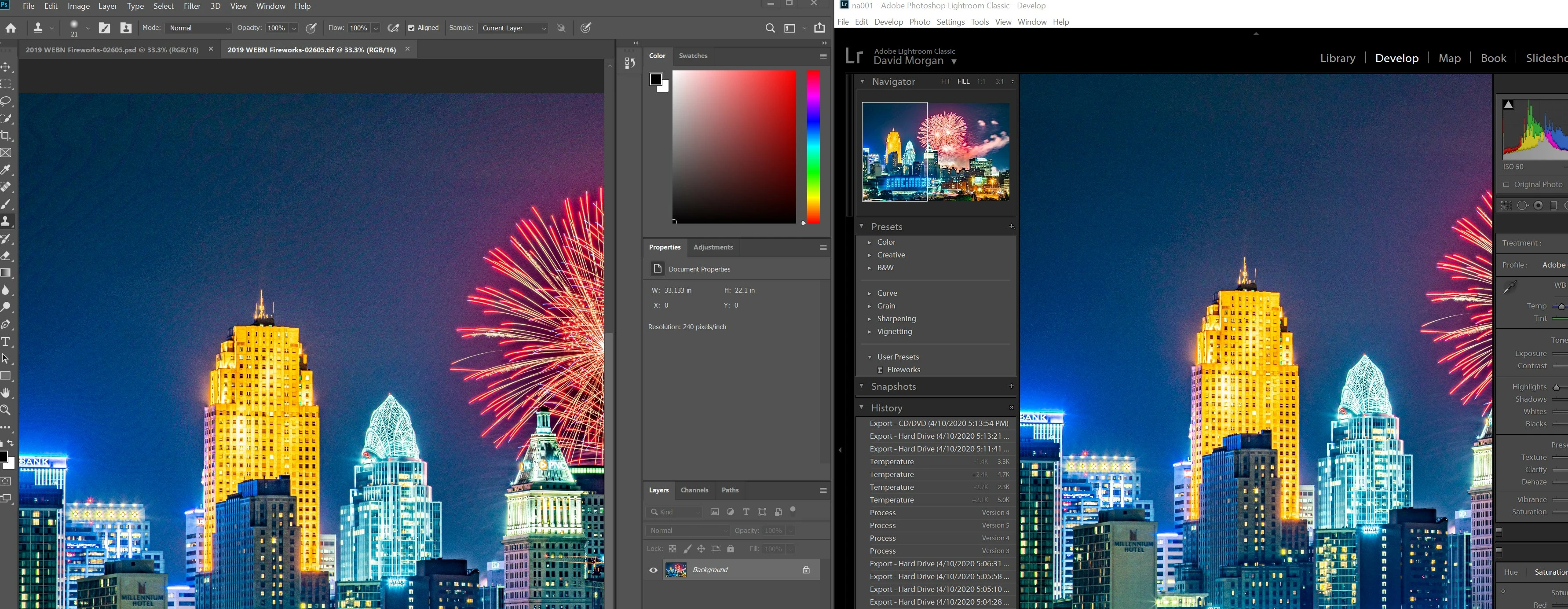
Lightroom export weird lines. Only in exported Image.

  • April 10, 2020
  • 5 replies
  • 3410 views

Lightroom export weird lines. Only in exported Image.   Any ideas what would cause this on only the exported image?   I does not show up when viewing in lightroom.   I think it might be something to do with the display driver.   But have no idea.   Thanks
 

This topic has been closed for replies.

5 replies

GoldingD
Legend
April 11, 2020

In reality, was the sky blue, was it not black? To increase exposure or lets say brightness in components if the photo try local adjustments via adjustment brushes and turn range mask on and avoid including the sky behind the city, behind the fireworks. The mask need no be neat, by turning range on you can disclude the sky.


Todd Shaner
Legend
April 11, 2020

"Its not that, It happens for 16bit Tiffs also...."

Then the banding is happening in the display path, which is only 8 bits. As WobertC   mentions the settings you've applied are pretty extreme, especially +5 Exposure. Try backing off the controls especially Dehaze and make sure your Export Color Space is set to sRGB to minmize banding.

Rob_Cullen
Community Expert
Community Expert
April 11, 2020

I will have another 'stab' at an answer-

The development has really 'overcooked' the image! No wonder you see artifacts- even in the Lightroom Develop panel on the raw!


A 5 stop increase in Exposure. wow!

Shadows +100

Texture +63

Clarity +79

Dehaze +62

All will contribute to a breakdown of image details.

Reset and start again.

Regards. My System: Windows-11, Lightroom-Classic 15.0, Photoshop 27.0, ACR 18.0, Lightroom 9.0, Lr-iOS 10.4.0, Bridge 16.0 .
Rob_Cullen
Community Expert
Community Expert
April 10, 2020

I am inclined to suggest it is the artifact commonly called 'Banding' as a result of the JPG Bit depth reduction to 8bit with compression.

See- http://regex.info/blog/lightroom-goodies/jpeg-quality

I have seen suggested that introducing some 'Noise' (in Lr) to the blank sky areas can help overcome the banding.

Regards. My System: Windows-11, Lightroom-Classic 15.0, Photoshop 27.0, ACR 18.0, Lightroom 9.0, Lr-iOS 10.4.0, Bridge 16.0 .
Participant
April 11, 2020

Its not that, It happens for 16bit Tiffs also....

Legend
April 10, 2020

Show us two screen captures -- the image as seen in Lightroom, and the exported image with the wierd lines.

Participant
April 10, 2020