

philippew87725816
Participant
February 10, 2017
Answered

Lightroom: How to Change the interface font size of the menus

  • February 10, 2017
  • 2 replies
  • 11760 views

Hello,

my interface menu (font size) are so small that I cannot read the menus.

How can I change this?  I am on a MS surface PC.
    Correct answer John T Smith

    Adjusting font size for a high DPI display https://forums.adobe.com/thread/2171036 see reply #2

    -and https://forums.adobe.com/thread/2263440

    2 replies

    philippew87725816
    Participant
    March 2, 2017

    Hello Again John, Tanuj,

    I was wondering if buying the new version Creative Cloud All Apps would solve the problem?

    Philippe

    Participant
    February 5, 2025

    Does anyone know the answer to this? 


    The links above no longer work.

    johnrellis
    Legend
    February 7, 2025

    On Windows, to adjust the size of text in LR's menus in the main menu bar at the top and in some dialogs, go to Windows' Settings > System > Display and change Scale.


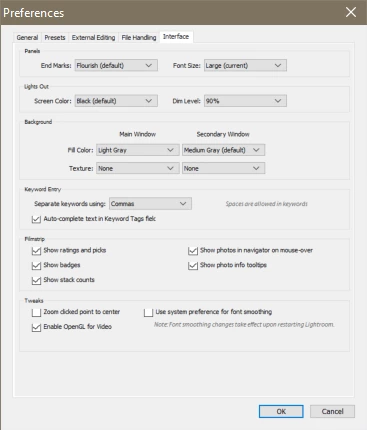
    To adjust the size of all other text in LR, go to LR's Preferences > Interface and change Font Size.


    * * *


    On Mac, Preferences > Interface > Font Size doesn't make much difference. Instead, go to Mac's System Settings > Displays and click Larger Text or More Space at the top.

    John T Smith
    Community Expert
    John T SmithCommunity ExpertCorrect answer
    Community Expert
    February 10, 2017

    Adjusting font size for a high DPI display https://forums.adobe.com/thread/2171036 see reply #2

    -and https://forums.adobe.com/thread/2263440

    philippew87725816
    Participant
    February 11, 2017

    Thank you for your help. 

    It is a complex task to do ... on all the Adobe products.  Hmmm.
