


karenkkk
New Participant
July 23, 2017
Answered

Reference View Option in Lightroom Disappeared

  • July 23, 2017
  • 3 replies
  • 5726 views

Hi, I subscribed to the Creative Cloud package in February this year. It's a one year subscription and therefore hasn't expired yet.

I had been using reference view all this while, but the option just suddenly vanished from Lightroom and I have been struggling over the past week trying to call it out again. Has anybody else experienced this problem? I would really appreciate if anyone has a solution to this frustrating problem.
This topic has been closed for replies.
Correct answer John Waller

karenkkk  wrote

This is the version I'm using : CC 2015 [1014445] / Version: 10.12 [5]

I think the version above refers to the operating system i.e. macOS Sierra 10.12.5

Mine says:

You appear to be running the original version of Lightroom CC 2015.0 [Build 1014445]. Reference View first appeared in CC 2015.8. That would explain why you're not seeing it.

Are you saying that you used to have the Reference View and now it's not available?

3 replies

New Participant
September 25, 2017

I have the same problem too. Does anyone know how to solve it?

johnrellis
Brainiac
September 26, 2017

By "same problem", do you mean that reference view has disappeared from your LR?   Please Help > System Info and report the precise version of LR you're running.

New Participant
September 26, 2017

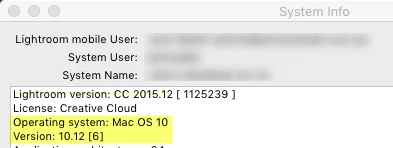
Lightroom version:  CC 2015 [1014445]

License: Creative Cloud

Operating system: Mac OS 10

Version: 10.12 [6]

this happens only on my macbook air. no iMac is normal. disappear the R / A box

Inspiring
July 25, 2017

I thought I was going crazy but on one of my machines as I discovered today, Lightroom reverted to the 2015.0 version (the splash screen shows the trees and the version is [1014445] as shown above) after the last 2015.12 update done automatically through the CC app. On my other machine it installed the .12 update correctly. Never seen anything like it. This machine has had every version since 2015.0. There must be a bug in the installer.

karenkkk
karenkkkAuthor
New Participant
July 25, 2017

Did you manage to install the latest version back again then?

Inspiring
July 25, 2017

No still trying. I removed it completely and upon installing from the creative cloud app again, it installs the .0 version. Using the manual .12 updater does not change the version. I managed to get to 2015.10.1 now by running the manual updater from Download Photoshop Lightroom​ but running the 2015.12 updater from there just throws up an error about application manager already running. Creative cloud app thinks there are no updates. Might have to completely nuke creative cloud from this machine.

Update: looks like I managed to get this machine to 2015.12 now by killing all Adobe software and running the manual updater. However now Lightroom reverted back to the 2015.0 version! This is quite amazing. Seems like I can only get to 2015.10.1 and no further.

Rob_Cullen
Brainiac
July 24, 2017

Do you NOT see the Reference icon [R/A] under the develop window?

What version number of Lightroom? Go- Help>System Info

Regards. My System: Windows-11, Lightroom-Classic 15.0, Photoshop 27.0, ACR 18.0, Lightroom 9.0, Lr-iOS 10.4.0, Bridge 16.0 .
karenkkk
karenkkkAuthor
New Participant
July 25, 2017

I used to see it under the develop window but it disappeared recently. Also when i right click, there is no reference photo option.


This is the version I'm using : CC 2015 [1014445] / Version: 10.12 [5]

John Waller
John WallerCorrect answer
Brainiac
July 25, 2017

karenkkk  wrote

This is the version I'm using : CC 2015 [1014445] / Version: 10.12 [5]

I think the version above refers to the operating system i.e. macOS Sierra 10.12.5

Mine says:

You appear to be running the original version of Lightroom CC 2015.0 [Build 1014445]. Reference View first appeared in CC 2015.8. That would explain why you're not seeing it.

Are you saying that you used to have the Reference View and now it's not available?