


OwleyMedic
Known Participant
January 9, 2025

P: Auxiliary Folder automatically appears

  • January 9, 2025
  • 13 replies
  • 3325 views

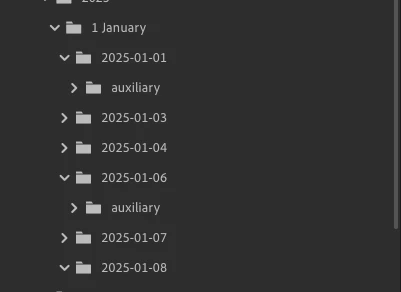
I an getting a folder called "auxiliary" showing up when I export a file(s) to a seperate folder. Nothing appears to be saved to this folder, but it appears the first time I export a file. If I delete the folder it does not reappear if I expoet more files.


Ian Winter
 

13 replies

Rikk Flohr_Photography
Community Manager
Community Manager
April 24, 2025

Greetings all, 


A new update for Adobe Photography Products has been released.  The April updates contain an update for this issue. 

If you do not see the update in your Creative Cloud Application, you can refresh it by hitting [Ctrl/Cmd]+[Alt/Opt]+[ R ].

Note: It may take up to 24 hours for your update to be available in your Creative Cloud app.


Thank you for being so patient.

Rikk Flohr: Adobe Photography Org
Participant
April 7, 2025

+1 on the bug, empty auxiliary folder in my original photo folder. Latest version of Lightroom, I just edited my photos and used the GenAI feature to remove content, then exported several edited photos to my local directory. Seems pretty normal process to me. BTW I am using Win11 latest version, AMD CPU + Intel B580 GPU.

Participant
March 21, 2025

Lightroom Build 20250201-0700-1b12095
OSX Build 15.3.2

When exporting from a updated version of Lightroom on an updated Mac from a fully updated NAS a folder is sometimes and often created titled Auxillary.
This folder contains no data during export or after export.
When looking for hidden files none exist.
When looking at file size it is of 0kb.

I'm not the first to report this, https://community.adobe.com/t5/lightroom-ecosystem-cloud-based-bugs/p-auxiliary-folder-automatically-appears/idc-p/15089895

OwleyMedic
Known Participant
February 14, 2025

Any updates on a resoulition to this issue?

IW

clm801s
Participant
January 24, 2025

having the same issue and now I have three empty auxiliary files that I can;t get rid of. This only has happed in the last cople weeks. Please advise.

Community Manager
January 27, 2025

Hey @clm801s! Our team is currently investigating this bug. If you could provide any steps to reproduce the issue or share a video, it would be super helpful. Keep an eye on this thread for updates.

Thanks for your patience! Alek

*(If you mention me with an @, like @Aleke, I’ll get a notification and can respond faster.)*
clm801s
Participant
January 29, 2025
The only solution I have found is deleting the folder via Finder. S new auxiliary folder appears every time I create a new subfolder. This also happened when I was using LRC. Nia if happens in LR.

Get Outlook for iOS<>
OwleyMedic
Known Participant
January 23, 2025

You should have access now


IW

OwleyMedic
Known Participant
January 23, 2025
OwleyMedic
Known Participant
January 23, 2025

I just did ity adain and I noticed the folder is created when I first click export before change file name or chose a location. And it did it a second time after I deleted the one created in the video. Hope that helps.

Community Manager
January 23, 2025

Hi @OwleyMedic,

It seems like the video isn't playing on my end—it's just showing as a still image. Could you please try re-uploading it? Thanks a lot!

Alek

*(If you mention me with an @, like @Aleke, I’ll get a notification and can respond faster.)*
OwleyMedic
Known Participant
January 23, 2025
IMG_8802.MOV
<>
OwleyMedic
Known Participant
January 23, 2025

I was finnaly able to reproduse it. Tried a few times last night and it wouldn't do it but this morning I did. see attached video

Rikk Flohr_Photography
Community Manager
Community Manager
January 22, 2025

Updating Status

Rikk Flohr: Adobe Photography Org