



clairvoyant0101
Participating Frequently
March 3, 2022

P: (Win) Lr Export Bad argument #1 to stringByAppendingPathComponent (string expected, got nil)

  • March 3, 2022
  • 12 replies
  • 9303 views

Hello,

Issue:

I have a user experiencing an issue while trying to export photos using Lightroom. Not Lightroom Classic.

Lightroom Classic works as expected. 

I reinstalled Lightroom fresh, so it should be the latest version of the application.

Screenshot:
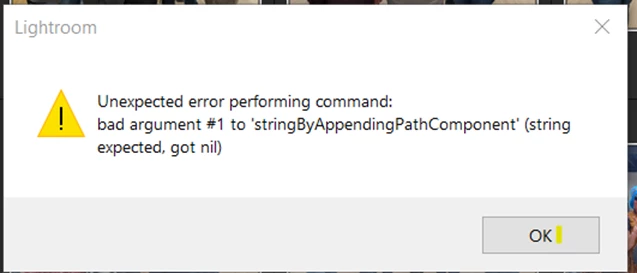


The user previously used the application on their home computer, but transitioned to their work computer and receives this error while attempting to export photos. I wonder if it has to do with where the application is trying to export files, but I have no idea how to change that. 


Any further information, I can provide. Any help is appreciated.

Thanks!


{Thread title modified by moderator}

12 replies

Rikk Flohr_Photography
Community Manager
Community Manager
February 13, 2025

Thank you for confirming!

Rikk Flohr: Adobe Photography Org
Participating Frequently
February 13, 2025

It does work. Everything seems to be OK since the update. Thanks!

Rikk Flohr_Photography
Community Manager
Community Manager
February 13, 2025

Greetings all, 


A new update for Adobe Photography Products has been released.  The February updates contain an update for this issue. 

If you do not see the update in your Creative Cloud Application, you can refresh it by hitting [Ctrl/Cmd]+[Alt/Opt]+[ R ].

Note: It may take up to 24 hours for your update to be available in your Creative Cloud app.


Thank you for being so patient.

Rikk Flohr: Adobe Photography Org
New Participant
December 13, 2024

hi i got the same problem i try everything but nothing is working. i can't export pictures on my computer  on my phone its fine everything is working but on my computer not i try everything

Sameer K
Community Manager
Community Manager
December 10, 2024

Setting status to investigating.

Thanks for the input! 

Sameer K

Participating Frequently
December 3, 2024

Bonjour,

Je ne parviens plus à exporter mes photos. Lorsque j'en sélectionne une (ou plusieurs) et que je clique sur la fleche de partage ou sur l'option Fichier > Exporter, ou sur Maj + E, rien ne se passe... aucune fenête ni message n'apparaît. 

J'ai désinstallé puis réinstallé, LR, pas mieux.

Connaissez-vous une solution ? 

Merci !

Sameer K
Community Manager
Community Manager
December 3, 2024

Hey, @lvd0v. Welcome to the Lightroom Community. I'll need more info to help you figure this out.


What is the image format of the original files? Does this happen with all the images? Before going further, you must ensure you have all the data backed up locally or on the cloud.


You can log on to Lightroom Web (https://adobe.ly/3LUKpiM) to check and confirm everything is synced. You can use Lightroom Web to export your images as a temporary workaround.


Thanks!
Sameer K

(Type '@' and type my name to mention me when you reply)

Participating Frequently
December 4, 2024

Thanks @Sameer K ! My pictures are in RAW format. And yes, it occures whith all the images. 

I feel like I have backups scattered all over locally, taking up space. In the preferences, I see a message indicating that the disk is full. That's probably where the problem comes from. I also have an error message:

New Participant
September 17, 2024

Mam taki problem przy eksportowaniu zdjęć 

Sameer K
Community Manager
Community Manager
September 18, 2024

Hey, @Sviatlana_Daruzhynska3255. Welcome to the Lightroom Community. I'll need more info to help you figure this out.


What is the image format of the original files? Does this happen with all the images? Before going further, you must ensure you have all the data backed up locally or on the cloud.


You can log on to Lightroom Web (https://adobe.ly/3LUKpiM) to check and confirm everything is synced.


Check the registry entries in the following location (might require IT authorization as this might be a work machine):

  • Press Windows + R > type in 'Regedit' and press OK to open Registry Editor.
  • Navigate to the following location in Registry Editor: HKEY_CURRENT_USER\SOFTWARE\Microsoft\Windows\CurrentVersion\Explorer\User Shell Folders

Please share a screenshot of this window.


Thanks!
Sameer K

(Use '@mention' to tag me when you reply)

New Participant
August 20, 2024

Unexpected error performing command: bad argument #1 to 'stringByAppendingPathComponent' (string expected, got nil)

New Participant
June 8, 2024

Recently, I discovered that my export does not work anymore.


Whenever I try to export any pictures (edited and non-edited) the export screen does not show up. Whenever I right-click to export as JPG (Large) an error message shows up: "Bad Argument #1 ... etc"

I uninstalled Lightroom and deleted any files related to Lightroom using REVO Uninstaller. Uninstalling Adobe Cloud and using a clean install did nothing. The export function does not work as intended anymore, what to do now?

Sameer K
Community Manager
Community Manager
June 21, 2024

Hey, @Joel William29771817x4ix. Welcome to the Lightroom Community. I'll need more info to help you figure this out.


What exact version of Lightroom and the operating system are you working on? Is this a personal or work (IT-managed) machine?


Has this started after recent updates to the OS? Is Microsoft OneDrive backup enabled on this machine? 


Please refer to this thread where I've detailed the steps you can take to potentially identify the cause & fix the issue yourself: https://adobe.ly/4ctFNLJ


Let me know if this helps. Thanks!
Sameer K

New Participant
May 11, 2022

I was getting the same error message. I think I found the problem. Initially I tried to save in smaller batches until I found one problematic image marked as DNG . All ARW (sony made) files would export successfully except this DNG file. The moment I excluded the DNG file from export, all worked fine.