Participant
November 14, 2023
Answered

Add the ability to export Lightroom file names to a text list.

  • November 14, 2023
  • 2 replies
  • 734 views

Does LIghtroom have a feature that allows you to export files names into a text list?  This would be tremendously useful for copyright registrations.  Sems like an easy feature to add.
This topic has been closed for replies.
Correct answer Rob_Cullen

No. A feature to export a text list is not available.  Best work-around I can suggest (there might be others) is to-

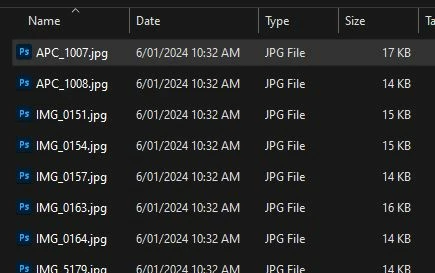
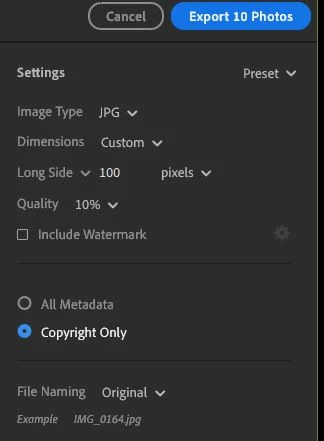
Export the photos as very small JPG thumbnails and create your list from the exported files. Delete the JPG files later.


 My Example-  Lightroom-Desktop v7.1.2 on Windows-PC. Exported files to temporary folder and then used a small PC app (Directory List and Print) that can create Word Docs, Excel Lists, Print to PDF.


2 replies

Rob_Cullen
Community Expert
Rob_CullenCommunity ExpertCorrect answer
Community Expert
January 6, 2024

No. A feature to export a text list is not available.  Best work-around I can suggest (there might be others) is to-

Export the photos as very small JPG thumbnails and create your list from the exported files. Delete the JPG files later.


 My Example-  Lightroom-Desktop v7.1.2 on Windows-PC. Exported files to temporary folder and then used a small PC app (Directory List and Print) that can create Word Docs, Excel Lists, Print to PDF.


Regards. My System: Windows-11, Lightroom-Classic 15.0, Photoshop 27.0, ACR 18.0, Lightroom 9.0, Lr-iOS 10.4.0, Bridge 16.0 .
Participant
January 9, 2024

Thank you very much, it helped!

May I ask you one more a bit related question about Lightroom desktop (7.1.2)?

Is it possible to export keyword list of, for instance, an album and to see how many of different of them occured there. 

(once I found strange solution - to select group of files, to press K for keywords list and then to have a screenshot for the list - and then to use some service to make doc out of the screenshot with the list (jpg to doc) (but the Lightroom doesnot show how many of each keyword in the album). I think this was very strange solution.

Rob_Cullen
Community Expert
Community Expert
January 9, 2024

I don't have an answer for this question.

My only thought (for my 'Export' suggestion above) is a paid Pro Licence for the app 'Directory List & Print'  which would allow listing keywords in an excel spreadsheet (easily summed).

Your problem involves 'downloading' files from the Cloud to extract exif metadata (Not available in Lightroom). Finding an app to view the metadata is the next step.

Adobe Bridge will show keywords of the files you Export from Lr, but not a sum for each KW. Bridge will [find] all images with one specific KW for a visual indication of files with that specific KW, but it is a manual process to [Find] each KW.


Regards. My System: Windows-11, Lightroom-Classic 15.0, Photoshop 27.0, ACR 18.0, Lightroom 9.0, Lr-iOS 10.4.0, Bridge 16.0 .
jane-e
Community Expert
Community Expert
November 15, 2023

@jedbmaggie 


I've moved your post from Creative Cloud Desktop to Lightroom for you.


Jane

Participant
January 5, 2024

Hi. Could you tell - is the feature of exporting files names list avaiable or still not?