

Answered
Changing crop overlay in LR Mobile
How do I change the crop overlay in Lightroom Mobile iOS from rule of thirds to golden rule?
Thanks in advance for your help!

How do I change the crop overlay in Lightroom Mobile iOS from rule of thirds to golden rule?
Thanks in advance for your help!
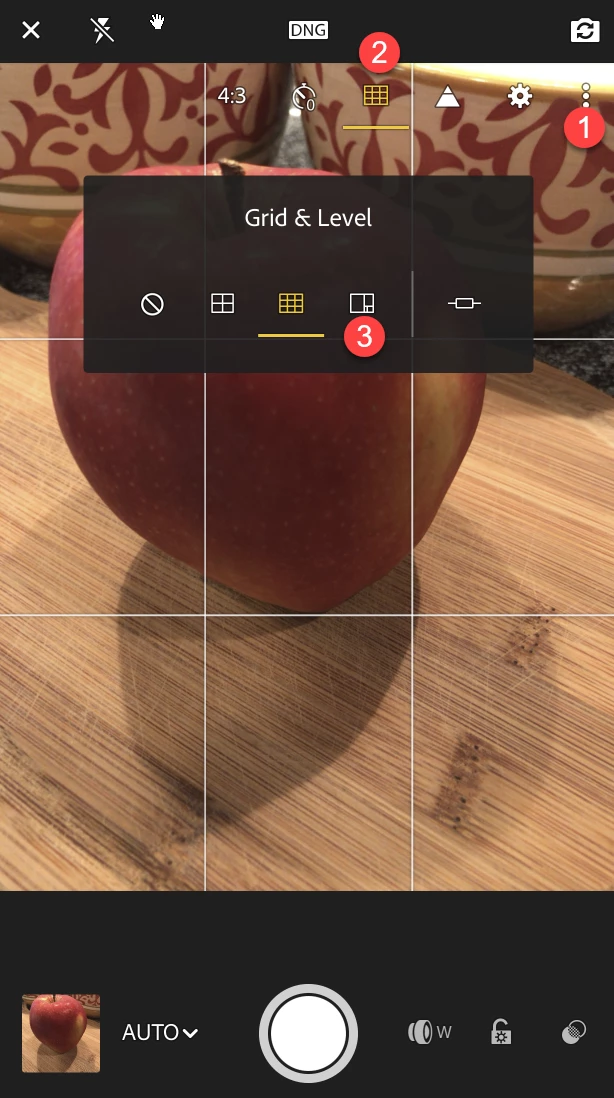
In the camera view of the Lightroom Mobile App, you can do the following:
1. Tap the three dots in the upper right corner
2. Tap the Grid icon
3. Choose None, Halves, Thirds, Golden, and toggle on and off the level.
For more info: Get started with Lightroom for mobile app on iOS (this link will take you directly to the section on composing shots).
Mike
Already have an account? Login
Enter your E-mail address. We'll send you an e-mail with instructions to reset your password.
 AdChoices