


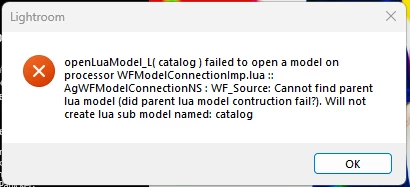
Error in startup of Lightroom "failed to open a model (...) Cannot find parent lua model"
Hi,
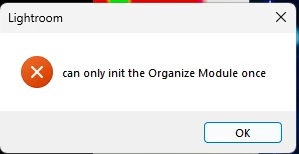
since couple of months I have an error while starting the cloud-based Lightroom. As I'm usually only using Lightroom Classic, I didn't care about the problem. But I'd like to use now the Clod-based Lightroom. Please find below the screenshots of the error messages and the system information.
After the startup Lightroom looks completely crippled, all menus only have place holders for menu texts. I already reinstalled it and deleted the two folders
C:\Users\...\AppData\Roaming\Adobe\Lightroom CC
C:\Users\...\AppData\Local\Adobe\Lightroom CC\Data
Still nothing changes. Any ideas are appreciated.
Thanks!
Lightroom-Version: 8.0 x64 [ 20241003-1027-def78b5 ] (Oct 3 2024)
NGL-Version: 1.39.0.9
WF-Version: 7.0 f8231de
VF-Version: 1.0.150
HIL-Version: 40501
CAI-Version: adobe_c2pa/0.9.3 c2pa-rs/0.31.0
PH-Version: 5.0
Betriebssystem: Windows 11
Betriebssystemversion: Windows 11 Home (2009)
Anwendungsarchitektur: x64
Systemarchitektur: x64
Computermodell: MEDION P67064 / Intel(R) Core(TM) i5-10400 CPU @ 2.90GHz
Anzahl logischer Prozessoren: 12
Prozessorgeschwindigkeit: 2,9 GHz
Integrierter Speicher: 65432,3 MB
Für Lightroom verfügbarer phys. Speicher: 65432,3 MB
Von Lightroom verwendeter phys. Speicher: 397,9 MB (0,6%)
Von Lightroom verwendeter virtueller Speicher: 341,0 MB
Cache-Speichergröße: 0,0 MB
Interne Camera Raw-Version: 17.0 [ 2043 ]
Maximale Anzahl Threads, die Camera Raw verwendet: 7
Camera Raw SIMD-Optimierung: SSE2,AVX,AVX2
Virtueller Speicher in Camera Raw: 0MB / 32716MB (0%)
Monitore/Anzeigegeräte: 1) 1920x1080, 2) 1920x1080
DPI-Einstellung des Systems: 96 DPI
Dunkelmodus: Nein
Desktop-Komposition aktiviert: Ja
Eingabetypen: Multitouch: Nein, integrierte Toucheingabe: Nein, integrierter Stift: Nein, externe Toucheingabe: Nein, externer Stift: Nein, Tastatur: Nein
Informationen zum Grafikprozessor: DirectX: NVIDIA GeForce GTX 1660 SUPER (31.0.15.2849) - 6 GB
Grafikprozessordaten: geladen: Ja, unterstützt: Ja, Computing: Ja, Init.: I4_GPU3, Hardware: success, Software: success, al: Ja, dl: Nein
Medienfähigkeit des Betriebssystems: true
Anwendungsordner: C:\Program Files\Adobe\Adobe Lightroom CC
Einstellungen-Ordner: C:\Users\...\AppData\Roaming\Adobe\Lightroom CC
Bibliotheksordner: C:\Users\...\AppData\Local\Adobe\Lightroom CC\Data
 AdChoices