

Inspiring
July 20, 2023
Answered

How to view an individual photo file

  • July 20, 2023
  • 2 replies
  • 600 views

I cannot for the life of me find where my photo files are on my computer... they are all accessible in the Lightroom app, where are they on my computer?

This topic has been closed for replies.
Correct answer anonymous_hedgehog

You could install the Lightroom App on the other computer and Sign-in to see photos, or-

Two suggestions-

1) The Adobe Downloader App

https://lightroom.adobe.com/lightroom-downloader

2) Export files from Lightroom as (Original + XMP)
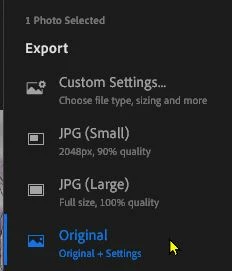


Thanks, the 2nd suggestion was correct.

2 replies

Rob_Cullen
Community Expert
Community Expert
July 20, 2023

If using the Lightroom (Cloud ecosystem) v6.4 then your files are stored in the Cloud!

COMPARE LIGHTROOM & LIGHTROOM-CLASSIC FEATURES


Regards. My System: Windows-11, Lightroom-Classic 15.0, Photoshop 27.0, ACR 18.0, Lightroom 9.0, Lr-iOS 10.4.0, Bridge 16.0 .
Inspiring
July 21, 2023

How do I get all of my photos out of the cloud and store them on my computer?

Ranjisha Sengupta
Legend
July 20, 2023

Hi @anonymous_hedgehog 


Thanks for reaching out. We're here to assist you. In Lightroom, the location of your photo files on your computer depends on how you've set up your Lightroom catalog and import settings. 

Are you using Lightroom Classic?

If yes, try these steps:

  1. Open Lightroom and select the Library module.
  2. Look for the "Folders" panel on the left-hand side in the Library module. If it's not visible, click the "Show" menu and select "Folders."
  3. In the "Folders" panel, you'll see a list of folders that contain your imported photos. Click on the arrow next to each folder to expand it and see the images within.

If you imported photos using the "Add" option, you won't see any physical folders in Lightroom's "Folders" panel. Instead, you'll see a list of folders representing the directories where your photos are located on your computer.

You'll see the folders you specified during the import process if you imported photos using the "Copy" or "Copy as DNG" option.

By locating the folders in the "Folders" panel of Lightroom, you can find the original location of your photo files on your computer. Remember that Lightroom's catalog system allows you to manage and organize your photos within the app while leaving the original files intact in their locations on your computer.


Let us know if it helps!


Best,

Ranjisha

Inspiring
July 21, 2023

How do I get all of my photos out of the cloud and store them on my computer so I can transfer them to another computer?

Rob_Cullen
Community Expert
Community Expert
July 21, 2023

You could install the Lightroom App on the other computer and Sign-in to see photos, or-

Two suggestions-

1) The Adobe Downloader App

https://lightroom.adobe.com/lightroom-downloader

2) Export files from Lightroom as (Original + XMP)


Regards. My System: Windows-11, Lightroom-Classic 15.0, Photoshop 27.0, ACR 18.0, Lightroom 9.0, Lr-iOS 10.4.0, Bridge 16.0 .