


New Participant
December 3, 2019
Question

Lightroom no resizing option on Export

  • December 3, 2019
  • 2 replies
  • 911 views

New Lightroom user here. I have Lightroom (1TB) which is Lightroom on desktop and mobile with other Creative Cloud services. Version 3.0

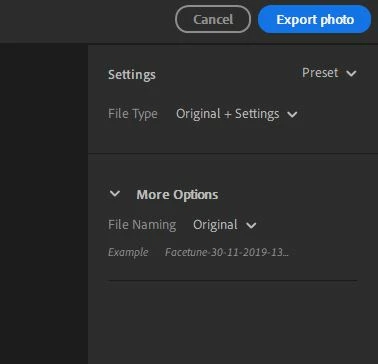
I need to resize a .jpeg image and found that you need to export the image to get the resizing option. I don't see a resizing option. Just Settings   File Type & File Naming. Attached a screenshot.

Resize only show up when exporting RAW images?

-Andrew
This topic has been closed for replies.

2 replies

JohanElzenga
Adobe Expert
December 3, 2019

You selected 'Original'. An original is an original. If you could resize it it would not be an original anymore.

-- Johan W. Elzenga
JP Hess
Inspiring
December 3, 2019

If I click on more options I get these choices, and one of them is to specify how many pixels on the long side.

Omega77Author
New Participant
December 3, 2019

Thanks Jim!

I selected Custom under Dimensions and Long Side showed up


Andrew