



stephen b
New Participant
December 7, 2017
Question

LR mobile upload stuck (pending)

  • December 7, 2017
  • 30 replies
  • 21660 views

Hello,

I have 281 Photos on my Iphone, in LR Mobile that will not finish uploading to Adobe CC. I successfully uploaded & downloaded 175 others (in the same catalog) onto my PC from my phone, but the other 281 have stopped uploading. It has said "Pending" for weeks now. I have updated (mobile & desktop), restarted, logged in & out to no avail. I can also see on my PC that 281 files are "dowloading" but nothing ever changes. I'm not sure if the problem is with the upload (mobile) or download (PC). Maybe there is a way to re-fresh, or cancel & restart the sync? I would like to get the rest of the photos from my phone onto my PC, someone please help!

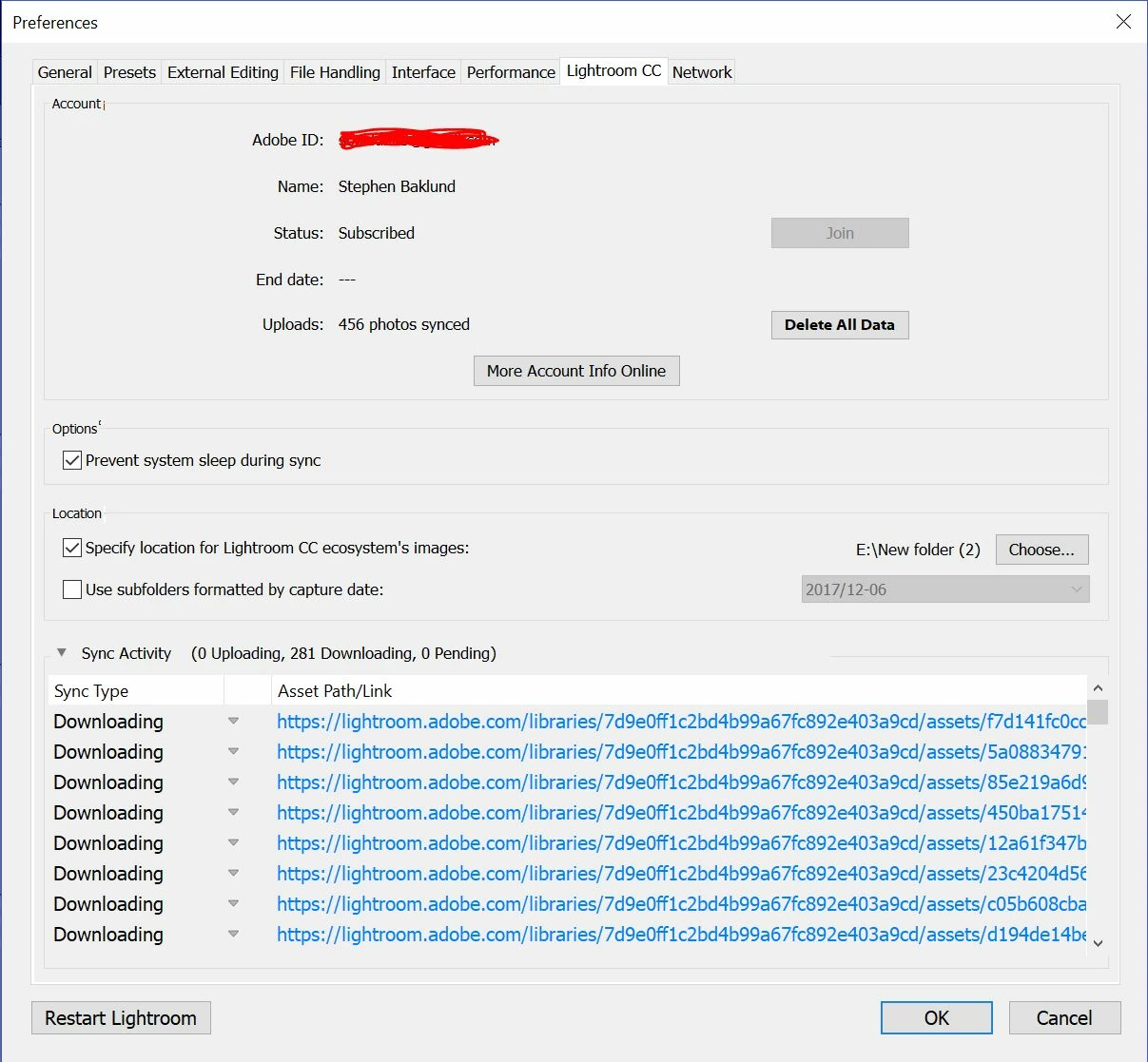
This topic has been closed for replies.

30 replies

djpalmis
Participating Frequently
December 31, 2018

I have this issue on my tablet: [Android][Sony a7 ii]The importing process stops after a while

I tried on my Samsung Galaxy S7 edge: it worked. I transferred about 190 RAW files on my mobile but now.. it doesn't upload them on cloud!  

It's an odyssey!  

djpalmis
Participating Frequently
January 1, 2019

It fixed itself out of the blue!

It took about 36 hours.. maybe it's something related to my wifi speed? So maybe it just do not show the uploading progress..

It was connected with no luck all night long and I have 2 megabits per seconds in upload ..

New Participant
January 2, 2019

Sure enough, the issue resolved itself as well for me!

Thank you for the update!

New Participant
December 23, 2018

Not sure if I should be happy or disappointed that others are having the same issue I have just started having. I have 600+ photo’s that are pending in Lightroom Mobile on my iPad Pro.  I have been going crazy trying multiple different things to solve this. Oddly, for some reason, every once in a while a photo will make it to upload. One major concern i have , and this is my fault. Because i didn’t notice that things were not uploading here is what i did.

-import via usb card reader to my iPad to a temp album that i use

-open Lightroom mobile and allow them to import into LR

-go and delete photo’s in my temp folder.

this was not a smart thing i imagine. especially if i cant get things to work... right?

Known Participant
November 14, 2018

Same issues here and It’s not the first time.

Seems I can sync files/images from IPad to IPhone and Mac, But not from IPhone to any other device.

Any suggestions please.

I have turned of and logged out from all devices, all software is up to date.

New Participant
August 26, 2018

S9 user with the same issue. 6 photos have been syncing for about 3 days now. It's stopped me from opening any galleries successfully and is honestly doing my head in. I was hoping to do some finishing touches on some work while interstate but I guess with no answer to the problem, that won't be happening. Can't wait for a fix.

New Participant
August 25, 2018

Huawei P10 got the same issue, cannot display any image and at the cloud icon always show loading spinner then I try to touch on that it show "upload pending" and it still show that message so far

New Participant
August 13, 2018

S9+, same issue...it gets stuck even when uploading 1 single photo. I pay for this app and i really need to use it. Tried reinstalling it, worked for a few minutes with 3 photos, and then got stuck when uploading a new one.

Please fix this asap!

nilsc87334845
New Participant
July 11, 2018

My problem has been solved. Apparently I had folders in my LR CC Mobile app that had pictures which were taken on an older phone. So when I switched phones and downloaded the app, logged in it showed all the same folders. Then I hit sync and the app tried to sync files which it couldn't find on my device and it got stuck. I went to lightroom.mobile.com and logged in, deleted the sync issue files, deleted the app and reinstalled it and... It works again! Hopefully this helps any of you guys.

nilsc87334845
New Participant
July 10, 2018

I actually didn't even need or want to sync. but there 8s no cancel button... So I can't even stop the sync.

Still can't use LR CC Mobile AT ALL right now.

Please help me fix this.

selondon
Community Expert
July 10, 2018

You should be able to Pause Sync

New Participant
July 11, 2018

The pause button is not available when LR has pending  files. Second funny thing is that the download of files is still working.

nilsc87334845
New Participant
July 9, 2018

Hey, same problem here.. I have almost 10.000 files in LR Mobile and clicked sync. now it says 130 pending since a week and can't open amy folders, don't see any pictures in the app and therefore can't edit anything.

New Participant
July 8, 2018

Same issue on Galxaxy S7 edge with Android 8. When will Adobe fix it? A paid cloud service makes only sense with properly working sync function.