LrM sync issue error - "Code: T20200121; Message: xmp develop sha256 mismatch"
Hi -
I have run into some unexpected LrM/LrD sync trouble after the recent updates, leading to the below error. I was making some edits on LrM (iPadOS) to Smart Previews synced up from LrC. Everything seemed to generally be going fine. Changes synced across as expected, though some images weren’t always properly changing albums in LrM when moved in LrC. At one point, I switched back to Edit in LrM for a couple of those images. I'd changed Edit settings on them a few minutes prior. I received a "Settings could not be loaded" error. "Error Code: T20200121; Message: xmp develop sha256 mismatch." Screenshot below. Issue was originally for 2, but now 3, images.
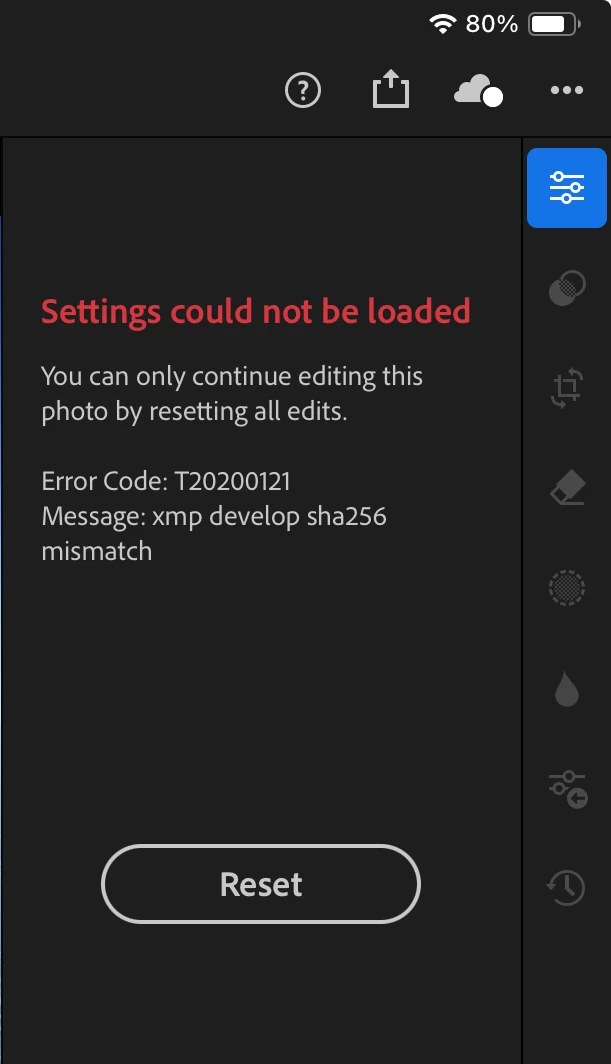
iPad LrM shows sync progress for 3 images, but is moving insanely slowly—after 3 hours it is at 98%, and has been there for maybe an hour. Internet connection is fine. Some other images and album/collection membership do currently sync fine between LrC, the cloud, and LrM—it’s not a totally broken connection.
I could try to wait to see if the iPad sync % someday hits 100% and fixes the issue there, but it seems more systemic. As noted, a third image joined the original two, while I was troubleshooting, and troublingly, there aren’t just issues with the iPad.
I’m also seeing the exact same album membership issues for the same problem images when I open/sync LrD (or LrM on an iPhone). I don’t yet see the Settings error on those platforms for the problem images at this point, but haven't tried to make any settings changes there. I haven't used LrD much/at all with these images. Given the same album membership issues are present despite that, I suspect I'd eventually run into the same problem.
Interestingly, LrW is matching/syncing with LrC completely as expected in terms of album/collection membership, develop/edit settings, and metadata. LrW is not throwing the Settings error in Edit for the problem images, or indicating any sync errors overall. LrC is not stuck on any sync and is not indicating any issues. The problem seems to be between whatever powers LrW ("the cloud?") and LrD/LrM on my devices.
Common denominators on the images: They're are all HEICs locally in LrC, but it’s a small enough sample size that I don’t know if it’s relevant. (I'm also working with DNGs in the same group of ~15.) They all also have some sort of AI usage/application. The first two have generative AI removals; the third one has AI object detection based masks (all AI-based masks/remvals were originally created in LrC).
I'm happy to interface directly with someone at Adobe with asset IDs and such if helpful to trace the problem/error. I'm extremely concerned the issue might continue to grow, especially given that it's not just the iPad acting abnormally.
Thanks.
----
System:
- I have my collection/library in LrC (v13.3) on Sonoma 14.5 on a 13" MBP M1 2020.
- I was editing smart previews synced into the cloud on LrM v9.3.0 on iPadOS v17.5.1 on an 11" iPad Pro (2nd gen).
- LrD on the MBP, in which I see the same album membership issues as the other products, is v7.3.
 AdChoices