


Participant
May 2, 2023
Answered

Manual De-Noise Issues since Software update to 6.3 and AI DeNoise

  • May 2, 2023
  • 2 replies
  • 1213 views

Hi,

Since the recent software update to 6.3, the new AI DeNoise is taking 5-10 mins per photo on my (new mid-range) laptop which is simply not usable for me on a day to day basis. I've tried using the sliders for the "old" manual DeNoise, but these don't seem to be doing anything. I've read about the speed of the AI DeNoise on some PCs, but is anyone having a similar issue regarding the "old" Manual DeNoise sliders?

Thanks a lot!

Rich

This topic has been closed for replies.
Correct answer Jim Wilde
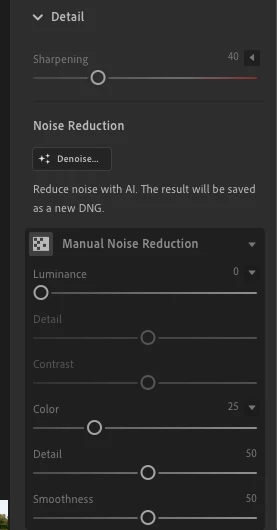
quoteWhere do I find the “old” Manual de-noise tool? I can see Manual De-Noise in the menu, but it doesn’t seem to have the slider I used previously and none of the sliders which are available seem to have any visible impact on background noise.


By @Richard296967289lb0


To the right of the Manual Noise Reduction entry is an arrowhead, probably left facing. Click on that, it will turn down and open the set of original NR sliders (make sure they in turn have their arrowheads also p[ointing down):


2 replies

Participant
May 4, 2023

Dear Ranjisha,


Many thanks for the quick reply. I am processing RAW images from a Canon R5. My laptop is running Windows 11 with 16GB Ram and Processor              11th Gen Intel(R) Core(TM) i7-1165G7 @ 2.80GHz, 2803 Mhz, 4 Core(s), 8 Logical Processor(s) [See below for full Spec].


I have now used the new AI DeNoise tool on ~30 images and they are all taking 5-10 mins each. I have 2 main queries:

  1. Is there any way I can speed this process up with the Laptop I have?
  2. Where do I find the “old” Manual de-noise tool? I can see Manual De-Noise in the menu, but it doesn’t seem to have the slider I used previously and none of the sliders which are available seem to have any visible impact on background noise.


Many thanks,

Richard


Jim Wilde
Community Expert
Jim WildeCommunity ExpertCorrect answer
Community Expert
May 4, 2023
quoteWhere do I find the “old” Manual de-noise tool? I can see Manual De-Noise in the menu, but it doesn’t seem to have the slider I used previously and none of the sliders which are available seem to have any visible impact on background noise.


By @Richard296967289lb0


To the right of the Manual Noise Reduction entry is an arrowhead, probably left facing. Click on that, it will turn down and open the set of original NR sliders (make sure they in turn have their arrowheads also p[ointing down):


Participant
May 4, 2023

Hi Jim,

Much appreciated. I was using this, but hadn't realised that "Luminance" now seems to be the key slider for reducing background noise. I don't think it was called this prior to the software upgrade? Either way, thanks a lot!

Rich

Ranjisha Sengupta
Legend
May 3, 2023

Hi Rich,


Thanks for reaching out.

What type of file format are you working with? Would you mind sharing your system specification?

You can try optimizing your Lightroom; Steps here: https://helpx.adobe.com/lightroom-classic/kb/optimize-performance-lightroom.html.

This is a Lightroom Classic related article, but steps will be primarily common.


Let us know how it goes.


Best,

Ranjisha