
Participating Frequently
May 5, 2021

P: Desktop Memory leak on M1 Machines

  • May 5, 2021
  • 57 replies
  • 14714 views

Hi!


I am a software developer. Recently, my Lightroom CC (version 4.2 - 20210301-0713) is very slow . A close look at activity monitor reveals that the app consumes too many threads and memory (attached photos) which freezes the app.
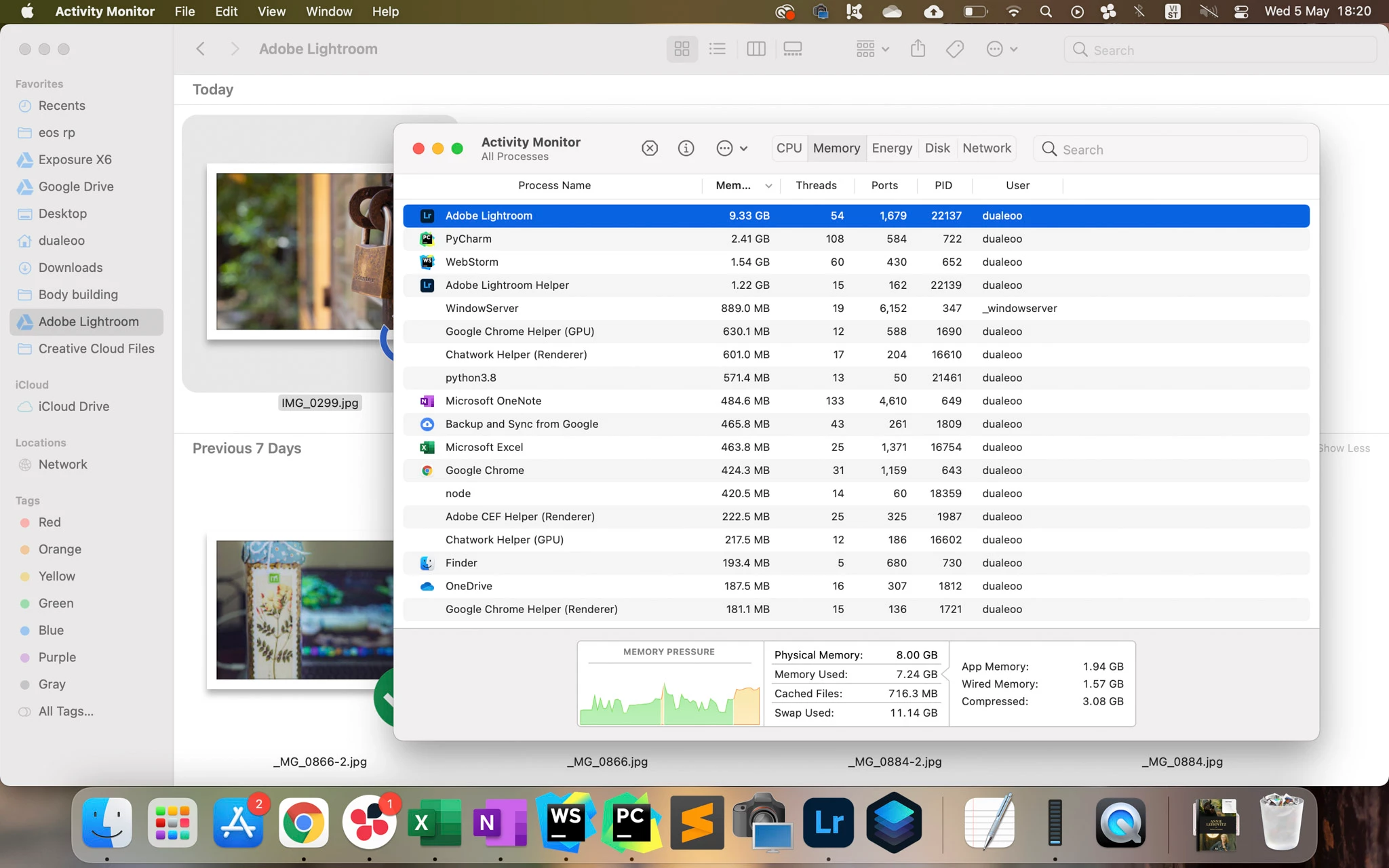


@Rikk Can you help me forward this to the development team?


Thank you so much!

57 replies

Rikk Flohr_Photography
Community Manager
Community Manager
July 1, 2021

Is there anyone on this thread who does not have an 8 GB M1 Mac?

Rikk Flohr: Adobe Photography Org
wok5
Known Participant
June 7, 2022

Good morning!

I just have it on my second, brand new MacBook Air. The first one had 16GB of RAM, the current has 8GB of RAM. Start LR, wait 5 seconds: 45GB of System Memory is eaten up. I can not access Prefs or anything in the App.

Thanks

Wolfgang

Minh0D4DAuthor
Participating Frequently
June 29, 2021

Hi!

Your problem is quite different from four of us as it happened on Intel Lightroom. In this case, please contact

Rikk, Adobe administrator, https://feedback.photoshop.com/users/5f5f265b6880ca11de7cd433 or Adobe helpx https://helpx.adobe.com/support.html for further support 

Minh0D4DAuthor
Participating Frequently
June 29, 2021

*nickminers

Hi Nick!

Thanks for reporting. Currently, the issue is happening on at least 4 M1 mac: mine, @justinwadejones, *JanPochyly, and your. There is no solution available at the moment. The only thing we can do is to ask Adobe to release a fix soon.

For further support, please contact Rikk, Adobe administrator, https://feedback.photoshop.com/users/5f5f265b6880ca11de7cd433

Regards,

Minh

Community Manager
June 28, 2021

*xtalman38 I should add - trouble seemed to begin with latest update to Big Sur MacOS 11.4

Community Manager
June 28, 2021

I'm having the same problem on an Intel (3.6GHz 8-Core i9) Mac.   Have had to reboot my machine basically every time I use LightRoom

Community Manager
June 26, 2021

Can I just report that I am experiencing the same thing with Lightroom Classic? Twice now in the past week I have had a message that my M1 Mac has run out of RAM, with Lightroom being the culprit (despite being idle in the background for over a day in each case)

Minh0D4DAuthor
Participating Frequently
June 26, 2021

@Rikk 

Thank you for reproducing the issue on your M1 Mac.

I got the very similar result as your:

Select a different raw file- memory goes to 4.2 GB

Export: Peaks at 8.48 GB

Memory returns to 5.1 GB (Note that 2.86 GB of that is cached files - the two previous raw files held in memory in case you want to go back to them.

But how about those users who use M1 MAC 8GB ram like me? You said the memory peaks at 8.48 GB. This is reasonable for you because you have a 16GB MAC and it consumes about 1/3 of your RAM. But it is not reasonable for me because 8.48GB is 100% of my RAM and it freezes my laptop the moment I click export.

To sum up:

1. When I subscribe for the app, Adobe tells me it can run on my 8GB M1 Mac but in reality it is not true for me, for @justinwadejones M1 MAC, and for *JanPochyly M1 Mac.

2. LightRoom CC on Intel chip consumes about 3GB of RAM during usage (reported by @justinwadejones) while M1 LightRoom CC consumes about 6-7 GB of RAM during usage (your report)

3. Lightroom is the most expensive photo-editing app on the market and I am now bound with a 1-year subscription contract.

Please help!

justinwadejones
Participating Frequently
June 25, 2021

I don't see the issue while exporting. I only see the memory leak after editing photos.  Edit a few photos and you will see it uses 12-16gb of RAM and never returns it until you close the app and reopen.

Rikk Flohr_Photography
Community Manager
Community Manager
June 25, 2021

One of the threads you link to is actually this thread-where you are the sole poster.  The other thread may be unrelated as it is a loupe-walk -not export/memory problem.

In any case, here is my test:

M1 Mac - 11.4 LrD 4.3 16 GB - files local on NAS

Open App: 1.49GB

Select 50MB raw file: 2.73 GB - memory usage is stable (not increasing)

Export: Peaks at 5.19 GB of memory

20 seconds later memory is at 2.81 GB

Select a different raw file- memory goes to 4.2 GB

Export: Peaks at 8.48 GB

Memory returns to 5.1 GB (Note that 2.86 GB of that is cached files - the two previous raw files held in memory in case you want to go back to them.

Select 3rd file - memory goes to 5.77 GB

Export - memory peaks at 7.12 GB 

Wait 20 seconds -Memory returns to 6.37 GB ( 2.96 is cached previous files)

After that it remains stable in the ~6.5 GB range where 3 GB is used to cache your last three images rendered.  That feels pretty reasonable to me for the primary app open to consume about 1/3 of ram.  I could never get it to consume 10 GB in my testing. 

I did restart and repeat the test and found memory remained in the 6 to 7 GB range after exporting several images. 

Rikk Flohr: Adobe Photography Org
Minh0D4DAuthor
Participating Frequently
June 25, 2021

@justinwadejones

I totally agree with you. That's what I and *JanPochyly experienced.

As a software developer, I discovered this bug a month ago. The architecture of M1 CPU is different. There must be a bug when they migrate the Intel-Lightroom to M1-Lightroom.

I hope @Rikk would soon report this problem to the development team.