


New Participant
March 5, 2023
Question

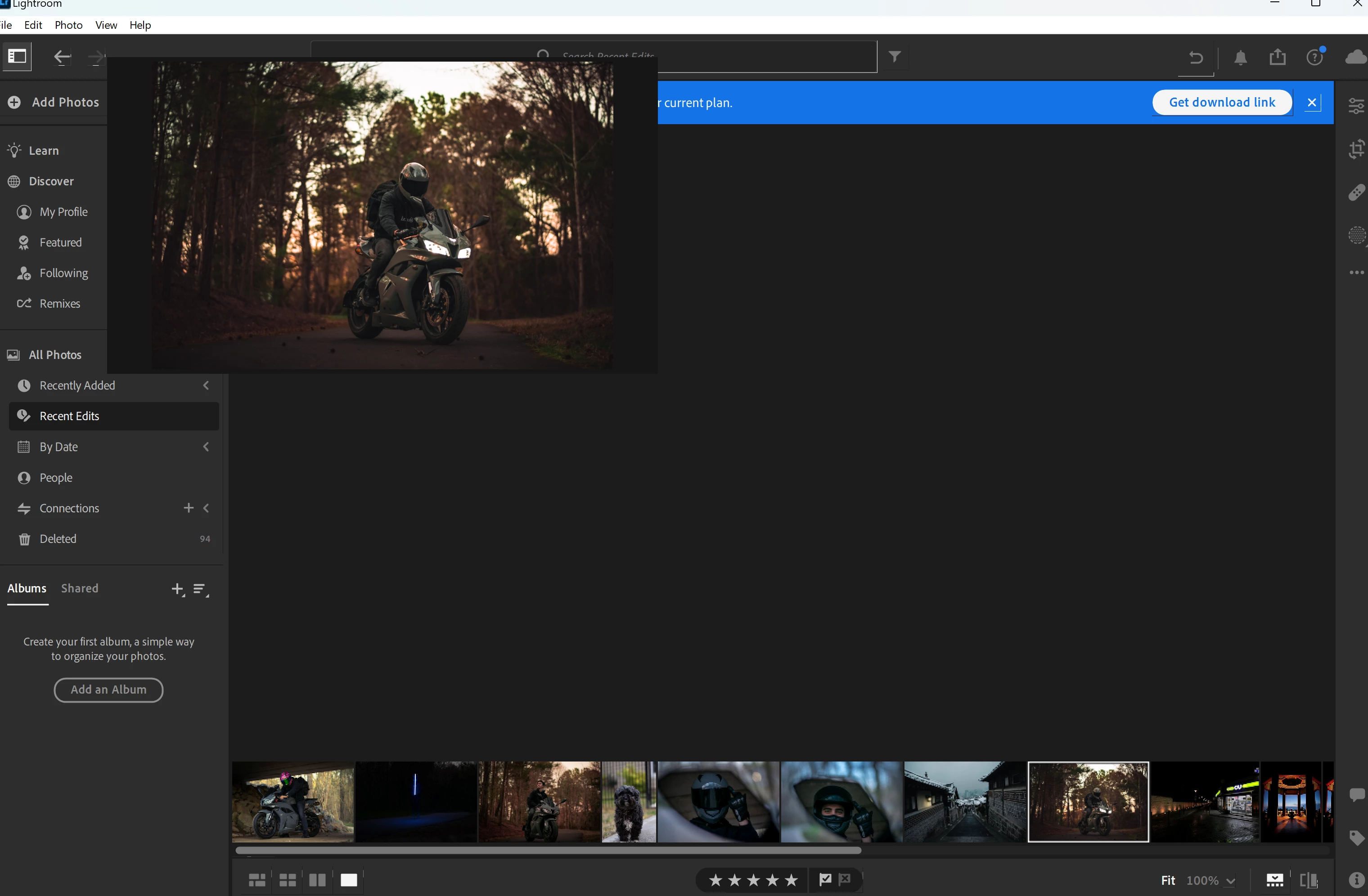
P: Glitch in UI shows image in upper left.
  • March 5, 2023
  • 3 replies
  • 5385 views

This is a weird glitch I have encountered. Use NVIDIA GeForce GTX 1660 TI, so that shouldn't be it. Of course, I restarted the computer, reinstalled the app multiple times, and tried older versions, but the image keeps showing up in the top left like this. Any advice?

3 replies

CMass
Community Manager
Community Manager
March 30, 2023

If you're experiencing this issue as well, please try the following troubleshooting steps before voting for this bug: 

  • Restarted App
  • Uninstalled and reinstalled
  • Rolled back to several previous versions of Lightroom. 
  • Roll back your driver
CMass
Community Manager
Community Manager
March 29, 2023

Moved to bugs.

Ranjisha Sengupta
Brainiac
March 6, 2023

Hi @Joshua28468779rfm0 


Thanks for reaching out.

Could you please share the system info of Photoshop from Help > System info > Copy & paste into a text document > upload to Creative Cloud files (https://assets.adobe.com/files) and share with us?

Does this happen only in the Lightroom app? 


You can try to reset the preferences of Lightroom using the steps mentioned here: https://adobe.ly/2JSym5e

Please back up your presets prior to resetting the preferences.

Let us know how it goes. 


Ranjisha

New Participant
March 7, 2023

I will paste them below. I also noticed that when I turned off GPU acceleration, the problem would go away, so I updated my drivers but that didn't change the outcome when GPU acceleration is enabled. Also, this is not Lightroom Classic.

_____________________________________________________

Lightroom version: 6.2 x64 [ 20230130-1137-462e97a ] (Jan 31 2023)
NGL Version: 1.31.0.19
WF Version: 5.2 a01f05f
VF Version: 1.0.133
HIL Version: 40405

Operating system: Windows 11
OS Version: Windows 11 Home (2009)
Application architecture: x64
System architecture: x64
Computer model: Microsoft Corporation Surface Book 3 / Intel(R) Core(TM) i7-1065G7 CPU @ 1.30GHz
Logical processor count: 8
Processor speed: 1.4 GHz
Built-in memory: 32353.1 MB
Real memory available to Lightroom: 32353.1 MB
Real memory used by Lightroom: 1843.9 MB (5.6%)
Virtual memory used by Lightroom: 6109.4 MB
Memory cache size: 3533.7 MB

Internal Camera Raw version: 15.2 [ 1381 ]
Maximum thread count used by Camera Raw: 5
Camera Raw SIMD optimization: SSE2,AVX,AVX2
Camera Raw virtual memory: 832MB / 16176MB (5%)
Camera Raw real memory: 934MB / 32353MB (2%)

Display: 1620x1080
System DPI setting: 96 DPI
Desktop composition enabled: Yes
Input types: Multitouch: Yes, Integrated touch: Yes, Integrated pen: Yes, External touch: No, External pen: No, Keyboard: No

Graphics Processor Info: DirectX: NVIDIA GeForce GTX 1660 Ti with Max-Q Design (31.0.15.3118) - 6 GB
Graphics Processor Detail: loaded: Yes, supported: Yes, compute: Yes, init: I4_GPU3, hard: success, soft: success, al: Yes, dl: No
OS Media Capability: true

Application Folder: C:\Program Files\Adobe\Adobe Lightroom CC
Settings Folder: C:\Users\jsore\AppData\Roaming\Adobe\Lightroom CC
Library Folder: C:\Users\jsore\AppData\Local\Adobe\Lightroom CC\Data

Ranjisha Sengupta
Brainiac
March 7, 2023

Thanks for sharing the details. Does resetting the preferences help?