


Participant
November 4, 2024
Answered

P: No "Add a border and share" option for some customers on LrM (iOS)

  • November 4, 2024
  • 7 replies
  • 2432 views

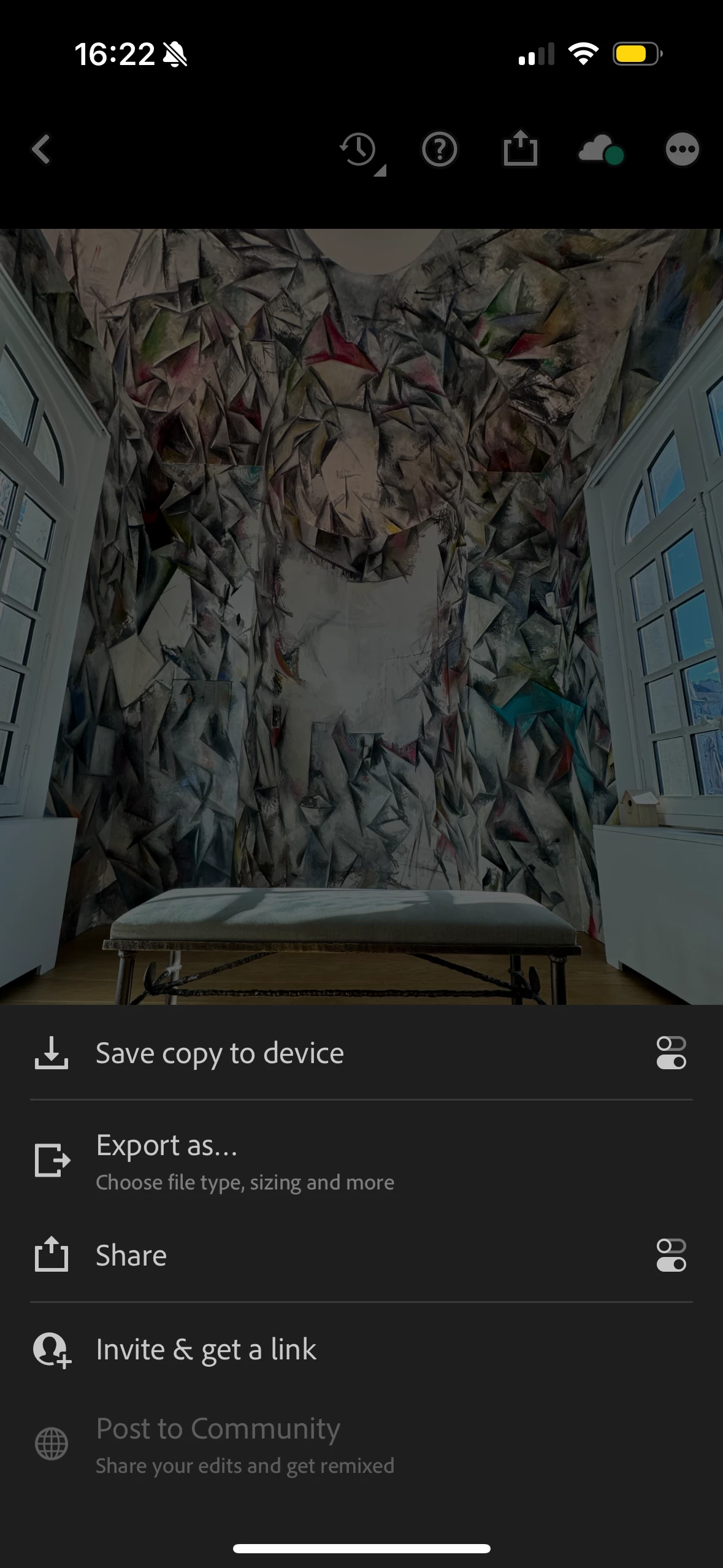
I'm trying to follow an incredibly simple tutorial from this IG reel (https://www.instagram.com/reel/DB1sODGtk_d/) and the first step has already thrown me off. She imports a photo to Lightroom and clicks the option "add a border and share." When I also click the share option on my photo in Lightroom I'm not presented with that option. See screenshot attached. Am I doing something wrong here?
Correct answer Rikk Flohr_Photography

The team occasionally runs tests on the placement and inclusion of preview features. Currently, a test is running involving the Add a Border and Share feature.  It is likely you are seeing this because you've uninstalled and reinstalled
the app recently. 


Note: The test is now complete and this functionality should be restored for all customers. 
If you do not see the function restored, please quit Lightroom Mobile and restart it. 

We apologize for any inconvenience. 


7 replies

Participant
February 23, 2025

I'm also having this issue. 

Lightroom Android v 10.2.0

Google pixel 8 Android v 15

Paying subscriber 


Please can you help. Thanks 

Jim Wilde
Community Expert
Community Expert
February 23, 2025
quote

I'm also having this issue. 

Lightroom Android v 10.2.0

Google pixel 8 Android v 15

Paying subscriber 


Please can you help. Thanks 


By @r22756004aqjr


The "Add Border and Share" option is not available on the Android version of Lightroom Mobile.

Participant
November 19, 2024

Hello


  • I was trying to find an answer for this question, but I found just some old videos. Is there any chance anybody know how to create a frame around a photo in Lightroom for mobile phone ? 


Thanks so much for answers! 


Participant
November 16, 2024

Hi. 

im posting in regard to the "Add Border & Share" button being gone when exporting. I use it for my business to create borders without issues, but I had to remove the app last week, and upon reinstalling, the option is no longer there.


I'm on version v.10.0.1 450863/171

this is a very deep issue and I hope I can get some help 😞 

Participant
November 12, 2024

Can we please bring back a white border for exported photos.


kglad
Community Expert
Community Expert
November 12, 2024

what app?

Participant
November 11, 2024

Im glad I'm not the only one! I just downloaded LR for this exact feature and it's just........not there? I thought I was going crazy. Adobe, please add it back!! 🙏

Rikk Flohr_Photography
Community Manager
Community Manager
November 6, 2024

The team occasionally runs tests on the placement and inclusion of preview features. Currently, a test is running involving the Add a Border and Share feature.  It is likely you are seeing this because you've uninstalled and reinstalled
the app recently. 


Note: The test is now complete and this functionality should be restored for all customers. 
If you do not see the function restored, please quit Lightroom Mobile and restart it. 

We apologize for any inconvenience. 


Rikk Flohr: Adobe Photography Org
Participant
November 9, 2024

Hello!


I used to have the "add border and share feature". I deleted and had reinstalled the app and now this feature is gone. How do I get the feature enabled again?

Community Manager
November 4, 2024

Hey Heather, can you confirm the version of Lightroom Mobile for iOS that you're using (tap on the ellipses on the top right, them tap on App Settings, and finally on About Lightroom)? Also, please confirm the model of iPhone you're using. Finally, can you confirm whether you're using the free version of Lightroom or are a paying subscriber?


Normally, you'd see the option to add a border when tapping on the Share icon.


Participant
November 4, 2024

Lightroom v. 10.01 450863/171

iPhone 15 Pro iOS 17.6.1

paying subscriber

Community Manager
November 4, 2024

Thank you for confirming that info. One more thing - I assume you've tried tapping the Share icon on different types of images and do not see the "Add border and share"?


One thing you could try is to delete the app from your iPhone and download it again from the App Store. If you take that route, just ensure that you complete your sync first. Let me know if that does the trick. Otherwise, we can escalate it further.