
Participating Frequently
February 23, 2022
Answered

P: Samsung S22 Ultra exhibits unusual color pattern due to malformed metadata in file

  • February 23, 2022
  • 32 replies
  • 15480 views

I just got a new Samsung Galaxy S22 Ultra phone and installed the latest Lightroom Mobile (LRM). All the DNG RAW photos I take with the LRM camera  are unusable because they come out with bands of rainbow colour all over them.  The angle of the bands varies between photos.  JPG files from the LRM camera are OK.   JPG or DNG photos taken with the default Samsung camera are OK.  Is this a bug that will be fixed in Lightroom Mobile?   

Interestingly, the Lightroom Mobile DNG files look fine when viewed in the Microsoft Windows Photos app on my PC - but not in any Lightroom app (including Lightroom Classic, Lightroom Web)! 

I cannot attach an example because this site says the content type does not match its DNG extension but here is a JPG exported from the DNG in Lightroom Classic which shows the problem.
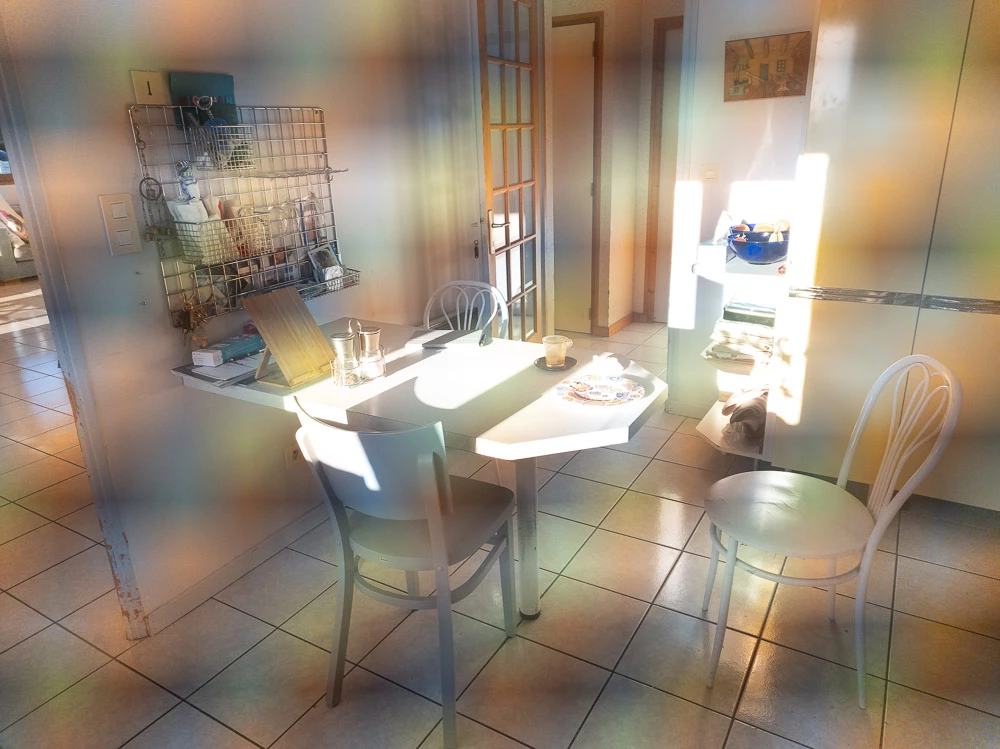
My old Samsung Galaxy Note 9 did not have this problem.

This topic has been closed for replies.
Correct answer Rikk Flohr_Photography

Settings status from Started to Investigating. We've received sample files - thank you. 
After evaluating, we've forwarded our findings to Samsung for further evaluation. 

32 replies

romanm82421608
Participant
April 1, 2022

I have to add my findings:
It is not related just to Lightroom, the same issue has Motion cam or Open camera.
I assume that only Exynos phones are affected, since there are videos on YT where US users are able to use Motion cam to capture CineDNG files and create videos (https://youtu.be/dClAIGMO1t0?t=129  or https://youtu.be/Z9DbHPk3xvg?t=483 ). 

Could all of you with this issue discolose if you have Snapdragon or Exynos variant? It could help Adobe and also Adobe then could address it to Samsung. I assume they have better chance then us, individuals.

I have already had a chat with Samsung helpdesk, but they suggested to enter safe mode, which will disable any 3rd party apps and contact Adobe, since Samsung native app is working fine.

H B-P
Participant
June 27, 2022

Yes, I have same issue with the moire coloured pattern when using Lightroom Camera app on Samsung S22 Ultra which has Exynos chipset (UK model)

H B-P
Participant
June 27, 2022

Example.....this is just a screen shot of the RAW file taken using Lightroom Camera (v7.41 Lightroom Android) Android V12

jose manuel jara
Participant
March 17, 2022

Any fix to this problem?

Thanks 

Participating Frequently
March 1, 2022

Hello SteinarBI, thanks but I was aware I could use the Samsung camera in PRO mode and edit the DNGs in Lightroom.  In fact I made some available to the Adobe engineers so they could compare DNGs from the two camera apps.   So one can manage but it would be nice to have the choice of the Lightroom camera, its particular design and features.


[Since this phone has multiple camera lenses with different focal lengths you are not limited to "digital zoom" (cropping) in the Samsung camera app.  A couple of days ago I made a separate post in this community to suggest that the Lightroom camera could also allow the choice of other lenses, which is not presently possible.  In Lightroom you can see which lens has been used.]

Participant
March 1, 2022

Hi

It's not necessary to shoot with the LrM camera. Just shoot with the S22 camera in PRO mode and RAW, and synk the RAW to LrM. Then you get access to adjustment in LrM and thge dng synced to your computer.

BTW, there is NO reason to use other than PRO and the lens standard focal length. ALL use of zoom or different formats is just cropping and/or upscaling for jpg. That goes for what they say is optical zoom.


/steinar

Rikk Flohr_Photography
Community Manager
February 25, 2022

Settings status from Started to Investigating. We've received sample files - thank you. 
After evaluating, we've forwarded our findings to Samsung for further evaluation. 

Rikk Flohr: Adobe Photography Org
Participating Frequently
October 3, 2022

Hi Rikk

I have a question whether Adobe has managed to determine where this problem with belts comes from when shooting with adobe lightroom mobile and when will you be able to solve it?
Regards
Rafal

Miroslav Ondříšek
Participant
October 6, 2022

I second that. Samsung S22 with all updates and described problem with banding persists.


Participating Frequently
February 25, 2022

Hello Rikk,  I also sent you a Dropbox link in a private message.  The folder includes DNGs from the LR camera showing the problem, JPGs from the LR camera which do NOT have the problem and DNGs from the Samsung camera app which do not have the problem.   
The Lightroom camera files have names of the form LRM*.* of course.
They are all taken with the same lens (the Rear Wide Camera).  
A possible clue to the problem is that these files have a resolution of 12 or 15 MP whereas the Samsung camera can also take 108 MP images with this camera.   I have not found a way to change resolution in the Lightroom camera but this might be a departure from the traditional principle that a RAW file uses the full sensor resolution.   Just a guess ..  Thanks for looking at this.


Participant
February 24, 2022

Hi Rick
Just send you a dropbox link with 4 pic, dgn and jpg.
Strangly, when I open the dng in Windows Photo it looks fine, but in all programs using Adobe Camera RAW the banding shows.

/Steinar

Rikk Flohr_Photography
Community Manager
February 24, 2022

Thank you for the files!

Rikk Flohr: Adobe Photography Org
Inspiring
August 3, 2022

Will Adobe now just ignore the users on this issue?

Rikk Flohr_Photography
Community Manager
February 24, 2022

To assist us in diagnosing the issue we need 2-3 DNG files that exhibit the problem. Would it be possible for those experiencing the issue to provide a couple of files?


Thanks for your help!

Rikk Flohr: Adobe Photography Org
Participant
June 29, 2022
Given that we cannot download files in dng format, I created a shared folder on Google Photos, here is the link: https://photos.app.goo.gl/y36r1qD2cmaEC8tn8
Rikk Flohr_Photography
Community Manager
February 24, 2022

Setting status to investigating

Rikk Flohr: Adobe Photography Org
Participating Frequently
June 28, 2022

Hello Rikk, Is there any news about this problem?  It's over 4 months since my first post ... Thanks