


Participant
November 18, 2023
Question

Mixamo addon not working on Blender 4.0

  • November 18, 2023
  • 21 replies
  • 70976 views

Could they please fix this, I was working on a project, and would really love to stick to Blender 4.0, its causing me a headache, i thought i could use, rigify, but mixamo's offers a faster workflow for me. Even when installing it takes longer and halts for some reason now, and i have to click to the side or resize the window to show the addon, when i proceed to activate it, the error pops up.
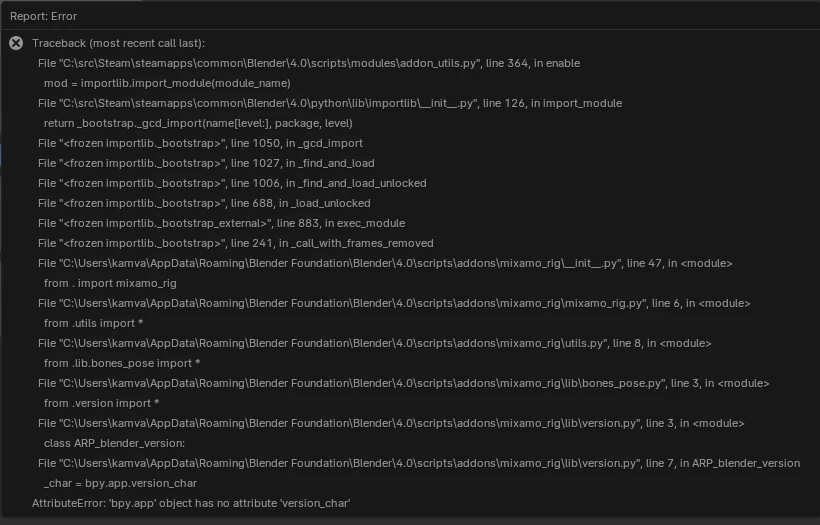

please @Adobe fix this.

21 replies

Participant
February 4, 2024

Tried doing this on 2 computers, thought my Educational work computer had blocked it, but nope.  Same exact error message on my home computer.  Come on Adobe, we're looking to do this on our tech classes but now have to look outside Adobe.  Very disappointing

Participant
January 26, 2024

SAME!! issue


Participant
January 2, 2024

i messaged adobe's customer support and they were no help. please update the plugin adobe!

Participant
December 10, 2023

Same here.

Participant
December 10, 2023

see the above response with the addon with all fixes.


Participant
April 3, 2024

حسنا يا جماعة لنراجع الموضوعا انتم تقلون ان الصطر السابع علي تبديله بالسطر اللذي كتبتوه  

Participant
December 7, 2023

Hey so I just found the fix on YouTube, here's the link for Mixamo Addon for Blender 4.0 

https://drive.google.com/file/d/1G71J1TgZ9sX-LRx1uU8SdrZA4UUwxtLz/view


Participant
December 7, 2023

Share the youtube video

Participant
January 26, 2024
Participant
December 6, 2023

Managed to solve it

Pasted the error text in Chat GPT and it worked.


Used option 3 and tweaked the code a bit.


Found the file: 

Or by command line using cd:

/Users/aaronbl/Library/Application Support/Blender/4.0/scripts/addons

And using teh command "open ." to openning it on finder.

Opened the file in VS Code. Copied all the code there and give it to chat GPT....

Here is the whole conversation: https://chat.openai.com/share/4ca619f5-aecf-4ab5-a4fb-5357fb657255


Then copied and pasted the code he gave me, pressed command + s to save, went to blender and all worked fine. Cheers


Participant
December 8, 2023

it is working very well!

the fix is easy:

  1.  Go to the file ".../Blender/4.0/scripts/addons/mixamo_rig/lib/version.py" 
  2.  Line 7 is `_char = bpy.app.version_char`
  3. Replace it with `_char = getattr(bpy.app, 'version_char', '')`
  4. save and enable addon.
Participant
December 8, 2023

This worked like a charm. Nisim gave the info if you already had it installed after an update. If you're downloading it fresh:

  1. Download the plugin
  2. Extract the ZIP
  3. Go into the folders to 'mixamo_rig/lib/version.py'
  4. Replace line 7 with '_char = bpy.app.version_char', so that it fetches the new version number properly
  5. Save the file, and ZIP the mixamo_rig folder again. Then just add it in Blender as you would any other plugin.

    Quick fix, and works great.
Participant
December 6, 2023

Same error in my MacBook Air Ventura 13


Participant
December 6, 2023

same error msg. macbook, ventura.

Participant
December 5, 2023

same

Participant
December 3, 2023

same +