


October 25, 2023

P: macOS 14.1 / Photoshop 2024 v25.0/25.1 Toolbar click through issue

  • October 25, 2023
  • 返信数 47.
  • 22998 ビュー

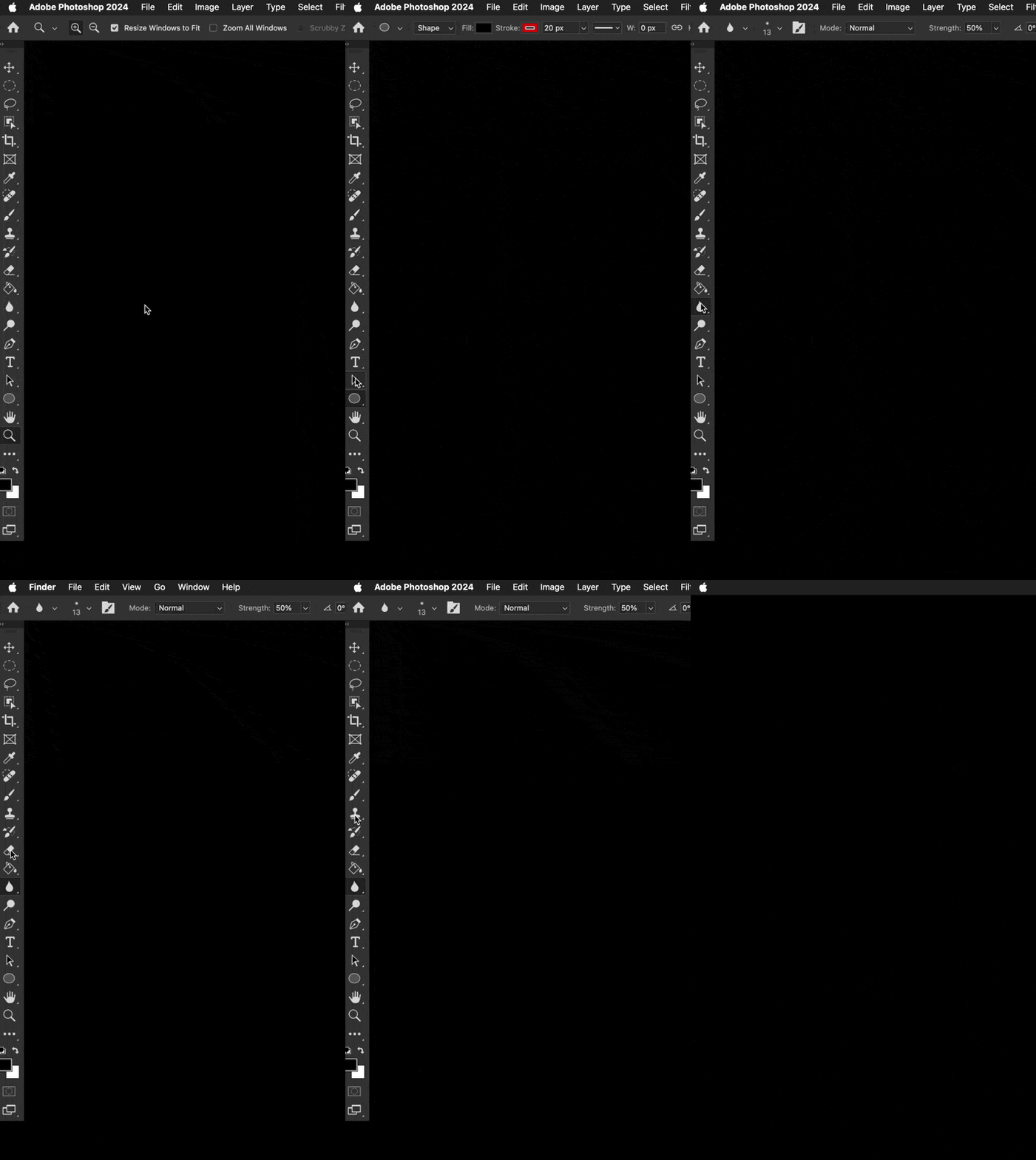
Well ... that wasn't something I ever expected or have ever seen. Was using Photoshop 2024 v 25.0.0 just this morning no problem with macOS 14.0.1. Updated to macOS 14.1 this afternoon, and now the top half of the toolbar clicks THROUGH the toolbar into the Finder. What? The bottom half of the toolbar works as usual. I've turned off most of the toolbar and tool prefs & that does nothing. Did a bunch of Interweb searches ... nothing relevent yet.


This is pretty new Photoshop behaviour ... wondering if anyone else has run into this yet.


Any ideas?


I could temporarily move all the most used tools to the bottom half of the toolbar. Though all the tools can be chosen by keyboard commands ... just can't click on those tools in the bar.


Color me perplexed. ¯\_(ツ)_/¯ 
 

返信数 47

Participant
October 31, 2023

I am using a MacBook Air with the M2 Chip and Photoshop 23.5.2 on Mac OS Sonoma 14.1

Disconnecting the toolbar from the rest of the windows helped really. That was yesterday. Thanks to silk-m's comment. 

Today the same problem. On top of that  my Wacom Tablet lost the driver and disconnected. No workfow possible, making me breathless. A real nightmare for a freelance like me. I closed PS and luckily everything worked again.

The question is, for how long.


Sometimes I regreted the update to Sonoma, Ventura worked fine for me. 

I closed 

Camagna
Known Participant
October 31, 2023

Newest PS Beta out today still has the same bug. It's becoming a real hassle. Can't believe that Adobe can't do anything about this…

Participant
October 30, 2023

Disconnecting the menu panes from each other does seem to work. The trick is being able to click anywhere inside the affected pane to get it to separate from the others.

jane-e
Community Expert
Community Expert
October 30, 2023


@Lea331986851k75 wrote: does not let me separate the tool bar from the side even when in full screen


Turn off Full Screen mode "F" and enable the Application Frame (Window menu) instead.


Another user has found that using Full Screen Mode and Sonoma 14.1 has its own set of bugs.

https://community.adobe.com/t5/photoshop-ecosystem-bugs/ps-full-screen-issue-v25-n-sonoma-14-1/idi-p/14189971


Jane


Participant
October 30, 2023

Running on P25.0, and it does not let me separate the tool bar from the side even when in full screen. Is there a solution to this?

Inspiring
October 28, 2023

Hi,
I recently noticed that I'm not able to click on the panel icons on the right side to activate them.
At first, I noticed that in Photoshop, but it also happens in Illustrator. Whether you are using the floating window mode or the full-screen mode, you can not click on the first six icons.
I added a video so you can see what I mean.
Does anyone else have this issue too, or am I the only one?

Participant
October 31, 2023

I am having similar issue with Photoshop & Illustrator since upgrading to Sonoma. Can't click on most panels when they are floating but work fine when attached to the document window. If I minimise the floating panels then they become useless and have to reset my workspace.

silk-m
Community Expert
Community Expert
October 28, 2023

If you want to display multiple palettes without using the application frame, you can do so by not concatenating each column.

It can also be applied if you have multiple monitors and want to place the palette on the second monitor.

--Susumu Iwasaki
Participating Frequently
October 27, 2023

same here and also in illustrator. going back to older version does not solve this, this seems to be an adobe and 14.1 problem!

Participant
October 27, 2023

On an iMac:  version 25.1.0: when click on the tool bar, the entire PS disappears to the last open window.  It is like clicking outside of PS when on and it goes to an area like desktop or whatever.

PS is completely unusable as is.


[versions added to subject by moderator]


jonathanf98670596
Participant
October 27, 2023

I am having the same issues in AI and PS.

My work around so far has been to use "application frame" mode. The tool bar works there.

Jeff Arola
Community Expert
Community Expert
October 27, 2023

This is also a problem with photoshop in Full Screen Mode regardless of whether the Application Frame is on/off.

nicorohrbach
Participating Frequently
October 27, 2023

For me Illustrator 2024 (28.0) is affected as well if the Application Frame turned off.