



TenTin
Known Participant
May 14, 2021

P: Does not recognize full memory (RAM) - Windows

  • May 14, 2021
  • 32 replies
  • 5675 views

Hi,

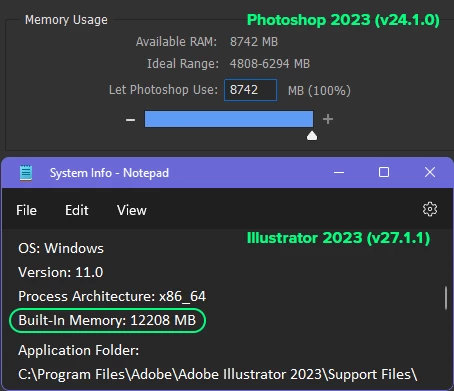
I have updated Photoshop to the latest version (Photoshop 2021 v22.4.0.195) and it does not recognize full memory (RAM) on Windows 10 (20h2). 

I have 12GB ram and it recognizes just 8GB of it!

Both Ps and Windows are x64 and are updated, also graphic card is updated. I didn't have this problem in previous version (22.3).


Update (29.12.2023): I am not a genius like Adobe, but I am idiot enough to understand there's nothing wrong with my Os, it's something wrong with my Ps! Unlike Adobe, I'm not rich. I don't have enough money to afford a new system or even a RAM module! Please address this rubbish, ridiculous mess! 
 

This topic has been closed for replies.

32 replies

Earth Oliver
Legend
June 9, 2021

@dramenon Just a heads-up, but there are quite a few professional Ps users in these forums who make their living using Ps for 8 hours/day, 5-7 days/week and have done so for decades. We're all very in tune with changes to both Ps and our OS, since our lives basically depend on it. When something changes that affects our way of life, we like to know why.
This memory behavior is a departure from what we've been used to for the past 15 or 20 years, and to us, this is very much a bug and not a feature.

Inspiring
June 8, 2021

Same Issue here! In just the immediate last version there was a bug with not recognize the discrete Nvidia GPU and now not showing the correct amount of RAM available! C'mon Adobe! 

TenTin
TenTinAuthor
Known Participant
May 21, 2021

I have noticed the 2 last Ps update are ruined VRAM and RAM settings!! I'm wondering why they do nothing for it!!!

Inspiring
May 21, 2021

I noticed that it seems to have subtracted the VRAM...
I have 48Gb of VRAM and 256Gb of RAM, and the available memory shown here is exactly 208Gb

Inspiring
May 20, 2021

Same thing here. Still after 22.4.1 update, no proper RAM memory size readout.

TenTin
TenTinAuthor
Known Participant
May 19, 2021

Same thing here!!! (after update to v22.4.1.211)

TenTin
TenTinAuthor
Known Participant
May 19, 2021

really?!!!! What are they doing?!!!!

Known Participant
May 19, 2021

I updated and restarted... no change here

Known Participant
May 19, 2021

As my screenshots above show, which were all taken within a minute of each other, the only difference is the version of photoshop.

Dramenon
Community Manager
Community Manager
May 19, 2021

One could ask:

What changed in software, operating systems or graphics drivers... it's a cooperative handshake between many systems.

It is not a bug for all details I have already posted.


That's probably a bookend for me on this subject. 

/end of line/