


steveharrington1974
Known Participant
April 22, 2025

P: Photoshop 2025 v26.6 Bug - black document window

  • April 22, 2025
  • 179 replies
  • 36825 views

Photoshop 2025 v26.5 was working absolutely fine, then I made the mistake of updating to the latest patch, version 26.6.0 on my M4 Mac Mini.


After updating to 26.6, the actual document window is solid black - even if I open a photo or previous document...
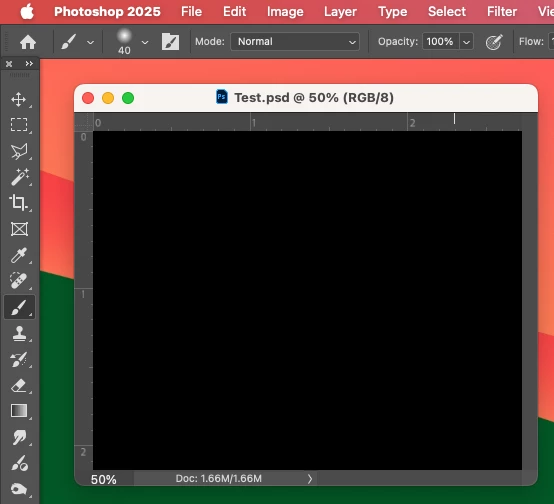


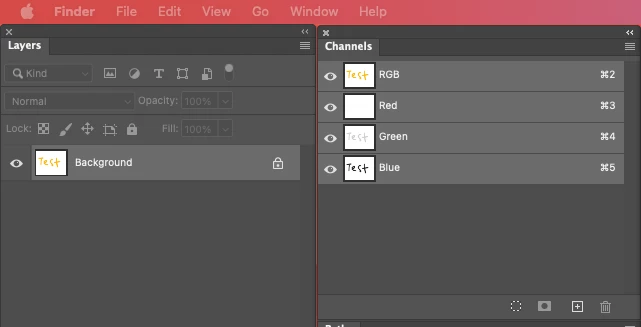
Even though the Layers and Channels palette preview thumbnails are showing what's in the document...


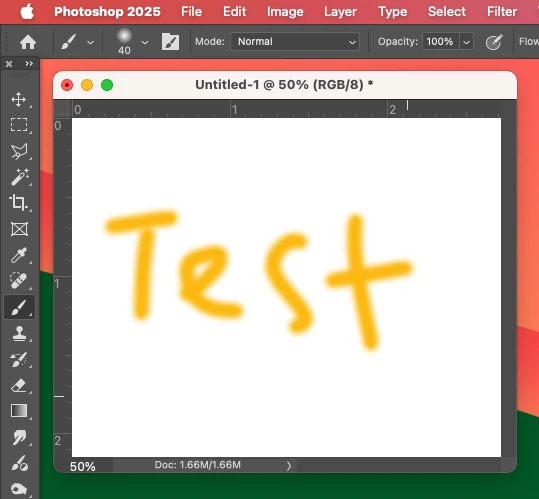
After digging around in Preferences, I tried turning off the "Use Graphics Processing" option and relaunching Photoshop afterwards, and it's working fine again...


I'm just wondering if this is a bug related to the M4 Mac Mini graphics driver compatibility with the version 26.6.0 release? And, if so, when can we expect a fix from Adobe. 


I've discovered the workaround for now, but obviously turning off the Graphics Processing setting will affect perfomance. Like I say, with this option switched on previously to the latest 26.6.0 release, it was working fine so it must be a new bug with 26.6.


I'm never updating this software ever again!!

179 replies

Participant
May 1, 2025

Hi guys - I get a black box instead of the pic when I open any images in PhotoShop. What's going on? I need PhotoShop to do my work - this has to be sorted fast.

Jeff Arola
Community Expert
Community Expert
May 1, 2025

Some users have reported that resetting the Photoshop preferences corrected the issue:

specifically removing the MachinePrefs.psp in 

Macintosh HD/Users/UserName/Library/Preferences/Adobe Photoshop 2025 Settings

https://helpx.adobe.com/photoshop/using/preferences.html

https://community.adobe.com/t5/photoshop-ecosystem-bugs/p-photoshop-2025-v26-6-bug-black-document-wi...

Community Manager
April 30, 2025

Update 4/30: If anyone has a  MachinePrefs.psp file that causes the issue, please DM a copy of it to me. Thank you!  

Inspiring
April 30, 2025

no, I'm not running M4 and have the same problem today. I just reverted back to previous build and it went away.

Community Manager
April 30, 2025

Hi @ryannp45402828,

Thank you for this feedback.  I’m going to DM you for more information. Please keep an eye out for it.

ryannp45402828
Participant
April 30, 2025
I’m experiencing a major issue with Photoshop on a brand new 2024 Mac mini (Apple M4, 16GB RAM) running macOS Sequoia 15.4.1.
 
Problem:
  • When I open or create new documents in 8-bit or 16-bit mode, the canvas appears completely black.
  • The issue disappears if I switch to 32-bit, or if I disable “Use Graphics Processor” under Preferences > Performance.
 
What I’ve tried:
  • Disabled GPU Compositing
  • Tried sRGB and other color profiles
  • Toggled all options under Technology Previews
  • Confirmed this happens in brand-new files with full-color images
 
This seems to be a GPU rendering issue affecting 8/16-bit mode on macOS Sequoia + M4 systems. Please advise or escalate for compatibility fix. Happy to share logs or assist in testing.
Participant
April 30, 2025

I have this problem with an Intel based 27" iMac, so it is not unique to M4-based Nacs.

Participant
April 30, 2025

Hello,

I have the same bug since I updated Photoshop yesterday. I now rolled back to version 26.5 which works fine. I also updated Photoshop Beta yesterday and there I have no such problems. I work with a MacBook Air with an M3 chip. Maybe that helps you.

justind69552972
Participant
April 30, 2025

Having the same issue on a 2022 Mac Studio with an M1 Max chip. Turning off the Use Graphics Processing worked. 

Participant
April 30, 2025

J'ai téléchargé la dernière version de Photoshop et je me retrouve avec un écran noir, alors que ma vignette de calque affiche mon image.... C'est quoi le problème ?

Ged_Traynor
Community Expert
Community Expert
April 30, 2025
andikm
Participating Frequently
April 30, 2025

Yes I have the same issue

Apple iMac Ventura 13.7.5. Have performed a GPU compatibility check. Was working fine before the update.