


steveharrington1974
Known Participant
April 22, 2025

P: Photoshop 2025 v26.6 Bug - black document window

Photoshop 2025 v26.5 was working absolutely fine, then I made the mistake of updating to the latest patch, version 26.6.0 on my M4 Mac Mini.


After updating to 26.6, the actual document window is solid black - even if I open a photo or previous document...
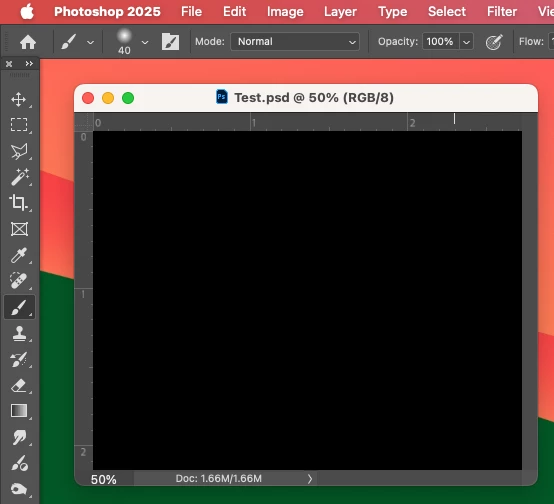


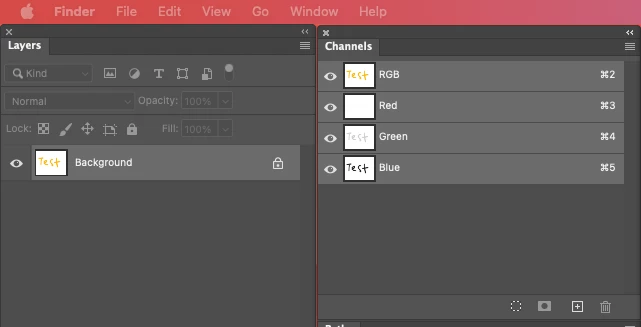
Even though the Layers and Channels palette preview thumbnails are showing what's in the document...


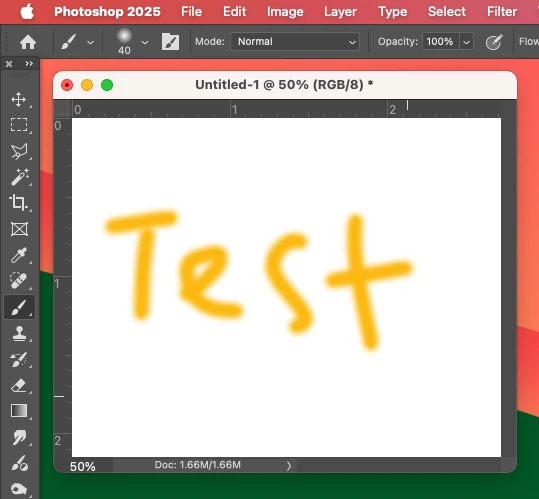
After digging around in Preferences, I tried turning off the "Use Graphics Processing" option and relaunching Photoshop afterwards, and it's working fine again...


I'm just wondering if this is a bug related to the M4 Mac Mini graphics driver compatibility with the version 26.6.0 release? And, if so, when can we expect a fix from Adobe. 


I've discovered the workaround for now, but obviously turning off the Graphics Processing setting will affect perfomance. Like I say, with this option switched on previously to the latest 26.6.0 release, it was working fine so it must be a new bug with 26.6.


I'm never updating this software ever again!!

179 답변

Participant
May 8, 2025

After updating to version 26.8.0 of Adobe Photoshop Beta, all files, including JPEG and PSD formats, are displaying as blank. Even new documents are showing a black blank page.

Ged_Traynor
Community Expert
Community Expert
May 8, 2025
Participant
May 7, 2025

Thanks!

Participant
May 7, 2025

Hey Steve, I just followed your advice and it is working for me again as well. Did you observe any disadvantages with turning the Graphics Processing off? 

Participant
May 7, 2025

I've tried that but still doesn't work

Participant
May 7, 2025

When I open a photo from LR in to PS it opens completely black. I can edit it but I see nothing it stays black. With the eyedropper it detects the colors but I don't see them. It looks as if there's a black layer over it but that isn't the case. Anyone any ideas? I can see a thumbnail of the photo in the navigator!

Ged_Traynor
Community Expert
Community Expert
May 7, 2025
Participant
May 6, 2025

Hola a todos. Necesito ayuda con lo siguiente. Quiero abrir un .psd en Ps y la imagen aparece toda negra. La miniatura en las capas se ve, en el navegador se ve, el histograma se ve, pero en la ventana principal el rectangulo de la foto todo negro. Y con cualquier archivo hace lo mismo. Gracias.

Participant
May 6, 2025

Participant
May 6, 2025

Last few days, when I open a file (various formats) it just opens to a black canvas. The layers pane has the thumbnail icon correct. Any ideas?

Participant
May 6, 2025

Photoshop 26.6.0. Did a restart too.

giulia_vue
Participant
May 6, 2025

Any image I open appears black in the work area. If I change the mode from 8 bits to 32bits the image appears in the work area 

If I modify the color from RGB to Grey scale it appers in grey.

This behavior happens since few days and only on MAC , I don't have the same issue in Windows

(Photoshop is the last version)

I have just tried to reset workspace/ preferences


Can anyone help me ?

Ged_Traynor
Community Expert
Community Expert
May 6, 2025
steveharrington1974
Known Participant
May 6, 2025

For anyone having trouble locating the folder where the "MachinePrefs.psp" file resides, the easiest way is to use Finder's "Go to Folder" option...


In Finder, click on "Go" and slect to "Go to Folder" option - or use the keyboard shortcut: Shift-Command-G


The copy and paste this below into the window and hit Return/Enter...


~/Library/Preferences/Adobe Photoshop 2025 Settings


This will open the "Adobe Photoshop 2025 Settings" folder, you just need to find the MachinePrefs.psp file in here - I renamed mine to "MachinePrefs-OLD.psp" to keep the old one just in case.

Participant
May 5, 2025

I am running a MBP 16" Apple M3 Max w/ 36 GB RAM running Sequoia 15.4.1 and I have this issue.

The image in every other color mode is visible for me... except RGB.