
Sean H [Seattle branch]
Known Participant
January 16, 2019

P: Switching tabs doesn't show the correct image

  • January 16, 2019
  • 64 replies
  • 3425 views

I keep running into render issues in the new PS 2020. Here's the most recent example. I loaded a large pano into the first tab then opened a PSD file into the second tab. This second tab should show me a couch and kitchen as indicated by the view in the layers, yet it's showing me the pano from the first tab. This has happened to me dozens of times in past few days.
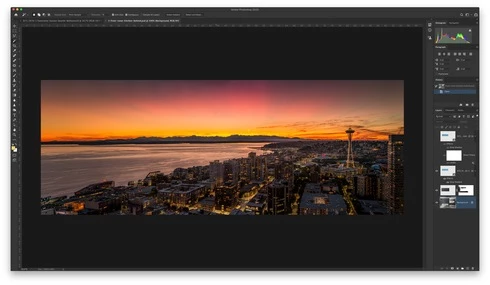

When I pull the tab out, it then renders the PSD correctly:
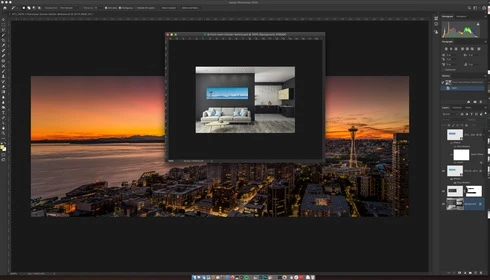

Another issue was when I went to restart the computer and had a dozen files open in PS that weren't saved. PS 2020 just closed it all out and skipped the "Do you want to save?" dialog. Just trashed the file progress.

This topic has been closed for replies.

64 replies

Inspiring
June 3, 2020
Yes it does correct it. Resizing photoshop helps to refresh it too. As a side, the layers section also doesnt update either. It's like a rendering/update issue. It happened again today and occured by just opening a new PSD so nothing out of the ordinary.
Higgison
Participant
June 3, 2020
Sorry, Hannah. I haven't been able to reproduce the issue again as I'm not working in PS near as much as I was earlier this week. I'll try that next time it happens.
Hannah Nicollet
Community Manager
Community Manager
June 3, 2020
Simon or Greg,

What happens if you grab the tab on the not-visible image and pull it out of the application frame (un-dock it). Does it appear for you? I'm not seeing the behavior so it's hard to test this.

Thanks,
Hannah
Inspiring
June 3, 2020
If you resize Photoshop it helps but the repro rate is high and very annoying. Somewhere this issue has crept in with the CC versions. The other issue is that saving is also affected if the image is not refreshed correctly which is far more dangerous.
Hannah Nicollet
Community Manager
Community Manager
June 2, 2020
I'm not able to reproduce this issue currently, but when I did if I undocked the tab from the application frame I would see the selected image. Does this work for you, does it not, or is it not an acceptable workaround for your workflow?
Higgison
Participant
June 2, 2020
Thanks for your reply. No, moving the app frame doesn't fix it. I also tried maximizing the window, the reverse, and nothing. I have to shut down PS and reopen my files again but the problem just keeps coming back.
Hannah Nicollet
Community Manager
Community Manager
June 2, 2020
Thanks for letting us know. Sorry to hear this wasn't resolved with the OS update. Does moving the application frame stop this behavior?
Higgison
Participant
June 2, 2020
I've been having the same issue in 10.15.4. Updated to 10.15.5 today after installing all updates for Photoshop/CC – after restarting and then working in Photoshop on only two files for another 30 minutes the problem is back. I have to restart PS to get it fixed but it's only temporary. Resizing the PS app window fixes nothing.
Inspiring
April 26, 2020
Having installed 10.15.4, unfortunately this problem still exists. It is very easy to reproduce within 30 minutes of Photoshop use. The workaround is to resize Photoshop. The "Use Graphics Processor" option does not work either. 😞
Legend
April 3, 2020
Thanks Robbert. Let me get instructions together to turn on logging.